
Telkino: VNC Remote Desktop
VNC経由でiPhoneやiPadからMacやWindows PCの画面を表示・操作できる。
Alex Manzer · ユーティリティ · 無料
iPhone スクリーンショット
新機能
バージョン 1.3.2 ·
• Drag three fingers to scroll the remote computer • In full screen, a small tab hides the controls and brings them back • The pointer no longer jumps to the corner when you briefly switch apps Questions or feedback: support@telkino.app
開発者はこの内容を日本語化していません。
App Store の説明開発者による説明です。
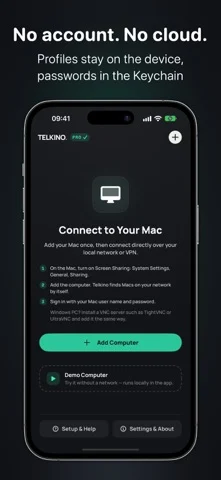
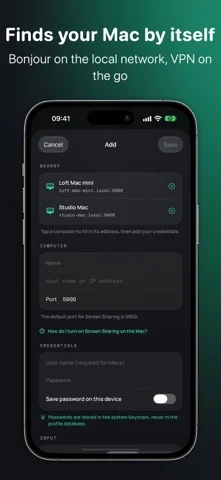
Telkino shows the screen of your Mac or Windows PC on iPhone and iPad and lets you control it. The connection runs directly over your own network or VPN. There is no server in between, no account and no cloud. DIRECT AND PRIVATE • Speaks the open VNC protocol directly with your computer • No account, no backend, no cloud sync • No tracking, no ads, no analytics SDKs • Profiles stay on the device, passwords only in the Keychain FOR MAC AND WINDOWS • Mac: turn on Screen Sharing in System Settings, done • Windows: with a VNC server such as TightVNC, UltraVNC or RealVNC • Finds Macs on the local network via Bonjour and fills in name, address and port • Away from home over VPN, for example Tailscale or WireGuard INPUT • Trackpad mode or direct touch • Pinch zoom, full screen and a key dock with Cmd, Option, Control, Shift, Esc, Tab, arrows and scrolling • Three-finger scrolling on the remote computer • Left and right click, type straight on the computer or send prepared text • Press and hold by touch: rest your finger in Direct Touch, double-tap and hold in Trackpad mode • Image quality per computer: Best, Balanced or Data Saver • Apple High Performance: Macs stream as HEVC video at a resolution that fits your device, with automatic fallback to VNC • iPad: computer list on the left, session on the right • iPad with mouse, trackpad, and hardware keyboard: typing goes straight into the session, click, drag, right click and shortcuts; scrolling arrives precisely on Macs • Shortcuts and Siri: “Connect to a computer” opens the session directly • Data usage of the current session in the status bar • Import computers from Tailscale with a Shortcut (telkino://add link) WAKE ON LAN (PRO) • Wakes a sleeping Mac or PC on the same network before connecting • Needs the MAC address in the profile and, on the Mac, “Wake for network access” DEMO COMPUTER Try everything without a network. The demo computer runs locally in the app and says so. PRICE Your first computer is free forever. Telkino Pro is a one-time purchase without subscription, with unlimited profiles, clipboard sync and Wake on LAN. Family Sharing included. SECURITY VNC is not encrypted by itself. Use a trusted LAN or a VPN. Telkino stops sessions when a server asks for no authentication and never recommends exposing port 5900 to the internet. THE NAME Telkino recalls the “Telekino” of Leonardo Torres Quevedo, the world’s first radio remote control (1903).
iPhone Duo での Telkino: VNC Remote Desktop:よくある質問
Telkino: VNC Remote Desktop は iPhone Duo に最適化されていますか?
開発者またはストアに iPhone Duo 対応の記載があります。
Telkino: VNC Remote Desktop の価格は?
Telkino: VNC Remote Desktop は App Store で無料でダウンロードできます。
その他のユーティリティアプリ
すべて見る ›
iPhone Duoのヒンジで0.1°まで角度を測定し、目標・照合・水平器も使える。

iPhone Duoを留め継ぎゲージに変え、ヒンジ角度を読み取る。他のiPhoneでは水平器として使える。

iPhone Duoをカードスロットや現金、ペン、レシート付きの本物そっくりの二つ折り財布に変える。

iPhone Duoのヒンジを角度・基準ツール集に変える。他のiPhoneでは無料の気泡水平器が使える。

iPhoneを定規・分度器・水平器・直径ゲージに、iPhone Duoを折り角度を映す折り尺にする。

iPhone Duoのヒンジ角度をリアルタイム測定。水平器や分度器、勾配計、カメラ角度計にもなる。