
iPhone 스크린샷
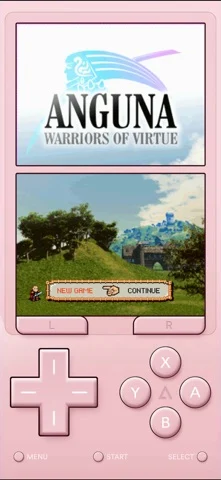
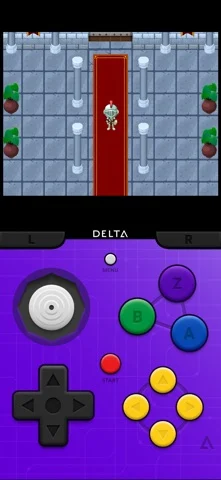
iPhone Duo 활용 방식
Duo support is reported in the linked sources. The specific fold interaction and real-device behavior have not been independently verified.
새로운 기능
버전 2.0 ·
iPhone Duo • Delta unfolds in all new ways to take full advantage of iPhone Duo • Optimized controller skins for every pose in both portrait and landscape • Supports Split View multitasking with other apps • Folding Duo puts DS games to sleep, just like closing the lid of a real DS Sega Genesis • Delta does what Nintendon’t! • Sega Genesis games are now playable in Delta • New controller skins for iPhone and iPad recreate the classic Genesis controller look • Built-in support for Action Replay and GameGenie cheats Liquid Glass UI • Fresh new UI designed from the ground up for Liquid Glass • Fully adapts to all screen sizes from Duo to iPad • System icons mark every page in your Game Library • Default artwork now has a light, glassy look RetroAchievements • Sign in with your RetroAchievements account to earn achievements in any supported game • Supports Hardcore mode, which disables loading save states and using cheats • Shows your achievement progress when you launch a game Recents & Favorites • New "Recently Played" and "Favorites" pages in Game Library • Quickly jump back in to your most recently played games • Add games to "Favorites" via long-press for easy access Animated Controller Skins • Controller skins come to life with support for fully animated buttons and controls • Supports 3rd-party skins, so skin creators can make their own • Try Delta’s new official animated GBA skin, designed by Caroline Moore Audio Settings • New audio settings to control how Delta handles other apps’ audio • "Mix with Other Audio" keeps music or podcasts playing alongside game audio • "Pause Other Audio" pauses everything else when a game starts Game Boy Color Palettes • Customize how your Game Boy games look with color palettes for original Game Boy games • Supports all the official color palettes from Game Boy Color Custom Fast Forward Speeds • Customize your experience with various Fast Forward speeds set per-game • Adjust your game’s default speed at any time from the Pause Menu or in Game Settings Adjustable Screen Position • Long-press to move your game screen wherever you like when playing with a controller • Easily move the screen above your favorite faceplate controllers DLC • Custom in-game experiences for classic Pokémon games • Unlock event items, receive rare Pokémon, and more • Supports all mainline GBA Pokémon games • First DLC coming soon! Redesigned Pause Menu • Fully redesigned & animated pause menu with Liquid Glass • Large, centered pause menu buttons make navigation simple • Dynamically adjusts pause menu layout to scale to all window sizes • Redesigned cheats screen with custom icons for additional customization Redesigned Settings • Reorganizes settings into more easily navigable hierarchy • Displays icons for all top-level settings • Redesigned controller input mapping screen for game controllers and keyboards • New Lil’ Settings and Advanced sections for additional customizations Custom Filters (Experimental Feature) • Experience your games just how you remember with new custom game filters • Set your filters per-system to change how games look across all your games • Choose from a set list of defaults (e.g. CRT) or import your own custom filters from the Files app Epilogue GB/SN Operator Support (Experimental Feature) • Use your GB/SN Operator devices with Delta, thanks to the Epilogue team • Connect game cartridges directly to your iPhone/iPad and play them natively • Reads and writes save files to cartridge • GB and SN operators support GBC/GBA and SNES games respectively • Blowing into cartridges optional Misc. • Added the ability to delete save states in bulk • Fixed issue causing audio crackling for SNES games • Fixed NES games occasionally opening to a black screen
개발자가 이 내용을 한국어로 제공하지 않았습니다.
앱 소개
Duo support is reported in the linked sources. The specific fold interaction and real-device behavior have not been independently verified.
영어 원문을 번역한 내용입니다.
App Store 설명개발자가 작성한 내용입니다.
Delta is an all-in-one emulator for iOS and iPadOS. Delta builds upon the strengths of its predecessor, GBA4iOS, while expanding to include support for more game systems such as NES, SNES, N64, Nintendo DS, and Sega Genesis. FEATURES Supported Game Systems • Nintendo Entertainment System • Super Nintendo Entertainment System • Nintendo 64 • Game Boy (Color) • Game Boy Advance • Nintendo DS • Sega Genesis Online Multiplayer • Play online-compatible Nintendo DS games with friends around the world! • Connect via community Nintendo WFC servers • Choose one of the default servers, or provide a custom DNS Controller Support • Nintendo Switch Pro controllers, Joy-Cons • Nintendo Switch Online controllers (NES, SNES, N64) • PS4, PS5 • Xbox One S, Xbox Series X • MFi game controllers • Bluetooth & wired keyboards RetroAchievements • Sign in with your RetroAchievements account to earn achievements in any supported game • Supports Hardcore mode, which disables loading save states and using cheats • Shows your achievement progress when launching a game Save States • Save and load save states for any game from the pause menu. • Lock save states to prevent them from being accidentally overwritten. • Automatically makes backup save states to ensure you never lose your progress. • Support for “Quick Saves,” save states that can be quickly saved/loaded with a single button press (requires external controller). Cheats • Supports various types of cheat codes for each supported system: • NES: Game Genie • SNES: Game Genie, Pro Action Replay • N64: GameShark • GBC: Game Genie, GameShark • GBA: Action Replay, Code Breaker, GameShark • DS: Action Replay • Genesis: Action Replay, Game Genie Delta Sync • Sync your games, game saves, save states, cheats, controller skins, and controller mappings between devices. • View version histories of everything you sync and optionally restore them to earlier versions. • Supports both Google Drive and Dropbox. Custom Controller Skins • Beautiful built-in controller skins for all systems. • Import controller skins made by others, or even make your own to share with the world! • Supports animated buttons for even more immersion when playing games Hold Button • Choose buttons for Delta to hold down on your behalf, freeing up your thumbs to press other buttons instead. • Perfect for games that typically require one button be held down constantly (e.g. run button in Mario games, or the A button in Mario Kart). Fast Forward • Speed through slower parts of games by running the game much faster than normal. • Easily enable or disable from the pause menu, or optionally with a mapped button on an external controller. • Customize speed per-game by long-pressing Fast Forward option in pause menu. 3D/Haptic Touch • Use 3D or Haptic Touch to “peek” at games, save states, and cheat codes. • App icon shortcuts allow quick access to your most recently played games, or optionally customize the shortcuts to always include certain games. Game Artwork • Automatically displays appropriate box art for imported games. • Change a game’s artwork to anything you want, or select from the built-in game artwork database. Misc. • Gyroscope support (WarioWare: Twisted! only) • Microphone support (DS only) • Support for delta:// URL scheme to jump directly into a specific game. Delta Terms of Use: https://altstore.io/terms **Delta is in no way affiliated with Nintendo. The name "Nintendo" and all associated game console names are registered trademarks of Nintendo Co., Ltd.**
iPhone Duo에서의 Delta - Game Emulator: 자주 묻는 질문
Delta - Game Emulator은(는) iPhone Duo에 최적화되어 있나요?
개발자 또는 스토어가 iPhone Duo 지원을 안내합니다.
iPhone Duo에서 Delta - Game Emulator은(는) 어떻게 보이나요?
Duo support is reported in the linked sources. The specific fold interaction and real-device behavior have not been independently verified.
Delta - Game Emulator의 가격은 얼마인가요?
Delta - Game Emulator은(는) App Store에서 무료로 다운로드할 수 있습니다.
다른 엔터테인먼트 앱
모두 보기 ›
Duo 인터랙션에 관한 출처가 있습니다. 실제 기기 동작은 별도로 검증하지 않았습니다.

Duo 인터랙션에 관한 출처가 있습니다. 실제 기기 동작은 별도로 검증하지 않았습니다.

Duo 인터랙션에 관한 출처가 있습니다. 실제 기기 동작은 별도로 검증하지 않았습니다.

Duo 인터랙션에 관한 출처가 있습니다. 실제 기기 동작은 별도로 검증하지 않았습니다.

Duo 인터랙션에 관한 출처가 있습니다. 실제 기기 동작은 별도로 검증하지 않았습니다.

내가 가진 M3U 재생목록으로 IPTV 채널을 시청하는 앱