
FoldLab - Hinge & Fold Tools
iPhone Duo 힌지를 각도와 기준 도구 모음으로 바꾸며, 다른 iPhone에서는 무료 수평계를 쓴다.
JARED P KACZYNSKI · 유틸리티 · 무료
iPhone 스크린샷
iPhone Duo 활용 방식
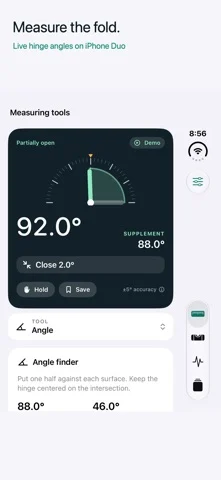
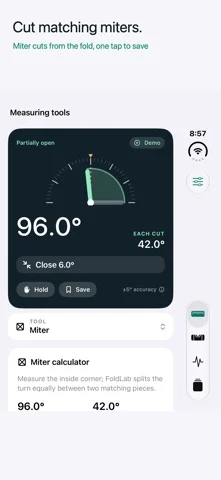
Put useful angles within reach. FoldLab turns the physical hinge in iPhone Duo into an angle and reference toolkit. Other iPhones can
App Store 설명개발자가 작성한 내용입니다.
Put useful angles within reach. FoldLab turns the physical hinge in iPhone Duo into an angle and reference toolkit. Other iPhones can use the free bubble level without a purchase. FREE TO USE • Live hinge angles on supported iPhone Duo hardware • On iPhone Duo, hold a hinge reading while you reposition the device • A free bubble level for one device plane on other iPhones too • On iPhone Duo, clearly labeled demo mode with manual angle and tilt controls FOLDLAB PRO FOR IPHONE DUO — ONE-TIME PURCHASE • Symmetric miter, slope and pitch tools • Relative angles, repeat targets and physical templates • Camera-panel elevation and personal joint-angle observations • Custom targets with haptic and optional audio guidance • Save readings from any tool, plus named presets and opening traces • Before/after records with optional reference photos • Calibration against a separate known-angle reference MADE FOR THE FOLD The workbench adapts to compact, portrait and wide layouts. On supported hardware, an outer-display companion keeps the current reading in view when the system makes that display available. YOUR RECORDS, ON YOUR DEVICE No account, advertising or analytics. Measurements and photo copies are stored locally; iOS backups may include app data according to your settings. Live and demo libraries stay separate. REQUIREMENTS AND LIMITS Requires iOS 27.0 or later for the free bubble level. Live hinge measurements, advanced tools, demo mode and FoldLab Pro require iPhone Duo with iOS 27.1 or later. Other iPhones display a hardware requirement message and provide the free bubble level without Pro offers. The app targets iPhone; iPads running it in iPhone compatibility mode receive the same limited experience. Advanced tools require Pro, including in demo mode. Readings can differ from the true angle by up to 5°, and displayed decimal places do not establish accuracy. Use a dedicated instrument when precision matters. Joint-angle readings are personal observations, not medical assessments. Hinge observations are not a mechanical health certification. Opening counts reflect only activity observed while the app is active. Never force the hinge.
iPhone Duo에서의 FoldLab - Hinge & Fold Tools: 자주 묻는 질문
FoldLab - Hinge & Fold Tools은(는) iPhone Duo에 최적화되어 있나요?
네. FoldLab - Hinge & Fold Tools은(는) Duo 전용 설계 앱으로, 폴딩, Split View 또는 외부 디스플레이를 활용합니다. 2026년 10월 25일 확인(App Store 설명).
iPhone Duo에서 FoldLab - Hinge & Fold Tools은(는) 어떻게 보이나요?
Put useful angles within reach. FoldLab turns the physical hinge in iPhone Duo into an angle and reference toolkit. Other iPhones can
FoldLab - Hinge & Fold Tools의 가격은 얼마인가요?
FoldLab - Hinge & Fold Tools은(는) App Store에서 무료로 다운로드할 수 있습니다.
다른 유틸리티 앱
모두 보기 ›
iPhone Duo 힌지로 0.1°까지 각도를 측정하고 목표, 매칭, 수평계 도구를 제공합니다.

iPhone Duo를 경사 게이지로 바꿔 힌지 각도를 읽고, 다른 iPhone에서는 수평계로 쓴다.

iPhone Duo를 카드 슬롯과 현금, 펜, 영수증이 있는 실제 같은 반지갑으로 바꾼다.

iPhone을 자, 각도기, 수평계, 지름 게이지로, iPhone Duo를 실시간 접힘 각도 자로 만든다.

iPhone Duo 힌지 각도를 실시간 측정하고, 수평계와 각도기, 경사계, 카메라 각도기로도 쓴다.

폴더블 기기, iPhone, iPad, Watch에서 힌지 각도, 수평, AR 거리를 측정합니다.