
iPhone 스크린샷
새로운 기능
버전 2026.6 ·
Good morning! Who's ready for a GIFwrapped update? - Work on the Library refactor continues, and this release takes care of a few additional things under the hood. Nothing interesting, really, unless you’re curious about the new features I hope to wring out of it… and then it’s actually verrrrrry interesting. - The code that calculates the size of the thumbnail grid has been a mess for a while, with each new platform adding complexity as I tried to tailor the grid to the screen, like an idiot. With the iPhone Duo effectively being an iPad that folds in half with an iPhone duct-taped to the back, things got even more complicated, so the best thing to do was simplify the heck out of it. If you’re on an iPhone you probably won’t notice, but the grid on iPad and Mac is definitely different now. - The iPhone Duo’s sneaky horizontal safe area played havoc with my custom sheet, despite all the work I put into it this year to get it working nicely with Liquid Glass. I had to rework its behaviour ever so slightly, and now (in the words of North of the Border) it’s not just good, it’s good enough. - In the last release, I fixed a crash caused by items coming through iCloud sync without a URL. Unfortunately, on new devices, that fix could decide some of your GIFs were missing before iCloud had finished listing them, and remove them. Now the Library only removes a GIF from iCloud when you delete it yourself, and if it can’t account for every file, it just… looks the other way. Sync is hard. - There were a few bugs in how URL schemes where being handled within GIFwrapped. Likely nothing anyone actually noticed (some obscure settings stuff, and a percentage encoding thing), but I took the opportunity to fix them as an excuse to pull that code out into something I can reuse elsewhere, so it’s a win for all of us. Mostly future-Jelly, who won’t appreciate it anyway. Ungrateful jerk. That's it. Technically a smaller release than I'd originally planned for this one, but who's counting? If you are, or if you need some help with GIFwrapped, please toss an email to support@gifwrapped.co and I'll see what I can do to help. Until next time, remember: you're a star.
개발자가 이 내용을 한국어로 제공하지 않았습니다.
App Store 설명개발자가 작성한 내용입니다.
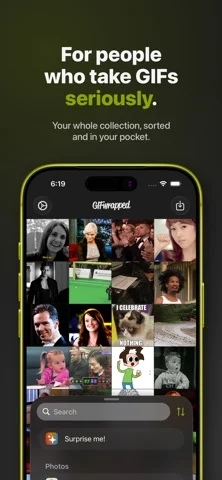
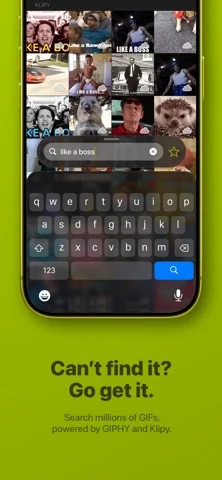
Collect your GIFs. Share them. Love them! If you're a GIF connoisseur, you need an app that's as serious about them as you are. That's where GIFwrapped comes in. • Use iCloud or Dropbox to add new GIFs and sync your collection. Keep your GIFs on multiple devices and have a backup in the cloud. The digital cloud. No one keeps GIFs in real clouds anymore — everything gets too wet. • Use the bundled Messages app to share GIFs from your Library with your friends in seconds. No muss, no fuss. • Find new GIFs using Klipy-powered search (of Giphy, if that's more your jam)! Just whack in a phrase like "cat" or "lumpy space princess" and be prepared for pure awesome to rain down on you from the heavens. • Import GIFs, Bursts, and Live Photos from your Photo Library. Save them back to Photos, too, if that's your jam. • Use an extension to quickly save images to your Library! It's super easy, and probably fun by someone's standards! • Preview GIFs in standard or retina quality. It all depends on whether you like pixels or not. Upgrade your GIF game even further by subscribing to GIFwrapped Premium for US$9.99 per year (may vary from country to country), which unlocks awesome features, removes ads, and supports an independent creator. • Turn off ads. I hate 'em as much as you do, but a guy's gotta eat. • Bookmark searches for easy access the next time you want them. These things are important for those GIF standoffs you're somehow always getting into. • Reuse (and recycle!) your search history as a list of bookmarks, so revisiting the past doesn't need to involve time travel… or memory. • See additional information about images in the Info panel, including frame count, duration, and more. That way you can know your GIFs inside and out. • Turn off the embedded watermark in Bursts and Live Photos. I mean, liking GIFwrapped is one thing, but plastering the logo over GIFs of your pets? Probably a bit much. If you choose to subscribe to GIFwrapped Premium, payment will be charged to your iTunes account, and the subscription will automatically renew within 24 hours of the end of the current period. You can manage this in Account Settings. Cancel your subscription at least 24 hours before the end of the current period to let it lapse. Privacy Policy: https://gifwrapped.co/privacy Terms of Service: https://gifwrapped.co/terms
iPhone Duo에서의 GIFwrapped: 자주 묻는 질문
GIFwrapped은(는) iPhone Duo에 최적화되어 있나요?
개발자 또는 스토어가 iPhone Duo 지원을 안내합니다.
GIFwrapped의 가격은 얼마인가요?
GIFwrapped은(는) App Store에서 무료로 다운로드할 수 있습니다.
다른 엔터테인먼트 앱
모두 보기 ›
마음속 질문에 대해 기기 내 저장된 답변을 화면을 펼치며 보여줍니다.

페이지 절반에 물감을 칠하고 접어 문지른 뒤 펴면 거울처럼 대칭된 그림이 나온다.

잉크를 떨어뜨리고 폰을 접어 얼룩을 만든 뒤 보이는 것에 대한 해석을 받습니다.

휴대폰을 접어 물감을 눌러 펴면 대칭 그림이 나오는 놀이.

냉장고에 메모·사진·식료품을 배치.

내가 가진 M3U 재생목록으로 IPTV 채널을 시청하는 앱