
Just Split: AI Bill Splitter
청구서를 나누고 사람별 잔액을 기록해 누가 얼마를 빚졌는지 알 수 있습니다.
On World Tech LLC · 금융 · 무료
iPhone 스크린샷
iPhone Duo 활용 방식
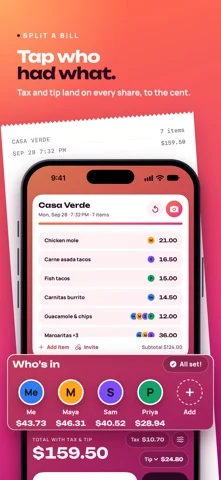
On iPhone Duo, unfold it and the bill sits on one page with the people who shared it on the other.
새로운 기능
버전 2.3 ·
NEW IN 2.3 • "6 of 7 placed" now takes you to what's left: tap it and the next item still waiting for someone opens, ready to pick who had it. On iPhone Duo you tap it on the people page and the item opens on the bill's page • Remove someone from a bill: touch and hold their name, then Remove from Bill. Undo puts them back with everything they had • Adding an item is now a proper form: the price of each, how many, and discount lines. Add stays off until there's a name and a price • If a scan can't read a receipt, Just Split says why and what to do next: try again, choose a photo, or type the items in. A failed scan never uses a free scan • A finished bill names the place and the total, and when everyone has paid you back, the People tab says "Everyone's square" • Siri and Shortcuts: "Scan a receipt with Just Split" and "Who owes me in Just Split" • VoiceOver tells you when a bill is fully placed and when someone is all square, and every person's actions are in the Actions menu FIXED • On iPhone Duo held upright (flat or half-folded), the finished-bill card with four or more people no longer runs onto the fold • The scan's haptic now matches the bill audit: a gentle warning when something needs a look Questions or ideas? support@onworld.tech
개발자가 이 내용을 한국어로 제공하지 않았습니다.
App Store 설명개발자가 작성한 내용입니다.
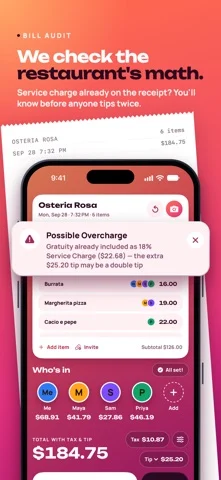
Splitting one bill is easy. Remembering who owes you across last month's dinners, the beach trip, and rent — that's Just Split. On iPhone Duo, unfold it and the bill sits on one page with the people who shared it on the other. Every bill you split feeds a running ledger: open the People tab and see exactly where you stand with each person, across everything. Settle up in one tap — a single Venmo or Cash App request for the net amount, with an itemized note listing every bill it covers. Record cash payments, and the balance updates. No accounts, no spreadsheet, no "wait, didn't you get the last one?" And before anyone pays, Just Split checks the restaurant's math. WHY JUST SPLIT IS DIFFERENT • THE LEDGER — Running balances per person across every bill. "Sarah owes you $63 · 4 bills." One tap settles all of it. • RECURRING SPLITS — Rent, utilities, streaming: set it once and it lands on everyone's ledger every month, automatically. • THE BILL AUDIT — Just Split checks the restaurant's math. Double tips (a printed gratuity plus a tip on top), wrong totals, duplicate charges — caught before you pay, with a running total of what the Bill Guardian has caught for you. • WORKS WITH EVERYONE — Venmo, Cash App, or text. Friends claim their own items from a link in any browser — Android friends included, no app, no account. • EXACT TO THE PENNY — Every person's share adds up to exactly the bill total. No vanishing cents. Discounts and voided items count too. BUILT FOR IPHONE DUO • Held sideways, two pages: everyone you split with beside one person's whole tab, a bill beside its people, your history beside any bill • Held upright, the same pages above and below the fold • Half-folded, each page on its own side of the crease, with the app's buttons kept off it • Just Split's sheets and forms open on one side of the fold • Closed, the outer display runs the full phone layout ALSO IN JUST SPLIT • AI receipt scanning: every line item, tax, tip, and service charge — even multi-page and long grocery receipts • Tax, tip, and fees split proportionally or evenly, by everyone or just some people • Quick Split: type a total and see each person's exact share • Trips & events: group bills together and settle the whole weekend at once • Searchable bill history with receipt photos — "what did that omakase cost in March?" • Undo instead of "Are you sure?" when you remove an item or delete a bill from Activity • Siri and Shortcuts: "Scan a receipt with Just Split", from Spotlight, the Shortcuts app or the Action button • PDF & CSV export for reimbursements and bookkeeping • iCloud sync, Contacts integration, 10 currencies FREE TO USE, ONE PRICE FOREVER The ledger is free, always — unlimited bills, people, and settle-ups, plus 3 audited AI scans every month. Just Split Pro unlocks unlimited scans and audits, events, full history, and exports for a one-time $9.99. No subscription. No recurring charges. Ever. YOUR DATA No account required. Your bills stay on your device and in your iCloud. To read a receipt, Just Split sends the photo through our server to Google Gemini, which returns the items and prices. You're asked before your first scan, the server doesn't keep the photo, and you can always type items in by hand. If you share a claim link, that bill's items stay on our server for 7 days so friends can open it. No ads, no third-party analytics. Terms of Use (EULA): https://onworld.tech/just-split/terms Privacy Policy: https://onworld.tech/just-split/privacy
iPhone Duo에서의 Just Split: AI Bill Splitter: 자주 묻는 질문
Just Split: AI Bill Splitter은(는) iPhone Duo에 최적화되어 있나요?
네. Just Split: AI Bill Splitter은(는) Duo 전용 설계 앱으로, 폴딩, Split View 또는 외부 디스플레이를 활용합니다. 2026년 10월 25일 확인(App Store 설명).
iPhone Duo에서 Just Split: AI Bill Splitter은(는) 어떻게 보이나요?
On iPhone Duo, unfold it and the bill sits on one page with the people who shared it on the other.
Just Split: AI Bill Splitter의 가격은 얼마인가요?
Just Split: AI Bill Splitter은(는) App Store에서 무료로 다운로드할 수 있습니다.
다른 금융 앱
모두 보기 ›
모든 구독을 한곳에서 관리하고 갱신 알림과 지출 분석을 제공합니다.

160개 이상 통화를 다루는 오랜 역사의 환율 변환 앱

지출, 수입, 청구서, 저축 목표, 순자산을 한 앱에서 기록하고 관리한다.

인도용 수동 가계부로 UPI 지출, 부채, 할부, 예산을 추적.

재량 지출을 기록하고 초과 지출을 자신에 대한 부채로 바꾸는 예산 앱입니다.

청구서, 지출, 수입을 달력에 정리하고 알림과 잔액 예측을 제공.