
iPhone 截图
新功能
版本 1.7.3 ·
Agent HUD opens faster and uses much less memory: it reads only what changed in iCloud, and long conversations stay on disk until you open them. Fixes a case where iOS could stop the app as it started in the background. The Lock Screen card now comes back on its own if it disappears while your agents are still working. Recordings from Apple Watch are always one tap away on the Sessions tab, iPhone asks for speech recognition as soon as Agent HUD is on your watch, and Recent events can be cleared.
开发者尚未提供此内容的中文版本。
App Store 简介由开发者撰写。
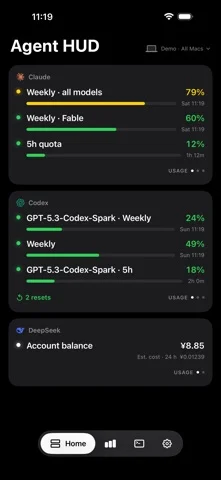
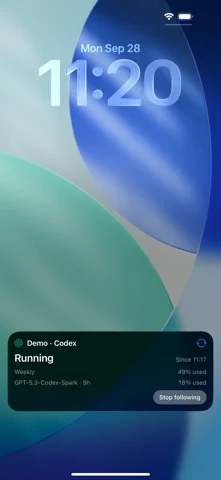
Keep up with your AI coding agents when you step away from your Mac. Agent HUD brings the quotas, token usage and session activity collected on your Macs to iPhone and Apple Watch. QUOTAS AND TOKEN USAGE Check quotas and reset times for Claude, Codex, Antigravity, Cursor and Grok. See available Codex resets, DeepSeek balances and estimated costs. Explore token usage over 5 hours, 24 hours or 7 days, compare models, and view input, output and cache-read tokens in charts and activity heatmaps. SESSIONS AND CONVERSATIONS See which sessions are running across your Macs. Browse models, token totals and recent activity, and read recent conversations shared from Claude Code, Codex, Grok CLI, Grok Bot and Antigravity. Open Codex subagent tasks and their conversations from the parent conversation. View all your Macs together or focus on one. On iPhone Duo, use either display and continue with the same session when you fold the phone. SPEAK, SEND AND FOLLOW UP Tell Codex or Claude Code what to do from Apple Watch. Check your message, choose a project offered by your Mac and send. Start a session, follow its progress, read the reply and continue the conversation from your wrist. You can also review and send these messages on iPhone. WIDGETS, LIVE ACTIVITIES AND ALERTS Add quota, balance or token widgets to your Home Screen and Lock Screen. Check quota rings, token charts and recent sessions on Apple Watch. Follow supported running sessions on the Lock Screen or Dynamic Island, receive completion and quota alerts, and respond to supported permission requests from iPhone or Apple Watch. CONNECT YOUR MACS The iPhone and Apple Watch apps are free to download. Scan your Mac's QR code to pair over the same local network, with no subscription required. For access away from your local network, enable Agent HUD Remote on your Mac. App Store subscriptions cover 1, 2 or 3 Macs, monthly or yearly, with a one-week free trial for eligible subscribers. iPhone and Apple Watch do not count toward the Mac limit. Remote sync requires the same Apple Account on your Mac and iPhone. REQUIREMENTS Requires Agent HUD on a Mac with macOS 14 or later, iOS 17 or later on iPhone, and watchOS 10 or later on Apple Watch. Local network pairing and shared conversations require Mac app version 0.4.39 or later. Starting a session requires Mac app version 0.5.5 or later, Agent HUD Remote and experimental Remote Sessions enabled on your Mac. Apple Watch requires a paired iPhone with Agent HUD installed; keep it available when using voice features. Automatic Live Activities require iOS 18 or later. Live Activities in the paired Apple Watch Smart Stack also require watchOS 11 or later. Available information depends on the tools and accounts connected on your Mac. Apple schedules background updates, widgets, notifications and Live Activities, so update and delivery times can vary. Agent HUD does not provide AI model access or run coding tasks on your phone. Terms of Use: https://www.apple.com/legal/internet-services/itunes/dev/stdeula/
Agent HUD 在 iPhone Duo 上:常见问题
Agent HUD 针对 iPhone Duo 优化了吗?
开发者或商店资料已标明支持 iPhone Duo。
Agent HUD 多少钱?
Agent HUD 可在 App Store 免费下载。
更多工具应用
查看全部 ›
利用iPhone Duo铰链测量精确到0.1°的角度,并提供目标、匹配和水平仪工具。

把iPhone Duo变成量角器,读取铰链内外角度,其他iPhone上可当水平仪使用。

把iPhone Duo变成逼真的双折钱包,有卡槽、现金、笔和收据。

把iPhone Duo铰链变成角度与参考工具集,其他iPhone可免费用气泡水平仪。

把iPhone变成尺子、量角器、水平仪和直径规,iPhone Duo还能实时显示折叠角度。

实时测量iPhone Duo铰链角度,也可作水平仪、量角器、坡度计和相机角度仪。