
iPhone 截图
新功能
版本 1.6 ·
# Remote Play - Added frame generation to bring 30fps video streams up to 60fps # Cloud Play - Improved Cloud streaming performance # General - Added iPhone Duo support - Adaptive frame pacing optimisations for a smoother picture - Frame generation performance improvements - User interface optimisations and cleanup # Platform Specific - (iOS/iPadOS) Added a Virtual Controller opacity slider to the Asobi overlay - (iOS/iPadOS) Added a Virtual Controller Liquid Glass toggle to the Asobi overlay
开发者尚未提供此内容的中文版本。
App Store 简介由开发者撰写。
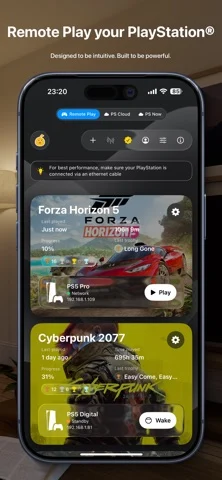
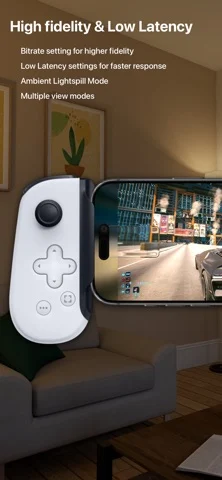
This app client turns your iPhone or iPad into a high-quality PS Remote Play client for your PlayStation® 4 and PlayStation® 5, with support for real controllers, virtual buttons and smart streaming. Core experience: • Account cloud sync - keep your consoles and settings in sync across devices. • Connect and remote play from your PS4 or PS5 • Multiple accounts - sign in with both local and PSN accounts. • Game info & progress - see what you’re playing and how far you’ve come. • 1080p / 30 fps SDR streaming - smooth, sharp video that just works. • Automatic bitrate - the app adapts quality to your network. • Special Backbone controller support with an experience akin to the PlayStation Portal • Built-in virtual controller overlay for on-screen play. • PS Cloud streaming support (PlayStation® Plus membership required for PlayStation® Cloud Game Streaming) • Internet Remote Play support • Automatic console registration support (Register consoles without having to use a pairing code) • PlayStation 5 multiplayer couch co-op support - up to 4 players on one screen, over local or internet Remote Play. • PlayStation 4 multiplayer couch co-op support - up to 4 players on one screen, over local Remote Play. Unlock the full mobile experience with a single in-app purchase: • Full DualShock 4, DualSense, DualSense Edge support • HDR video - take full advantage of your device’s color and contrast. • 1080 / 60 fps streaming - double the smoothness for responsive play. • ProMotion upscaling (4k) & up to 120 fps (on supported devices). • Low latency modes for lower lag between the PlayStation console and your device. • Manual bitrate control - tune quality and bandwidth to your network. • Experimental FEC mode - helps recover from visual skips on unstable Wi-Fi. • Audio settings - reduce sound delay and fine-tune behavior. • Controller haptics - feel more of the game. • Zoom & Pan - crop and focus the part of the screen that matters most for a full screen experience! • On-screen lightbar halo - visualize controller status right on your display. • On-device gyro support - emulate your controller gryo on iPhone or iPad. • On-device haptics - subtle taps and feedback from the device itself. • 1:1 adaptive trigger parity (DualSense / DualSense Edge) - native-feel trigger resistance that matches the real PlayStation experience. • 16 screen filters - Vivid, Monochrome, Cell Shaded, 32-bit and more, to restyle your game. • Realtime 2D to 3D conversion - supporting Side-by-Side (SBS), TriOviz and Anaglyph (Red/Cyan) for 3D displays and XR glasses. Disclaimer Asobi is an independent Remote Play client for PlayStation®4 and PlayStation®5. It is intended for use with content you own or are licensed to use, on hardware you own, with a valid PlayStation Network account and, for cloud streaming, an active PlayStation Plus subscription. Asobi does not circumvent copy protection or facilitate piracy. Asobi is not affiliated with or endorsed by Sony Interactive Entertainment. PlayStation®, PlayStation Plus®, DualShock®, DualSense®, PlayStation Portal®, PlayStation®4, and PlayStation®5 are trademarks of the Sony Group Corporation.
Asobi: Remote Play 在 iPhone Duo 上:常见问题
Asobi: Remote Play 针对 iPhone Duo 优化了吗?
开发者或商店资料已标明支持 iPhone Duo。
Asobi: Remote Play 多少钱?
Asobi: Remote Play 可在 App Store 免费下载。
更多娱乐应用
查看全部 ›
把问题留在心里,展开手机时逐步显示设备内预存的答案,供你静心思考。

在页面一半涂色,合上折叠揉压,再打开得到镜像颜料印画。

滴墨后合上手机压出墨迹,再获得针对你所见内容的文字解读。

通过折叠手机压印颜料,展开后得到对称的颜料印画。

手机里的冰箱,可贴便签、照片和磁贴,并摆放食品。

通过自己的 M3U 播放列表观看 IPTV 频道