
iPhone 截图
新功能
版本 2.2.3 ·
* Optimized for iPhone Duo.
开发者尚未提供此内容的中文版本。
App Store 简介由开发者撰写。
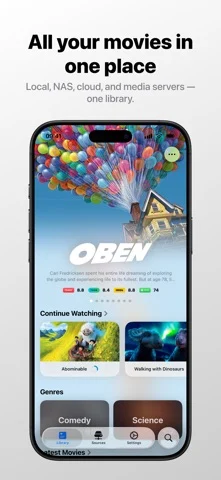
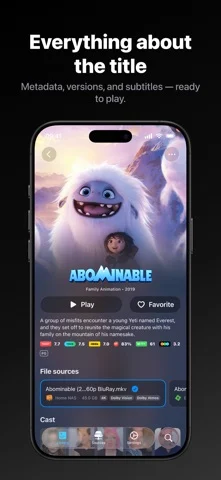
Conflux: The All-Format Video Player & Media Library for Apple Devices Play videos directly from local storage, NAS, cloud drives, and media servers — no transcoding required. Conflux supports popular and uncommon formats, connects to Plex, Emby, and Jellyfin, and works with cloud drives including 115, Aliyun Drive, and Baidu Netdisk. Automatically organize your collection into a smart media library. Native Dolby Vision and Dolby Atmos playback (Atmos is currently in Beta), professional subtitles, danmaku, downloads, and a seamless experience across iPhone, iPad, Apple TV, Mac, and Apple Vision Pro. A Better Way to Watch • Native Dolby Vision & Dolby Atmos: Enjoy immersive video and audio. Dolby Atmos is currently in Beta. • Media Servers: Connect to Plex, Emby, and Jellyfin to browse and play your media libraries. Emby supports rich filtering and browsing. • Flexible Media Sources: Add NAS, network shares, cloud drives, and more. Configure multiple fallback URLs and automatically switch based on your Wi-Fi network. • Smart Media Library: Automatically identify movies and TV shows and retrieve posters, descriptions, ratings, and metadata. • Faster Indexing: Optimized indexing and metadata scraping, including faster 115 file indexing and movie/TV scraping. • Global Search: Quickly find indexed media and access search history. Powerful Playback • Extensive Format Support: Play MKV, AVI, MP4, M4V, MOV, WMV, MTS, ISO, VIDEO_TS, FLV, OGM, OGV, ASF, 3GP, DVR-MS, WebM, WTV, and more. • HDR & Dolby Vision: Optimized for HDR and Dolby Vision with excellent image quality and color reproduction. • 4K Ultra HD: Smooth playback for high-resolution video. • Faster Startup: Optimized playback, cache I/O, preloading, and media processing. • Professional Subtitles: Multiple subtitle formats, custom styles, true subtitle rendering, local subtitle files, and multi-language subtitle downloads. • Danmaku: Display, search, and customize danmaku while watching. The Conflux Danmaku Service can be enabled to share danmaku data. • AI Danmaku Protection: AI-powered face detection helps keep danmaku away from faces. • Portrait Video: Flexible orientation options for vertical videos, including video ratio, device orientation, and portrait/landscape locks. • Precise Seeking: Accurate time navigation, including Blu-ray disc images. • Picture in Picture: Start PiP directly in Conflux and continue using the app while watching. • AirPlay: Stream videos to compatible devices. • Downloads: Download media for offline viewing. Currently supported for file-based protocols and cloud drive sources. Built for Your Media Collection • New Onboard Flow: Easily add media sources and start watching. • Connection Testing: Automatically test sources when adding them, or check availability manually. • Multiple Media Sources: See playable versions of the same title across different sources. • Watch History: Browse viewing history by date and resume playback. • Intro & Outro Skipping: Automatically or manually skip TV show intros and outros, with conflict detection when marking time ranges. • TV Show Management: Automatically organize seasons and episodes with intro/outro markers. • Reviews & Recommendations: Explore reviews, production companies, recommended titles, and works by the same director. • Cloud Sync: Sync media library settings, watch history, and playback progress across Apple devices. Made for the Apple Ecosystem Conflux is designed for iPhone, iPad, Apple TV, Mac, and Apple Vision Pro, providing a consistent experience. Larger-screen devices support multi-column media layouts. Whether your videos are stored locally, on a NAS, in the cloud, or on a media server, Conflux brings everything together in one unified media library. Rediscover your media collection with Conflux.
Conflux - Video Player 在 iPhone Duo 上:常见问题
Conflux - Video Player 针对 iPhone Duo 优化了吗?
开发者或商店资料已标明支持 iPhone Duo。
Conflux - Video Player 多少钱?
Conflux - Video Player 可在 App Store 免费下载。
更多创作应用
查看全部 ›
把iPhone或iPad变成电影场记板,可打板同步并记录镜头。

在Duo内屏一半作画,合上再展开,得到左右对称的镜像图案。

用滴管、折叠和摩擦制作对折墨迹印画,并保存或分享每幅作品。

把iPhone变成拍立得相机,拍摄后生成带白边的相纸照片,可手写配文并保存收藏。

绘画应用,支持自定义画笔和无限图层

前后摄像头同时录制