
iPhone 截图
新功能
版本 1.3 ·
Returning to Home. Flyby has been updated! Want to see what we've been working on? ADDED • Siri and Shortcuts: ask “Can I fly with Flyby?” or “When’s the best time to fly with Flyby?” for where you are or a saved place. You can also plan a flight, log a flight, open your next flight, or open the Hangar. • Spotlight: search for one of your saved places to open it in Flyby. • Widgets for any place: pick a saved place for the Fly Score widget, or keep it following Today. Place widgets refresh in the background, and new Lock Screen sizes show the score at a glance. • Control Center: add controls to see your Fly Score, log a flight, or plan one. • Great-Day Alerts: watch a saved place, and Flyby lets you know when an excellent window is coming up there, with a picture of the spot and a button to plan the flight. Included with Flyby Pass. • More drones: 39 drones from seven makers, with search. Each one uses its maker’s published flight time and wind rating. • Track playback: tap Play to watch a flight’s track at 10× speed, with the map following along. IMPROVED • Local time for plans and flights • Plans and flights you add now use the place’s own clock, and name it when it’s different from your phone’s. • Log a Flight: import a GPX track first, and Flyby fills in the date, duration, distance, and takeoff point. You can check the track on a map before you save. • Long tracks: tracks with thousands of points open right away, and GPX files import faster. • Getting started: new pilots set up Flyby around the flying they do, and watch their Fly Score change as they go. • Flyby Pass: a simpler page shows what’s free and what Pass adds. • Lighter 3D: drones load faster and use less memory, and Flyby takes up less space. • Fresh look: Flight Card options and the track picker now match the rest of Flyby. FIXED • The Fly Score widget could show a score a few points off from Today’s. • Save on your current location’s card opened the location instead of saving it. • Flyby used more memory each time you opened the Hangar or tapped through Today’s flight windows. • Free Flight showed an alert each time it opened if you weren’t signed in to Game Center. That's all we have for today! Now get back to the skies, pilots. We'll be back soon with more exciting updates. Until then, happy flying! Love Flyby? A review on the App Store helps other pilots find it.
开发者尚未提供此内容的中文版本。
App Store 简介由开发者撰写。
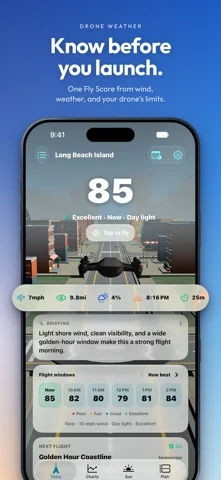
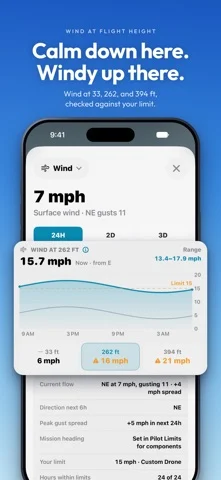
Know before you launch. Flyby turns wind at height, gusts, rain, visibility, and daylight into one Fly Score for your drone, so you know whether it’s a good time and place to fly. Built for drone pilots, not generic weather browsing. Open Flyby for the quick answer at your location or a saved launch spot, then go deeper when you need to. KNOW THE CONDITIONS • Fly Score: wind, gusts, rain, clouds, visibility, daylight, and Kp index in one number, explained factor by factor • Wind at height: wind at 33, 262, and 394 ft, not just on the ground, checked against your drone’s limit • Hourly charts for score, wind, rain, clouds, and visibility • Pilot limits: start Careful, Standard, or Flexible, then tune every threshold PLAN THE FLIGHT • Flight windows: Flyby picks out the best stretch of each day • Flight plans with a go/no-go verdict from the forecast for your window • Forecast alerts when a plan’s conditions really change • A preflight checklist on every plan • Sunrise, sunset, golden hour, blue hour, and daylight wherever you fly • Usable flight time, with battery reserve and accessory load CHECK THE AIRSPACE • FAA ceilings and LAANC availability on the map, free for everyone • Save launch spots and compare their conditions side by side KEEP EVERY FLIGHT • A logbook with routes, conditions, totals, and notes • Import GPX tracks to fill in launch point, distance, altitude, and duration • Flight cards: share a postcard of a flight with your best shot • Home Screen widgets for Fly Score, the sun arc, and your Flyby scene YOUR DRONE, YOUR WAY • Presets for popular drones, or build your own aircraft profile • Free Flight: fly around a 3D town, and race Gate Run with Game Center achievements FLYBY PASS Flyby is free to use. Flyby Pass, monthly, yearly, or lifetime, adds: • Flyby Guides: parks, waterfronts, and viewpoints near your launch • Scan or import your own drone in 3D • Hourly detail and charts beyond today • Live Activities for planned flights on the Lock Screen and Dynamic Island • Unlimited launch spots, flight plans, aircraft, and collections, plus more map styles PRIVATE BY DESIGN Flyby follows the O13 Standard. Your places, plans, and flights are stored on your iPhone. No ads, no ad tracking, and only minimal anonymous analytics. IMPORTANT Flyby is for planning and weather context, not authorization. Always verify local rules, temporary flight restrictions, LAANC requirements, manufacturer guidance, aircraft condition, people, wildlife, and launch access before flying. Privacy Policy: https://www.onethirteen.co/apps/flyby/privacy Terms of Use: https://www.onethirteen.co/apps/flyby/terms
Flyby – Drone Weather Planner 在 iPhone Duo 上:常见问题
Flyby – Drone Weather Planner 针对 iPhone Duo 优化了吗?
开发者或商店资料已标明支持 iPhone Duo。
Flyby – Drone Weather Planner 多少钱?
Flyby – Drone Weather Planner 可在 App Store 免费下载。
更多天气应用
查看全部 ›
追踪某个重要日子的天气预报,为 Duo 的每种姿态提供专属布局

以图表为核心的天气应用,Duo 展开后左右并排显示

采用游戏风格 3D 界面、预报详尽的天气应用

自带毒舌机器人主持的天气应用,现已支持 iPhone Duo

提供澳大利亚天气预警、降雨雷达、河流水位和农牧业专项预报。

提供气象专家风暴报道、交互雷达与逐小时天气预报。