
iPhone 截图
新功能
版本 8.1.3 ·
• Bug fixes. In case you missed what's new in 8.1: • Added support for iPhone Duo. • Image Adjustments will now remember the previously selected cropping format when opening an unadjusted file for adjustment - unless Manual cropping is selected. • When Image Adjustments opens an unadjusted file for adjustment in Crop mode—and a cropping format other than Manual or Original is selected—it will attempt to focus on a face in the photo. • Metadata now does not have trailing and leading white spaces cleaned up. It'll show/save whatever it's reading/being asked to save. • Image Adjustments change: Moved Flip Image and Crop Rotation Mode, previously available through a long-press / right click on the Rotation button, to a more discoverable place under the Options button (wrench icon). • Bug fixes. • Huge amount of user interface layout fixes and under-the-hood improvements.
开发者尚未提供此内容的中文版本。
App Store 简介由开发者撰写。
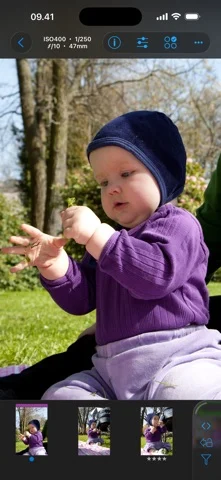
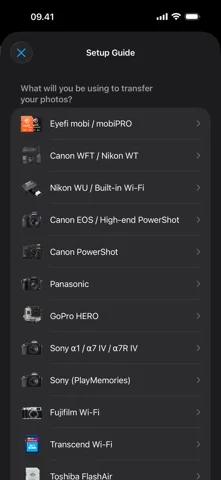
ShutterSnitch is subscription based. With a subscription you get access to all features and updates. The first week is *free* so you can verify that things work with your specific camera or wi-fi card. Wirelessly transfer images to your iOS device from an Eye-Fi, Transcend Wi-Fi, Toshiba FlashAir, PQI Air, or ez Share card, GoPro HERO, Fujifilm cameras with built-in Wi-Fi, PTP/IP enabled device (such as the Nikon WU / D750 / Z7 or Canon EOS 5D Mark IV / 6D / 70D / M3 / EOS R) or a Canon, Nikon or other filetransmitter that supports uploading to an FTP server over your wireless network. When a JPEG arrives, ShutterSnitch analyzes shutter speed, aperture, ISO, focal length, and light level and warns you if anything differs from the rules you've set up. You now have a large preview screen that you can browse, pinch, zoom, and evaluate seconds after snapping your picture. In a studio environment it's now easy to share shoots with crew and models. More fun and less juggling cards, adapters, and cables! Please note: A large part of the magic of the wireless delivery lies in the setup of the devices outside of the ShutterSnitch app. For older FTP systems, be prepared to spend more than just a couple of minutes on this initial setup. Features: • Works with iPad, iPhone, and iPod touch. • Full Retina & Retina HD display support. • Crop, straighten, and adjust colors in the sRGB color space (temperature & tint, exposure, contrast, highlights, shadows, whites, blacks, clarity, vibrance, and saturation). All edits are non-destructive, so you can always fine-tune or revert to the original photo. • Advanced metadata editing with presets and Code Replace. • Slideshow function with Ken Burns effect. • Arrange your shoots in albums. • Lock private albums. • Resize and/or watermark photos before sharing them via e-mail, Dropbox, Flickr, FTP, WebDAV, Google Drive, Microsoft OneDrive, SmugMug, or Zenfolio. • Large scale histograms (RGB,R,G,B). • Visible and/or audible warnings. • Map integration. Geo-tag JPEG photos automatically or manually. • Highlight warnings. • Add a caption and byline to the photos by tapping and holding the currently displayed full image. • Custom username, password, and port for the built-in FTP and WebDAV servers. • Receive files directly from one or more Eye-Fi cards. • Receive photos from your GoPro HERO, Transcend Wi-Fi, Toshiba FlashAir, PQI Air, or ez Share card/adapter as you shoot them or import files from the card manually. *Note for GoPro cameras in burst or time-laps mode*: Photos can only be retrieved once the camera exits the mode. • Supports receiving and importing photos via PTP/IP. For example from Nikon WU transmitters, D750 / D850 / Z7 / Z9 and Canon EOS 5D Mark IV / 6D / 70D / M3 / EOS R. • Supports receiving photos from Panasonic cameras that work with their LUMIX LINK app such as the GH3 and GH4. (Not the 'Image App' or 'LUMIX Sync' apps, so DMC-G7 and DC-G9M2 are not supported.) • Supports Sony α1, α7 IV & V, α7R IV, and NEX cameras. • Supports Fujifilm cameras with built-in Wi-Fi such as X100T, X-M1, GFX100, and X-T2. • Supports Canon PowerShot G16 and other Canon cameras that work with their CameraWindow app. • AirDrop export. • Bonjour support for easy discovery in your Bonjour enabled applications. ShutterSnitch can also be used as a regular image browser if you simply transfer the pictures from your computer through an FTP client. Subscription payments ($2.99 monthly or $29.99 yearly) are charged through your iTunes Account at confirmation of purchase and are auto-renewed. The account will be charged for renewal within 24-hours prior to the end of the current period. Renewal can be turned off 24-hours before the end of the current period in your Account Settings in the App Store. Any unused portion of a free trial period will be forfeited when a subscription is purchased. Privacy Policy & Terms of Use: https://2ndnaturesoftware.com/privacypolicy
ShutterSnitch 在 iPhone Duo 上:常见问题
ShutterSnitch 针对 iPhone Duo 优化了吗?
开发者或商店资料已标明支持 iPhone Duo。
ShutterSnitch 多少钱?
ShutterSnitch 可在 App Store 免费下载。
更多创作应用
查看全部 ›
把iPhone或iPad变成电影场记板,可打板同步并记录镜头。

在Duo内屏一半作画,合上再展开,得到左右对称的镜像图案。

用滴管、折叠和摩擦制作对折墨迹印画,并保存或分享每幅作品。

把iPhone变成拍立得相机,拍摄后生成带白边的相纸照片,可手写配文并保存收藏。

绘画应用,支持自定义画笔和无限图层

前后摄像头同时录制