
iPhone 截图
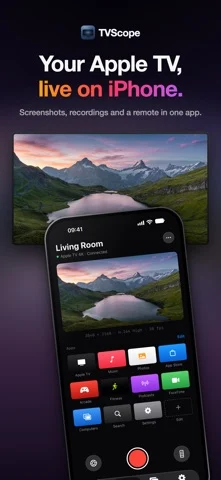
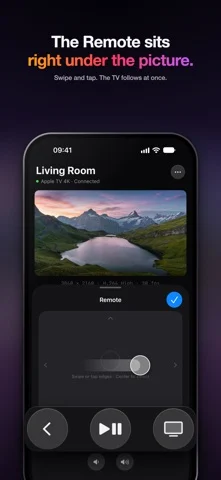
在 iPhone Duo 上的表现
来源中有 Duo 支持声明,具体折叠交互和真机表现尚未独立核验。
新功能
版本 1.3.0 ·
Type on the Apple TV. When the TV focuses a text field, the field above the Remote shows its text, and what you type arrives as you type. The keyboard is the Remote. Anywhere on the TV's page in Studio, the arrows, Return, Escape, Space, H and +/− work as the Siri Remote's keys, even with the Remote closed. Hold Return or H for a menu or Control Center. One power key. The Remote shows whether the Apple TV is on, and a press puts it to sleep or wakes it. Hold the TV key for Control Center. Two sounds, kept apart. A narrated recording keeps the TV and your voice on separate tracks, with a level and mute for each in the new Sound editor. They're mixed automatically when the recording is exported or shared, and echo is removed when you record over the speaker.
开发者尚未提供此内容的中文版本。
App Store 简介由开发者撰写。
TVScope brings your Apple TV's screen and sound to iPhone, iPad and Mac, live, over your own Wi‑Fi. No cables. No capture card. WHO IT'S FOR • tvOS developers: see the real picture from the TV in your hand, capture it in a tap, and check resolution, codec and frame rate • Reviewers and creators: get the exact picture the TV sends for tutorials, reviews and social posts • Anyone who wants to check what's playing on the TV from another room LIVE PICTURE • The TV's picture and sound, live on your phone, tablet or Mac • Choose the picture quality in Settings and ask for up to 4K • The Remote, one tap away: five-way touchpad, Back, Play/Pause and volume SCREENSHOTS AND RECORDINGS • Screenshots at the full resolution the TV sends, in HEIC or PNG • Recordings that keep the picture exactly as the TV sent it, with the TV's sound • Turn on Record Microphone to narrate while you record • Trim, crop and make GIFs • Screenshot Composer with presets for X, Xiaohongshu and blog sizes REMOTE AND APPS • Studio lists the apps on your Apple TV; tap one to open it on the TV • Control Center, the Lock Screen and the Action button: Play/Pause, Sleep, Wake and Open App, free • Remote and Apps widgets on the Home Screen (Pro) LESS TO THINK ABOUT • Pair once. With Auto Connect on, TVScope opens the last device when you launch it • TVScope is also an AirPlay receiver: a Mac or iPhone can send its screen here from Screen Mirroring • When a connection fails, TVScope shows the step where it stopped and what to check TVSCOPE PRO — ONE-TIME PURCHASE • 4K picture • Unlimited recording (free recordings stop at 30 seconds) • Microphone narration • Trim, crop and GIF • Screenshot Composer and export presets • Widgets: the Remote and your Apple TV apps (iPhone, iPad and Mac) • Any number of Studio apps, in your order, or all of them (free includes 3) The live picture and sound, the Remote, screenshots, three Studio apps and the controls in Control Center are always free. Buy once for iPhone, iPad and Mac. No subscription. PRIVACY TVScope collects no personal information. No account, no analytics, no ads. The picture goes directly between your device and your Apple TV and never passes through a server. Screenshots and recordings stay on your device and go to Photos only when you choose. REQUIREMENTS • An Apple TV with AirPlay turned on • The same local network as the Apple TV • Local Network access for TVScope Apple TV, tvOS and AirPlay are trademarks of Apple Inc. TVScope is not affiliated with Apple Inc.
TVScope: TV Screen Capture 在 iPhone Duo 上:常见问题
TVScope: TV Screen Capture 针对 iPhone Duo 优化了吗?
开发者或商店资料已标明支持 iPhone Duo。
TVScope: TV Screen Capture 在 iPhone Duo 上是什么样子?
来源中有 Duo 支持声明,具体折叠交互和真机表现尚未独立核验。
TVScope: TV Screen Capture 多少钱?
TVScope: TV Screen Capture 可在 App Store 免费下载。
更多创作应用
查看全部 ›
合盖触发场记板打板和镜次记录,展开并列显示场记板与镜次日志。

在一半屏幕画画,合上再展开,得到另一侧的镜像压印。

合盖折起墨纸,在外屏摩擦压印,再展开显示对称墨迹。

展开推动虚拟拍立得相纸输出;半折把取景器与机身控件分开。

绘画应用,支持自定义画笔和无限图层

前后摄像头同时录制