
iPhone スクリーンショット
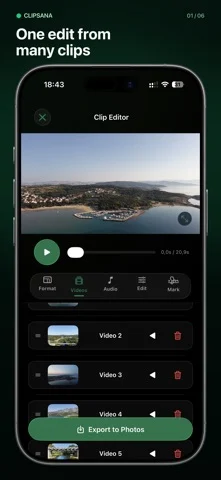
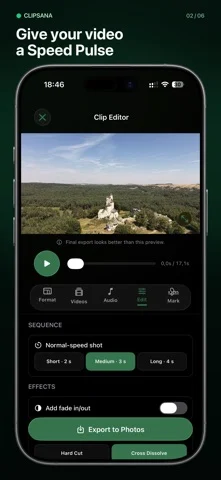
iPhone Duo での活用
Duo support is reported in the linked sources. The specific fold interaction and real-device behavior have not been independently verified.
新機能
バージョン 1.1.0 ·
Meet your tidier editing space: new Home, Edits, and More tabs keep your next creation, saved projects, and settings close at hand. Enjoy layouts adapted for iPhone Duo and a roomier editor on iPad. Smart Match now keeps your selected clips visible when filtering to Best fit, and iCloud checks won't make the clips you're browsing jump around. Your footage can do the dancing. We've also improved preview recovery after playback errors, so you can get back to creating with fewer interruptions.
開発者はこの内容を日本語化していません。
このアプリについて
Duo support is reported in the linked sources. The specific fold interaction and real-device behavior have not been independently verified.
英語版の掲載内容を翻訳しています。
App Store の説明開発者による説明です。
Your best moments deserve more than a camera roll. Clipsana turns several videos into one finished edit. Choose an effect, select clips from Photos, preview the result, and save your video back to Photos. CHOOSE YOUR EDIT • Motion Match joins similar moments from clips of a repeated movement into one sequence. For the best result, record the action with similar timing and framing. • Speed Pulse races through each clip, then returns to normal speed around the moments you want to show. FIND THE RIGHT FOOTAGE Smart Match suggests clips with compatible video settings. You decide which shots look good together. MAKE IT YOURS • Add, remove, reorder, or reverse clips. • Choose original, vertical (9:16), square (1:1), or wide (16:9) framing and adjust the crop. • Add a built-in soundtrack and choose where it starts. • Adjust transitions and fades; repeat the sequence in Motion Match. • Preview changes before you export. • Save edits on your device and return to them later. Export your finished MP4 to Photos. Free exports include a Clipsana watermark. Clipsana Pro removes the watermark. No account needed. Your videos are processed on your device. Terms of Use (EULA): https://www.apple.com/legal/internet-services/itunes/dev/stdeula/
iPhone Duo での Clipsana: Video Effects:よくある質問
Clipsana: Video Effects は iPhone Duo に最適化されていますか?
開発者またはストアに iPhone Duo 対応の記載があります。
iPhone Duo での Clipsana: Video Effects はどう見えますか?
Duo support is reported in the linked sources. The specific fold interaction and real-device behavior have not been independently verified.
Clipsana: Video Effects の価格は?
Clipsana: Video Effects は App Store で無料でダウンロードできます。
その他のクリエイティブアプリ
すべて見る ›
Duo 向けの操作やレイアウトについて出典あり。実機動作は独自に検証していません。

Duo 向けの操作やレイアウトについて出典あり。実機動作は独自に検証していません。

Duo 向けの操作やレイアウトについて出典あり。実機動作は独自に検証していません。

Duo 向けの操作やレイアウトについて出典あり。実機動作は独自に検証していません。

カスタムブラシと無制限のレイヤーを備えたお絵描き・ペイントアプリ

フロントカメラとバックカメラで同時に録画