
Clipsana: Video Effects
Duo support is reported in the linked sources. The specific fold interaction and real-device behavior have not been independently verified.
D BEST · Creative · Free
iPhone screenshots
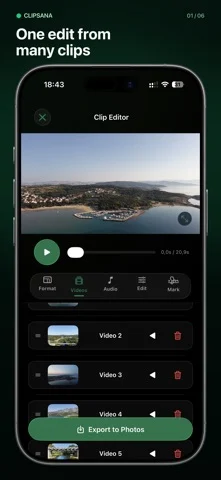
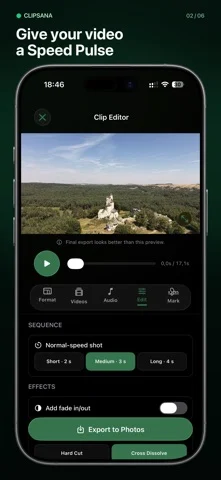
How it uses iPhone Duo
Duo support is reported in the linked sources. The specific fold interaction and real-device behavior have not been independently verified.
What’s New
Version 1.1.0 ·
Meet your tidier editing space: new Home, Edits, and More tabs keep your next creation, saved projects, and settings close at hand. Enjoy layouts adapted for iPhone Duo and a roomier editor on iPad. Smart Match now keeps your selected clips visible when filtering to Best fit, and iCloud checks won't make the clips you're browsing jump around. Your footage can do the dancing. We've also improved preview recovery after playback errors, so you can get back to creating with fewer interruptions.
About this app
Your best moments deserve more than a camera roll.
App Store descriptionWritten by the developer.
Your best moments deserve more than a camera roll. Clipsana turns several videos into one finished edit. Choose an effect, select clips from Photos, preview the result, and save your video back to Photos. CHOOSE YOUR EDIT • Motion Match joins similar moments from clips of a repeated movement into one sequence. For the best result, record the action with similar timing and framing. • Speed Pulse races through each clip, then returns to normal speed around the moments you want to show. FIND THE RIGHT FOOTAGE Smart Match suggests clips with compatible video settings. You decide which shots look good together. MAKE IT YOURS • Add, remove, reorder, or reverse clips. • Choose original, vertical (9:16), square (1:1), or wide (16:9) framing and adjust the crop. • Add a built-in soundtrack and choose where it starts. • Adjust transitions and fades; repeat the sequence in Motion Match. • Preview changes before you export. • Save edits on your device and return to them later. Export your finished MP4 to Photos. Free exports include a Clipsana watermark. Clipsana Pro removes the watermark. No account needed. Your videos are processed on your device. Terms of Use (EULA): https://www.apple.com/legal/internet-services/itunes/dev/stdeula/
Clipsana: Video Effects on iPhone Duo: FAQ
Is Clipsana: Video Effects optimized for iPhone Duo?
The developer or App Store listing mentions iPhone Duo support.
What does Clipsana: Video Effects look like on iPhone Duo?
Duo support is reported in the linked sources. The specific fold interaction and real-device behavior have not been independently verified.
How much does Clipsana: Video Effects cost?
Clipsana: Video Effects is free to download on the App Store.
More Creative apps
See all ›
On iPhone Duo, the phone is the clapperboard. Open it to the slate, hold it up to the lens and shut it

Requires iPhone Duo with iOS 27.1 or later for drawing.

On iPhone Duo the sheet fills the inner display with its crease on the fold. Close the phone and you've folded the

DESIGNED FOR IPHONE DUO

Drawing and painting app with custom brushes and unlimited layers

Record with the front and back cameras at the same time