
iPhone スクリーンショット
iPhone Duo での活用
Duo support is reported in the linked sources. The specific fold interaction and real-device behavior have not been independently verified.
新機能
バージョン 4.6.1 ·
24me is ready for iPhone Duo. Open up more room for your day with a calendar that expands across the screen and layouts that adapt as you fold and unfold. • See more of your schedule in the spacious calendar view. • Keep your task or note list visible while working on the details beside it. • Create and edit events, tasks, and notes in redesigned panels, with dates, reminders, and other details close at hand. Building on our iOS 27 update with Live Activities, Siri, Apple Intelligence, and Liquid Glass, 24me gives you even more ways to organize your day and focus on what matters. Your plans, tasks, and ideas, together wherever the day takes you.
開発者はこの内容を日本語化していません。
このアプリについて
Duo support is reported in the linked sources. The specific fold interaction and real-device behavior have not been independently verified.
英語版の掲載内容を翻訳しています。
App Store の説明開発者による説明です。
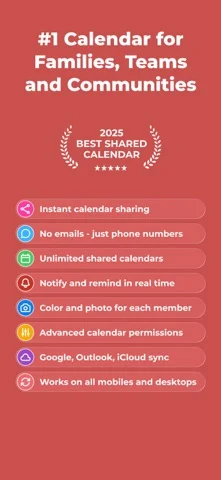
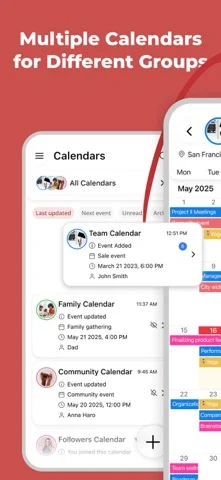
GroupCal is the most powerful platform for individuals and businesses, to share calendars with groups, families, customers, followers and any community. Inviting members to a shared calendar is quick and easy. Simply send a link to members, or invite them using their phone numbers from your contact list. They will be able to instantly view the calendar on any device. Members of shared calendars get real time updates when events are added or updated. GroupCal is free, easy to use, and available on any mobile device. ==== GroupCal - Main Features ==== SHARED CALENDARS FOR VARIOUS PURPOSES People use GroupCal to create shared calendars such as: • Family calendar for parents and children • Calendar for businesses with all activities and events • Calendar for teams to share meetings, projects and schedule • Calendar for students, teachers and classes • Calendar for a group of friends • Calendar for a group with a common interest • Public calendar for universities, clubs, bands and brands - anyone can search and join it CREATE MULTIPLE SHARED CALENDARS EASILY Create multiple shared calendars for different topics and groups. Each calendar is used for its own topic and with its own members. INVITE USING PHONE NUMBERS. NO NEED FOR EMAIL ADDRESS Invite members using their phone numbers, right from your contact list, or by sending a link via Email, Messenger, WhatsApp, or SMS. No need to have email addresses of the members. ALL YOUR CALENDARS IN ONE PLACE Your Existing Calendars are also in GroupCal. Your private schedule from Apple Calendar, Google Calendar, and Outlook is presented in GroupCal, side by side to the shared calendar you create or join using GroupCal. You get a unified view of all your calendars on one screen and in one place. BUSINESSES - CREATE PUBLIC CALENDARS Set calendars as “public” to have them visible to anyone around the world. Public calendars are searchable by GroupCal users. REAL TIME NOTIFICATIONS Members of shared calendars get real time updates and notifications when they are added to the calendar, and when events are added or updated. JOINING SHARED CALENDARS IS SO EASY Either click on a link a member sent to you, or join an existing public calendar on GroupCal by using the search option: discover your University's schedule, Yoga class schedule, your favorite band’s concerts and more. COLOR CODED CALENDARS AND SPECIAL CUSTOMIZATION Select a color and a photo for each calendar to easily distinguish between calendars and their events. KNOW HOW’S ATTENDING Get a better visibility about each event: see when the event was delivered per member, and who accepted or declined participation. MINIMALIST DESIGN & USER FRIENDLY GroupCal has a simple and clear design that makes it super easy to use. It’s built to be very user friendly and intuitive. Features in the app are accompanied with short explanations so you don’t have to spend much time to learn and get used to it. ADD REMINDERS AND TASKS TO CALENDAR EVENTS Use advanced features such as recurrence to events, multiple reminders for each event, or notes and subtasks which are assigned to events. ADVANCED CALENDAR PERMISSIONS Choose the permission level for each shared calendar. Assign admins, set whether the calendar’s name and photo can be changed, who is allowed to add or update events, and whether members can add other new members to the calendar. CROSS PLATFORM GroupCal is available worldwide for all major platforms.
iPhone Duo での GroupCal - Shared Calendar:よくある質問
GroupCal - Shared Calendar は iPhone Duo に最適化されていますか?
開発者またはストアに iPhone Duo 対応の記載があります。
iPhone Duo での GroupCal - Shared Calendar はどう見えますか?
Duo support is reported in the linked sources. The specific fold interaction and real-device behavior have not been independently verified.
GroupCal - Shared Calendar の価格は?
GroupCal - Shared Calendar は App Store で無料でダウンロードできます。
その他の仕事効率化アプリ
すべて見る ›
所要時間でタスクを分ける、落ち着いた ToDo リスト兼ペーパー風プランナー

iPhone Duo の両ディスプレイ向けレイアウトを備えたタスク・プロジェクト管理

展開するとメッセージと受信ボックスを並べて表示できる、Readdle の統合受信ボックス

iPhone Duo のあらゆる姿勢に合わせて形を変える、Cultured Code のタスク管理アプリ

iPhone Duo を開くとノートが開く、手書き風のプライベートノートブック

ブックとテーブルトップの姿勢向けの集中タイマーを備えた、ビジュアルタイムライン式の 1 日プランナー