
iPhone スクリーンショット
新機能
バージョン 2.7 ·
- Added support for iPhone Duo and improved performance.
開発者はこの内容を日本語化していません。
App Store の説明開発者による説明です。
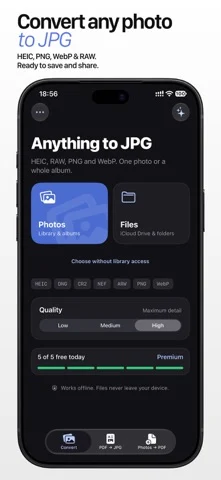
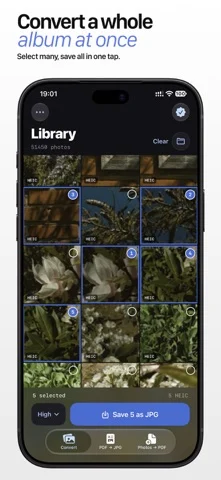
Convert files to JPG without uploading them anywhere. Turn HEIC photos, PDF pages, PNG, WebP and professional camera RAW files into compatible JPG images in seconds. Everything runs directly on your iPhone or iPad. WHY IT’S USEFUL • Convert one file or a whole batch • Export every page of a PDF as a separate JPG • Create multi-page PDFs from photos with Premium • Choose Low, Medium or High quality • Support for DNG, CR2, NEF, ARW and other RAW formats • Save to Photos or share through Files, AirDrop and Mail • Fully offline — your files never leave your device Select. Convert. Done. Premium is an auto-renewing subscription charged to your Apple Account. You can manage or cancel it in account settings. Privacy Policy: https://artcoastdesign.com/privacy/ Terms of Service: https://artcoastdesign.com/terms/
iPhone Duo での HEIC & PDF to JPG Converter:よくある質問
HEIC & PDF to JPG Converter は iPhone Duo に最適化されていますか?
開発者またはストアに iPhone Duo 対応の記載があります。
HEIC & PDF to JPG Converter の価格は?
HEIC & PDF to JPG Converter は App Store で無料でダウンロードできます。
その他のクリエイティブアプリ
すべて見る ›
iPhoneやiPadを映画用スレートにし、クラップと同期、テイク記録を行う。

Duoの画面半分に描き、閉じて開くと鏡像の絵が現れるお絵かきアプリ。

スポイトと折りたたみ、こすりで折り染めインク作品を作り、保存や共有ができる。

iPhoneをインスタントカメラに変え、白フチ付き写真を撮ってキャプションを添え保存できる。

カスタムブラシと無制限のレイヤーを備えたお絵描き・ペイントアプリ

フロントカメラとバックカメラで同時に録画