
HEIC & PDF to JPG Converter
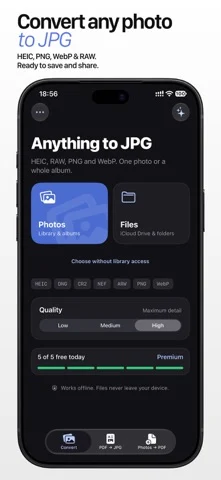
Convert HEIC, PDF, PNG, WebP, and RAW files to JPG entirely on-device.
Dmitry Mashkin · Creative · Free
iPhone screenshots
What’s New
Version 2.7 ·
- Added support for iPhone Duo and improved performance.
App Store descriptionWritten by the developer.
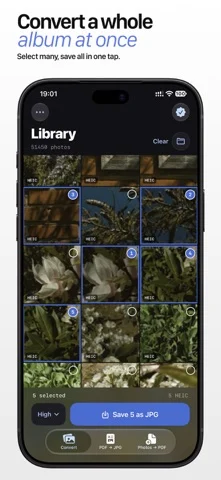
Convert files to JPG without uploading them anywhere. Turn HEIC photos, PDF pages, PNG, WebP and professional camera RAW files into compatible JPG images in seconds. Everything runs directly on your iPhone or iPad. WHY IT’S USEFUL • Convert one file or a whole batch • Export every page of a PDF as a separate JPG • Create multi-page PDFs from photos with Premium • Choose Low, Medium or High quality • Support for DNG, CR2, NEF, ARW and other RAW formats • Save to Photos or share through Files, AirDrop and Mail • Fully offline — your files never leave your device Select. Convert. Done. Premium is an auto-renewing subscription charged to your Apple Account. You can manage or cancel it in account settings. Privacy Policy: https://artcoastdesign.com/privacy/ Terms of Service: https://artcoastdesign.com/terms/
HEIC & PDF to JPG Converter on iPhone Duo: FAQ
Is HEIC & PDF to JPG Converter optimized for iPhone Duo?
The developer or App Store listing mentions iPhone Duo support.
How much does HEIC & PDF to JPG Converter cost?
HEIC & PDF to JPG Converter is free to download on the App Store.
More Creative apps
See all ›
Turns iPhone or iPad into a film slate that claps, syncs, and logs takes.

Draw on one half of the Duo, fold it shut, then reopen to reveal a mirrored picture.

Make folded inkblot prints with droppers, folding and rubbing, then save or share each print.

Turns your iPhone into an instant camera that prints framed photos you can caption and keep.

Drawing and painting app with custom brushes and unlimited layers

Record with the front and back cameras at the same time