
iPhone スクリーンショット
新機能
バージョン 3.3.5 ·
TEAMS • Each engineer's own details on certificates: on a Team plan, a member's position and test instrument come from their own settings, never the business owner's. Members can now set their position in Contractor Details. • Your company logo now prints on certificates from every device and every team member, not only the device it was added on. • Earthing and Bonding and 3 Circuit Minor Works certificates keep the name and position of the engineer who made them, whoever prints them. • Remote QS signature requests show the name of the engineer asking. • QS screens and the progress tracking page show your trading name. • Fixed a problem that could stop a Team owner's device uploading to iCloud. The app now repairs it automatically and nothing is removed. • The Team card on the Home screen now runs the full width of an iPad. COMPLIANCE CHECK AND CIRCUIT DESIGNER • Compliance Check no longer warns that client and address details are missing when they are filled in, and now uses the supply details recorded on each certificate. • Circuit Designer now starts from the certificate's own supply: earthing system, Ze and fault current. Questions? icertifi.zendesk.com
開発者はこの内容を日本語化していません。
App Store の説明開発者による説明です。
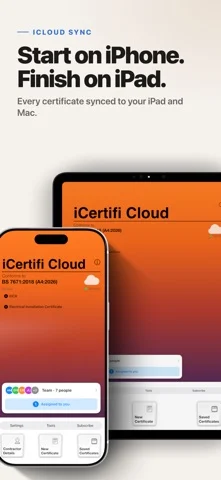
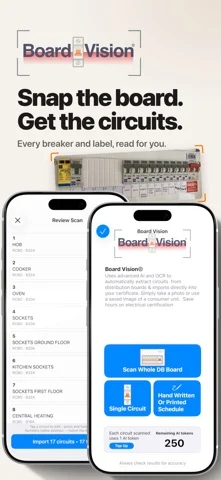
Photograph the board — iCertifi Cloud Pro reads every circuit and fills the schedule for you. EICR, EIC and Minor Works certificates to BS 7671, on iPhone, iPad and Mac. Start a certificate on your iPhone, continue on your iPad, finish on your Mac. Everything is backed up to the cloud with end-to-end encryption, so your work survives a lost, stolen or replaced device. BOARD VISION — POINT, SHOOT, DONE Take one photo of the distribution board. Board Vision detects the devices, circuit order and layout, and fills your circuit schedule in about 30 seconds. What used to be 20 to 45 minutes of typing out MCBs, ratings and labels is now a photo you check and confirm. TEST VISION — READINGS STRAIGHT OFF THE TESTER Photograph your test instrument's display and the readings are extracted and matched to the right circuit automatically. Any make, any model. No cables, no Bluetooth pairing, no transcription errors. SPARK AI — YOUR 24/7 TECHNICAL HELPLINE Instant answers on BS 7671, EICRs, testing procedure and observation coding, without leaving the certificate you are working on. COMPLIANCE CHECK Every certificate is checked automatically before you issue it, so mistakes are caught while you are still on site — not by the client, the assessor or your QS. WORKS COMPLETELY OFFLINE Certify with no signal, no laptop and no desktop software. Data uploads automatically the moment you reconnect. Built exclusively for Apple devices. CERTIFICATES INCLUDED - Electrical Installation Certificate (EIC) - Electrical Installation Condition Report (EICR) - Minor Electrical Installation Works Certificate - Three Circuit Minor Works - Domestic Installation Certificate - Electric Vehicle Charging Installation Certificate - Landlord Interim Report - Visual Inspection Report - Earthing & Bonding Certificate - Isolation Certificate - Danger Notice …and more NEW — CLIENT HUB Every customer in one place: their jobs, certificates and upcoming retests, grouped by client. Due work and reminders appear on the Dashboard the moment you open the app, so recurring contracts come back to you. TESTING TOOLS THAT DO THE MATHS - Zs calculations — auto-calculated for MCBs and RCDs, 100% or 80% options - Fuse calculator — 0.4s and 5s fuse Zs - BS 7671 regulation checks as you enter results - Split load RCD testing with multiple recorded times - Electrician's Toolbox — lighting calculator, fuse kA, thermal imaging and more - FLIR ONE thermal imaging — find faults without isolating the supply SPEED ON SITE - Template boards — save and reuse board configurations - Copy and paste boards between certificates - Smart Duplicate — reuse any previous certificate, omitting dates, signatures and test results - Smart Fill and Quick Fill — sections and common circuit values in one tap - Speech-to-text — dictate test results - Notes history, pre-filled defaults and searchable certificate types EICRs DONE PROPERLY - The Vault — nearly 500 prewritten observations with BS 7671 codes - Add photographs to document faults and observations - Digital circuit schedules with QR-encoded layouts - Printable EICR covers - Calibration certificate attachments for your tester records QS MONITORING AND REMOTE SIGNING Qualified Supervisors can review, approve and sign remotely, and flag issues live — useful for multi-engineer contracts and scheme assessments. PROFESSIONAL OUTPUT Signed, secure PDFs ready to email, print or store. Add your logo, adjust colours and set your enrolment numbers. Unlimited certificates, no per-certificate charge. SUBSCRIPTION A subscription is required to send and save electrical certificates. Free unlimited 7-day trial. Subscriptions renew automatically unless cancelled in your Apple Account settings at least 24 hours before the end of the current period. Terms of Use https://www.apple.com/legal/internet-services/itunes/dev/stdeula/ Privacy Policy https://icertifi.zendesk.com/hc/en-us/articles/201659279-iCertifi-s-Privacy-Policy-GDPR-Compliance
iPhone Duo での iCertifi Cloud Pro: Sync:よくある質問
iCertifi Cloud Pro: Sync は iPhone Duo に最適化されていますか?
開発者またはストアに iPhone Duo 対応の記載があります。
iCertifi Cloud Pro: Sync の価格は?
iCertifi Cloud Pro: Sync は App Store で無料でダウンロードできます。
その他の仕事効率化アプリ
すべて見る ›
所要時間でタスクを分ける、落ち着いた ToDo リスト兼ペーパー風プランナー

iPhone Duo の両ディスプレイ向けレイアウトを備えたタスク・プロジェクト管理

展開するとメッセージと受信ボックスを並べて表示できる、Readdle の統合受信ボックス

iPhone Duo のあらゆる姿勢に合わせて形を変える、Cultured Code のタスク管理アプリ

iPhone Duo を開くとノートが開く、手書き風のプライベートノートブック

ブックとテーブルトップの姿勢向けの集中タイマーを備えた、ビジュアルタイムライン式の 1 日プランナー