
Offline Music Player:Offly
手持ちの音楽・動画・ポッドキャスト・ラジオをオフライン再生。スマートプレイリストとEQ付き。
Karmjit Singh · ミュージック/オーディオ · 無料
iPhone スクリーンショット
新機能
バージョン 1.2.0 ·
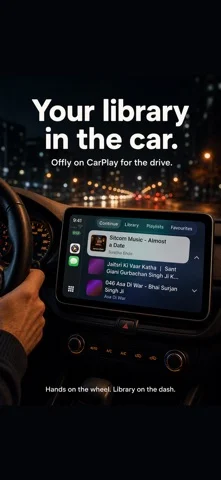
Podcasts, live radio and your own music server now sit beside your offline library. Plus smart playlists, a parametric equalizer and four new Looks. NEW • Podcasts: search for shows or paste a feed link. New episodes download by themselves and play offline, with transcripts and new-episode notifications • Live radio: find stations by name, genre or country, or add one by pasting its web page or stream link • Music servers: connect a Subsonic-compatible server or Jellyfin, then stream, or download songs to keep offline • Smart playlists that keep themselves up to date, with rules for instruments, tempo and energy. With Apple Intelligence, describe a mood and Offly writes the rules • Parametric equalizer with a graph you can drag, AutoEq import and profiles that switch with your headphones • Four new Looks: Koi Pond, Glass Terrarium, Whale Song and Grand Tour • Make your own theme and share it as a file IMPROVED • Swipe through the Looks and see the whole app change before you choose one • Bigger play and skip buttons on Home Screen widgets • Every Now Playing option in one toolbar: lyrics, Up Next, equalizer, speed, crossfade, sleep timer and AirPlay • CarPlay adds podcasts and live radio
開発者はこの内容を日本語化していません。
App Store の説明開発者による説明です。
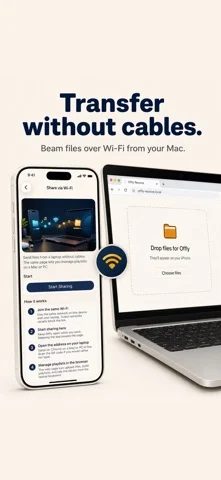
Your music, podcasts, radio and videos in one player for iPhone and iPad. Files you own play fully offline, with no streaming account. Offly is a free media player for the music and films you already have. Import MP3, FLAC and MP4, link a folder, or send files from a computer over Wi-Fi. Once they are on the device, playback does not need the internet. When you are online, Offly also follows podcasts, plays live radio and streams from your own music server. YOUR LIBRARY • Import from the Files app, or pull videos from Photos • Link folders, including iCloud Drive, and play files in place without copying them onto the device • Transfer over Wi-Fi from a Mac or PC browser: drop files, build playlists or scan a QR code • Bring in songs already downloaded in Apple’s Music app (local files, not streaming) • Audio and video in one library: albums, films and lectures • Formats: MP3, FLAC, AAC, WAV, M4A, AIFF, CAF, OGG, MP4, MOV and M4V • Favorites, Recently Added, In Progress, Lectures and Lossless • Edit titles, artists and lyrics, including synced LRC SMART PLAYLISTS • Playlists built from rules, which update as your library changes • Offly listens to new songs on the device and tags their instruments, tempo and energy, so a rule can match an instrument, a BPM range or an energy level • Describe a Playlist: type a mood or a scene and Apple Intelligence writes the rules on your device (on devices that support Apple Intelligence) PODCASTS • Search for shows, paste a feed link, or import an OPML file • New episodes download by themselves, ready to play offline • Transcripts that follow along, 15 and 30 second skips, and new-episode notifications LIVE RADIO AND YOUR OWN SERVER • Search internet radio stations by name, genre or country • Add a station by pasting its web page, a stream link or a playlist file • Connect a Subsonic-compatible server (Navidrome, Gonic, Airsonic) or Jellyfin, then browse, stream, or download songs to keep offline PLAY ANYWHERE • CarPlay, with your library, podcasts and radio • Siri and Shortcuts: play a playlist, play the latest episode of a show, or set the equalizer • Home Screen widgets with large play and skip buttons, progress and one-tap playlists • Lock Screen widgets and Control Center playback controls • Background audio, Lock Screen Now Playing, headset controls and Picture in Picture SOUND • Parametric equalizer: set each band’s type, frequency, gain and width on a graph you can drag, import AutoEq profiles, and have profiles switch with your headphones • Ten-band equalizer with presets for quick changes • Crossfade from 1 to 10 seconds • Sleep timer, playback speed, shuffle, repeat and HiFi mode • Resume where you left off, with remembered volume YOUR LOOK • Twelve Looks restyle the app, the player and the widgets: Cassette Pop, Cryo Silver, Amber Cockpit, Brick Deck, Stud Wave, Orrery Pop, Helios Desk, Sunlit Meadow, Koi Pond, Glass Terrarium, Whale Song and Grand Tour • Swipe through the Looks and see the whole app change before you choose one • Make your own theme from an accent, a background and a corner style, and share it as a file • Looks never color the video OPTIONAL SUPPORT Every feature in Offly is free. Optional in-app purchases support development and do not unlock anything. Offly Support (auto-renewable subscription) • Monthly: US$0.49 per month • Yearly: US$5.99 per year Payment is charged to your Apple ID at confirmation. The subscription renews automatically unless you turn off auto-renew at least 24 hours before the current period ends. Your account is charged for renewal within 24 hours prior to the end of the current period. Manage or cancel in Settings > Apple ID > Subscriptions. Prices may vary by region. • Optional one-time support Privacy Policy: https://offly.karmafy.com.au/privacy.html Terms of Use: https://offly.karmafy.com.au/terms.html
iPhone Duo での Offline Music Player:Offly:よくある質問
Offline Music Player:Offly は iPhone Duo に最適化されていますか?
開発者またはストアに iPhone Duo 対応の記載があります。
Offline Music Player:Offly の価格は?
Offline Music Player:Offly は App Store で無料でダウンロードできます。
その他のミュージック/オーディオアプリ
すべて見る ›
手持ちの音楽やストリーミングライブラリを楽しめるレトロな音楽プレーヤー

iPhoneをアコーディオンに変え、蛇腹を押し引きして音を鳴らす。

iPhoneをカセットデッキに変え、リールとキーで音楽を再生。

Apple Musicやローカル曲をレトロなカセットとして再生する音楽プレイヤー。

Duoをアコーディオンに。折り目を開閉して蛇腹を動かす。

Discogsのコレクションを同期し、レコードをスキャンして3Dで閲覧できる。