
iPhone スクリーンショット
新機能
バージョン 2.1.2 ·
Thanks for choosing PhotonCam. This version: - Improved the look of the date stamp. - Added a new option in Photo Edit Settings to always place the date stamp at the bottom-right corner, regardless of the photo’s orientation. - Added support for attaching Soft Skin, Grain, and Film Photographic Style metadata, so older iPhone models such as the iPhone 17 Pro can get similar Photographic Style editing in the Photos app. Requires iOS 27; turn on the new toggle in Lab settings first. - You can now adjust a photo’s horizontal and vertical perspective in the editor. - More optimizations for iPhone Duo. - Updated the in-app tutorials to support more languages. Recent update: - Added a brand-new Starburst effect. The Starburst effect is customizable with some options like the Ray Length, Temperature and Star points count. - Using the new ST filter can easily create Starburst effect even for older iPhone models for any photos. Note that due to performance consideration, using the Starburst effect in the camera view will only output maximum 12MP HEIF/JPEG, while there’s no limitation when saving photos in the editor. - Added the Curve adjustment. You can adjust the RGB Curve or individual channel. PhotonCam also introduces some nice details: when you select a point, you can fine-tune it by dragging in the empty area so your finger won’t block the UI; you can also sync the current curve to other channels via the “…” menu. - The halation effect now has HDR support. - Adapted for iPhone Duo. PhotonCam on iPhone Duo will have the editor only, just like iPad. Camera feature is coming soon. - Supports viewing image in landscape. - Note that the support for iOS 18 will be dropped in the near future. Please use iOS 27+ to get better experience. - Bug fixes and improvements.
開発者はこの内容を日本語化していません。
App Store の説明開発者による説明です。
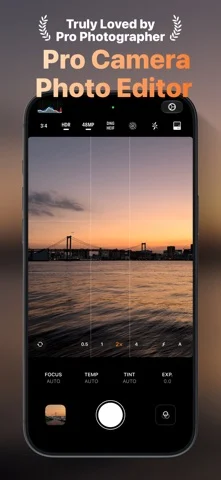
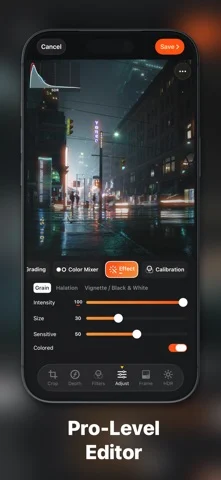
PhotonCam offers a professional-level camera experience with the following features: - Capture photos using ProRaw and 48MP on your high-end iPhone. You can also use manual camera controls to capture the perfect shot. - Capture and edit photos while preserving HDR effect. - Capture and edit Live Photo to relive the moment you love. - Enhance your captured or edited photos by adding Frames, giving each image a personalized and distinctive touch. You can also design your unique Frames by setting various styles. Explore the Frame Workshop to start designing your Frames. - Want some bokeh blur? Portrait mode is right there for you. - Choose from a variety of built-in filters for use during capture or photo editing. - Create your own filters using the provided tools, in addition to the built-in options. - Utilize ACR-level tools to edit photos or filters, including control over lighting, color grading, color mixing, and various other effects. - As a professional photographer, you can edit your photos and create a Lookup Table Cube using desktop software like Photoshop. You can then import it as a filter, allowing you to shoot in your unique style. - Import photos from your camera to edit and export using the aforementioned built-in tools. - Add a date stamp to your photos to create a film-look effect. You can try the app in Trial mode without any subscription. However, photos saved in Trial mode will have watermarks on them. To access the app's full features, a subscription or lifetime purchase is required. Privacy policy: https://juniperphoton.dev/photoncam/privacy/ Terms of Use: https://www.apple.com/legal/internet-services/itunes/dev/stdeula/
iPhone Duo での PhotonCam: Pro Camera & Editor:よくある質問
PhotonCam: Pro Camera & Editor は iPhone Duo に最適化されていますか?
開発者またはストアに iPhone Duo 対応の記載があります。
PhotonCam: Pro Camera & Editor の価格は?
PhotonCam: Pro Camera & Editor は App Store で無料でダウンロードできます。
その他のクリエイティブアプリ
すべて見る ›
iPhoneやiPadを映画用スレートにし、クラップと同期、テイク記録を行う。

Duoの画面半分に描き、閉じて開くと鏡像の絵が現れるお絵かきアプリ。

スポイトと折りたたみ、こすりで折り染めインク作品を作り、保存や共有ができる。

iPhoneをインスタントカメラに変え、白フチ付き写真を撮ってキャプションを添え保存できる。

カスタムブラシと無制限のレイヤーを備えたお絵描き・ペイントアプリ

フロントカメラとバックカメラで同時に録画