
iPhone 截图
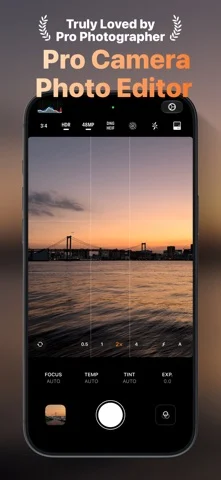
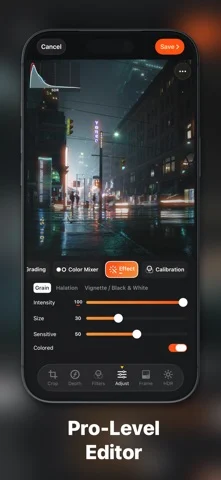
在 iPhone Duo 上的表现
来源中有 Duo 支持声明,具体折叠交互和真机表现尚未独立核验。
新功能
版本 2.1.2 ·
Thanks for choosing PhotonCam. This version: - Improved the look of the date stamp. - Added a new option in Photo Edit Settings to always place the date stamp at the bottom-right corner, regardless of the photo’s orientation. - Added support for attaching Soft Skin, Grain, and Film Photographic Style metadata, so older iPhone models such as the iPhone 17 Pro can get similar Photographic Style editing in the Photos app. Requires iOS 27; turn on the new toggle in Lab settings first. - You can now adjust a photo’s horizontal and vertical perspective in the editor. - More optimizations for iPhone Duo. - Updated the in-app tutorials to support more languages. Recent update: - Added a brand-new Starburst effect. The Starburst effect is customizable with some options like the Ray Length, Temperature and Star points count. - Using the new ST filter can easily create Starburst effect even for older iPhone models for any photos. Note that due to performance consideration, using the Starburst effect in the camera view will only output maximum 12MP HEIF/JPEG, while there’s no limitation when saving photos in the editor. - Added the Curve adjustment. You can adjust the RGB Curve or individual channel. PhotonCam also introduces some nice details: when you select a point, you can fine-tune it by dragging in the empty area so your finger won’t block the UI; you can also sync the current curve to other channels via the “…” menu. - The halation effect now has HDR support. - Adapted for iPhone Duo. PhotonCam on iPhone Duo will have the editor only, just like iPad. Camera feature is coming soon. - Supports viewing image in landscape. - Note that the support for iOS 18 will be dropped in the near future. Please use iOS 27+ to get better experience. - Bug fixes and improvements.
开发者尚未提供此内容的中文版本。
App Store 简介由开发者撰写。
PhotonCam offers a professional-level camera experience with the following features: - Capture photos using ProRaw and 48MP on your high-end iPhone. You can also use manual camera controls to capture the perfect shot. - Capture and edit photos while preserving HDR effect. - Capture and edit Live Photo to relive the moment you love. - Enhance your captured or edited photos by adding Frames, giving each image a personalized and distinctive touch. You can also design your unique Frames by setting various styles. Explore the Frame Workshop to start designing your Frames. - Want some bokeh blur? Portrait mode is right there for you. - Choose from a variety of built-in filters for use during capture or photo editing. - Create your own filters using the provided tools, in addition to the built-in options. - Utilize ACR-level tools to edit photos or filters, including control over lighting, color grading, color mixing, and various other effects. - As a professional photographer, you can edit your photos and create a Lookup Table Cube using desktop software like Photoshop. You can then import it as a filter, allowing you to shoot in your unique style. - Import photos from your camera to edit and export using the aforementioned built-in tools. - Add a date stamp to your photos to create a film-look effect. You can try the app in Trial mode without any subscription. However, photos saved in Trial mode will have watermarks on them. To access the app's full features, a subscription or lifetime purchase is required. Privacy policy: https://juniperphoton.dev/photoncam/privacy/ Terms of Use: https://www.apple.com/legal/internet-services/itunes/dev/stdeula/
PhotonCam: Pro Camera & Editor 在 iPhone Duo 上:常见问题
PhotonCam: Pro Camera & Editor 针对 iPhone Duo 优化了吗?
开发者或商店资料已标明支持 iPhone Duo。
PhotonCam: Pro Camera & Editor 在 iPhone Duo 上是什么样子?
来源中有 Duo 支持声明,具体折叠交互和真机表现尚未独立核验。
PhotonCam: Pro Camera & Editor 多少钱?
PhotonCam: Pro Camera & Editor 可在 App Store 免费下载。
更多创作应用
查看全部 ›
合盖触发场记板打板和镜次记录,展开并列显示场记板与镜次日志。

在一半屏幕画画,合上再展开,得到另一侧的镜像压印。

合盖折起墨纸,在外屏摩擦压印,再展开显示对称墨迹。

展开推动虚拟拍立得相纸输出;半折把取景器与机身控件分开。

绘画应用,支持自定义画笔和无限图层

前后摄像头同时录制