
iPhone スクリーンショット
新機能
バージョン 1.6.0 ·
New in 1.6: • Attach checklists to Pings and tick off items on your device. • Find people you share rooms with in My People and browse the redesigned Discover view. • Add attachments with the refreshed Custom Ping composer. • See your milestone medals on your profile. • Read full messages in clearer Ping and History cards. • Choose whether Pings use color in Accessibility settings. • Updated the app to comply with Apple’s latest guidelines. • Optimized for iPhone Duo.
開発者はこの内容を日本語化していません。
App Store の説明開発者による説明です。
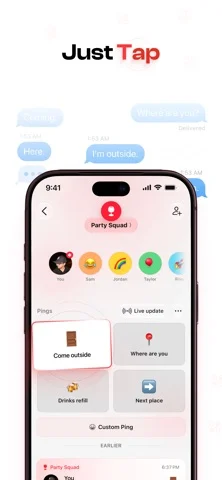
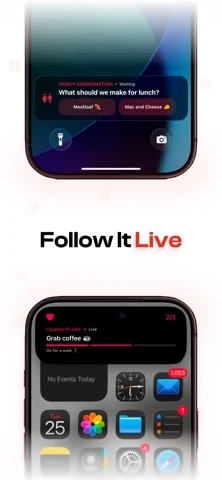
PingRoom: Short-form communication. One Tap, Everyone Knows Quick updates, questions and answers between people, apps and AI. Save the things you say every day as Quick Pings, ready to send with a tap. “Home safe.” “Dinner’s ready.” “Can someone cover this shift?” Create a room, invite your people and send a Ping when they need to know. GET AN ANSWER Ask a Question with two to four options. Members can answer from the Lock Screen or the room. The first response decides, and everyone sees the result. Request confirmation from one person or everyone, in private or public rooms. See who confirms or dismisses; dismissals are saved separately and do not count as confirmations. Choose urgent delivery when timing matters. MAKE EVERYDAY UPDATES QUICK Save Quick Pings with text, emoji, sound, color and links, or just an emoji. Attach a place, or ask for a link or location when tapped. Pro adds photo and file inputs, plus four pages for up to 16 Quick Pings per room. Attach a checklist to a Ping and tick off items on your device. Open a Ping to read its full message. Choose whether Pings use color in Accessibility settings. Use private, public or Personal rooms. Organize rooms in folders, start with templates, and share a folder with one link so others can preview and join its rooms. Explore without signing in. FOLLOW LIVE UPDATES Share status, steps, progress, metrics, countdowns, decisions and matchups. Preview updates before sharing, then follow them in the room, on the Lock Screen and in the Dynamic Island. FIND ROOMS NEARBY Find public rooms on the map and browse their updates before joining. Public room owners can add a place to help people find them. Find people you share rooms with in My People, and browse public rooms in Discover. See medals earned for in-app milestones on your profile. ON YOUR APPLE DEVICES Send and receive Pings, answer Questions and confirm Pings on Apple Watch. Use Quick Pings in the interactive Smart Stack widget. Add Home Screen and Lock Screen widgets or a Control Center control. Connect Siri, Shortcuts, NFC tags and personal automations. YOUR PERSONAL ROOM Share your Personal Room link or QR so people can reach you without your phone number. Choose who can Ping you and add private notes to connections. Pro adds insights and custom QR designs. CONNECT APPS AND AI Let apps and AI agents Ping you, ask a Question or request a decision, then continue after your answer. Choose which rooms they can access, view their activity and revoke access when needed. PingRoom AI output is labeled AI-generated. Before the first transfer, you choose which model provider may receive agent data. You can report unsafe output in the app. FREE TO START Create up to five rooms and join up to 20 for free. See the latest 100 Pings in each room and your latest 100 notifications. No credit card required. PingRoom Pro adds unlimited rooms and joins, place and scheduled triggers, incoming and outgoing webhooks, photo and file attachments, extra Quick Ping pages, password-protected rooms, external-channel forwarding, full retained history, Personal Room insights and custom QR designs. PingRoom Pro is an auto-renewing subscription. Payment is charged to your Apple Account at confirmation of purchase. It renews automatically unless canceled at least 24 hours before the current billing period ends. Manage or cancel it in your App Store account settings. Terms: https://pingroom.io/terms Privacy: https://pingroom.io/privacy
iPhone Duo での PingRoom:よくある質問
PingRoom は iPhone Duo に最適化されていますか?
開発者またはストアに iPhone Duo 対応の記載があります。
PingRoom の価格は?
PingRoom は App Store で無料でダウンロードできます。
その他の仕事効率化アプリ
すべて見る ›
所要時間でタスクを分ける、落ち着いた ToDo リスト兼ペーパー風プランナー

iPhone Duo の両ディスプレイ向けレイアウトを備えたタスク・プロジェクト管理

展開するとメッセージと受信ボックスを並べて表示できる、Readdle の統合受信ボックス

iPhone Duo のあらゆる姿勢に合わせて形を変える、Cultured Code のタスク管理アプリ

iPhone Duo を開くとノートが開く、手書き風のプライベートノートブック

ブックとテーブルトップの姿勢向けの集中タイマーを備えた、ビジュアルタイムライン式の 1 日プランナー