
Avionics Buddy
마이크로소프트 플라이트 시뮬레이터의 실시간 계측, 지도, 계기, 공항 날씨를 보여줍니다.
Sharif El Fatatry · 유틸리티 · $3.99
iPhone 스크린샷

새로운 기능
버전 1.5 ·
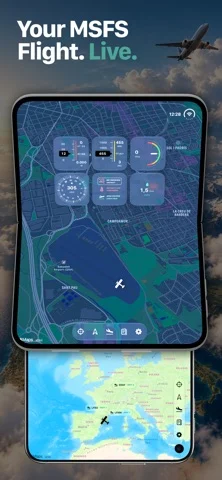
This update brings support for iPhone Duo, a redesigned onboarding experience, and improved FlightBridge connectivity. What’s New - iPhone Duo Support — Avionics Buddy now supports iPhone Duo, bringing your flight instruments, moving maps, and cockpit experience to the new device. - Completely Redesigned Onboarding — A beautiful new three-step introduction makes getting started easier than ever, from discovering the features to connecting FlightBridge and configuring permissions. - FlightBridge 1.0 Support — Improved communication with the latest Windows FlightBridge, while maintaining compatibility with previous versions. - FlightBridge Update Notifications — Get notified when a newer FlightBridge version is available, with direct links to update. - Performance & Stability Improvements — Various refinements to connectivity and the overall experience. Thank you for flying with Avionics Buddy!
개발자가 이 내용을 한국어로 제공하지 않았습니다.
App Store 설명개발자가 작성한 내용입니다.
Turn your iPhone, iPad or Mac into a live companion display for Microsoft Flight Simulator with live telemetry, maps, customizable gauges, airport information, weather, flight statistics, approach helpers, missions and challenges—all without leaving the simulator window. See your aircraft position on the map, monitor altitude, heading, airspeed, ground speed and vertical speed, browse airports, inspect runways, check live airport weather and use visual approach helpers while you fly. Take on Missions & Challenges and give your flights a destination. Choose from included challenges or download additional mission packs, explore airports around the world and complete each objective by flying there in Microsoft Flight Simulator. Avionics Buddy automatically recognizes your landings, tracks your challenge progress and awards medals as you complete them. Avionics Buddy is built for sim pilots who want to extend their Microsoft Flight Simulator setup beyond the main screen. Use it as a beautifully designed cockpit display on your desk or as an additional avionics screen in a larger multi-monitor simulator setup. Its adaptive interface makes use of the available screen space across iPhone, iPad and Mac, letting you build your own flight deck using the Apple devices you already own. Track your current flight with the Trip Computer, including distance, fuel, speed, altitude, wind and temperature. Continue building your Lifetime Logbook with accumulated flight time, takeoffs, landings, distance flown and personal records across all your simulator sessions. Search more than 80,000 airports, save your favorites, display selected airports on the map, inspect runways and review live weather before departure. Export and import your Airport Library to back up your saved airports or transfer them between your iPhone, iPad and Mac. Stay connected to your flight, even when Microsoft Flight Simulator is running on another screen. Key Features • Missions & Challenges with automatic landing detection, progress tracking and medals • Downloadable mission packs with detailed mission briefings – https://www.avionicsbuddy.com/missions/ • Live aircraft telemetry from Microsoft Flight Simulator • Follow-mode map with aircraft position, heading and selectable aircraft icons • Customizable cockpit gauges with multiple layouts, styles and live Session Gauge metrics • Trip Computer with live flight statistics for every session • Lifetime Logbook with cumulative flight time, takeoffs, landings, distance and records • Awards and medals earned through your flying • Search over 80,000 airports with favorites and map integration • Export and import your Airport Library between Apple devices • Runway approach helpers for visual alignment during simulator arrivals • Live airport weather with wind, pressure, clouds and current conditions • Optional cabin sound effects, including seatbelt announcements and other immersive details • Adaptive layouts across iPhone, iPad and Apple Silicon Mac • Local network connection through the free Avionics Buddy Bridge for Windows • No account required • No cloud telemetry How it works 1. Start Microsoft Flight Simulator on your Windows PC. 2. Download and run the free Avionics Buddy Bridge for Windows – https://www.avionicsbuddy.com/#bridge 3. Scan the QR code with Avionics Buddy on your iPhone, iPad or Mac. 4. Fly with live telemetry on your second screen. Avionics Buddy is intended for Microsoft Flight Simulator entertainment use only. It is not designed for real-world navigation, flight training, flight planning or operational aviation use. Avionics Buddy is not affiliated with Microsoft, Asobo Studio, Working Title, OurAirports or any aircraft manufacturer.
iPhone Duo에서의 Avionics Buddy: 자주 묻는 질문
Avionics Buddy은(는) iPhone Duo에 최적화되어 있나요?
개발자 또는 스토어가 iPhone Duo 지원을 안내합니다.
Avionics Buddy의 가격은 얼마인가요?
Avionics Buddy은(는) App Store에서 $3.99입니다.
다른 유틸리티 앱
모두 보기 ›
iPhone Duo 힌지로 0.1°까지 각도를 측정하고 목표, 매칭, 수평계 도구를 제공합니다.

iPhone Duo를 경사 게이지로 바꿔 힌지 각도를 읽고, 다른 iPhone에서는 수평계로 쓴다.

iPhone Duo를 카드 슬롯과 현금, 펜, 영수증이 있는 실제 같은 반지갑으로 바꾼다.

iPhone Duo 힌지를 각도와 기준 도구 모음으로 바꾸며, 다른 iPhone에서는 무료 수평계를 쓴다.

iPhone을 자, 각도기, 수평계, 지름 게이지로, iPhone Duo를 실시간 접힘 각도 자로 만든다.

iPhone Duo 힌지 각도를 실시간 측정하고, 수평계와 각도기, 경사계, 카메라 각도기로도 쓴다.