
iPhone 스크린샷
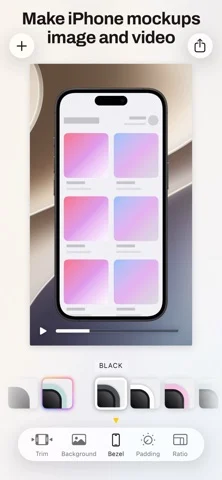
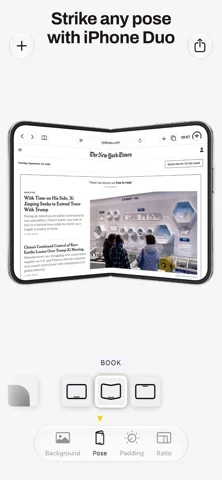
iPhone Duo 활용 방식
Duo support is reported in the linked sources. The specific fold interaction and real-device behavior have not been independently verified.
새로운 기능
버전 3.4 ·
FIXES: - Improved drag and drop of screenshots onto the iPhone Duo content slots. - Fix imported recordings framed on the wrong iPhone. - Fix unstable padding when switching between a still pose and a Short. - Fix the editor switching to another iPhone when picking a pose. - Fix the canvas going blank or fading when switching poses and Shorts. - Fix recordings held upside down flipping over when playback starts. - Fix a jump when a trimmed recording starts during a rotation. - Fix iPhone Duo recordings trimmed to the inner screen showing too large. - Fix the trim filmstrip showing rotated recordings sideways. - Fix imported pictures offering “Match Hardware”.
개발자가 이 내용을 한국어로 제공하지 않았습니다.
앱 소개
Duo support is reported in the linked sources. The specific fold interaction and real-device behavior have not been independently verified.
영어 원문을 번역한 내용입니다.
App Store 설명개발자가 작성한 내용입니다.
The best way to showcase your screenshots with stunning device frames and beautiful backgrounds on iOS. Bezel transforms your screenshots into professional presentations by automatically adding pixel-perfect device frames and gorgeous backgrounds. Whether you're sharing app designs, creating marketing materials, or just making your screenshots look amazing, Bezel makes it effortless. Simply select screenshots from your photo roll or files, choose your device frame, pick a background, and export. It's that easy to create stunning visuals that stand out. # Features READY FOR iOS 27 - Siri AI support; alter screenshots and screen recordings using Siri AI - Fully resizable; Adapts to the available screen space you give the app - Visual Intelligence support; frame screenshots directly without even opening Bezel - On device wallpaper and background color suggestions by Apple Foundation Models based on the colors in your screenshot DEVICE FRAMES - Pixel-perfect frames for every iPhone and iPad - Automatically matches your screenshot to the correct device - Always up-to-date with the latest Apple devices - Or go without any frame and just use the device shape BACKGROUNDS - Beautiful built-in background collection - Search Unsplash directly from the app to add backgrounds - Add your own background images and colors - Export with a transparent background for use in presentations, documents and websites WORKFLOW - Shortcuts support - Import from Photos or Files app - Quick preview before export - One-tap sharing to any app EXPORT OPTIONS - Video as well as images - High-resolution output - Transparent background support - Perfect for presentations and portfolios LIVE MIRROR - Live mirror you iPhone & iPad screen to your Mac or Apple Vision Pro - Download Bezel on Mac or Apple Vision Pro from the App Store, then use this app on your iPhone to share the screen. # Support Need help or have a suggestion? We love hearing from you: team@nonstrict.com If you like Bezel please take a moment to rate it on the App Store. It's a great way to support indie developers like us! # About Nonstrict B.V. is a Dutch indie studio founded in 2023 and operated by just two people Tom and Mathijs. Terms of Use: https://getbezel.app/terms.html Privacy Policy: http://getbezel.app/privacy.html
iPhone Duo에서의 Bezel • Phone Mirror: 자주 묻는 질문
Bezel • Phone Mirror은(는) iPhone Duo에 최적화되어 있나요?
개발자 또는 스토어가 iPhone Duo 지원을 안내합니다.
iPhone Duo에서 Bezel • Phone Mirror은(는) 어떻게 보이나요?
Duo support is reported in the linked sources. The specific fold interaction and real-device behavior have not been independently verified.
Bezel • Phone Mirror의 가격은 얼마인가요?
Bezel • Phone Mirror은(는) App Store에서 무료로 다운로드할 수 있습니다.
다른 유틸리티 앱
모두 보기 ›
Duo 인터랙션에 관한 출처가 있습니다. 실제 기기 동작은 별도로 검증하지 않았습니다.

Duo 인터랙션에 관한 출처가 있습니다. 실제 기기 동작은 별도로 검증하지 않았습니다.

Duo 인터랙션에 관한 출처가 있습니다. 실제 기기 동작은 별도로 검증하지 않았습니다.

Duo 인터랙션에 관한 출처가 있습니다. 실제 기기 동작은 별도로 검증하지 않았습니다.

Duo 인터랙션에 관한 출처가 있습니다. 실제 기기 동작은 별도로 검증하지 않았습니다.

Duo 인터랙션에 관한 출처가 있습니다. 실제 기기 동작은 별도로 검증하지 않았습니다.