
Clap: Film Slate
iPhone이나 iPad를 영화 슬레이트로 바꿔 클랩, 동기화, 테이크 기록을 합니다.
DM Solutions and Development LLC · 크리에이티브 · 무료
iPhone 스크린샷
iPhone Duo 활용 방식
On iPhone Duo, the phone is the clapperboard. Open it to the slate, hold it up to the lens and shut it
App Store 설명개발자가 작성한 내용입니다.
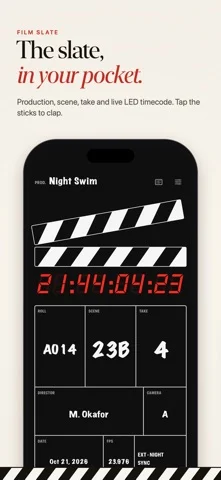
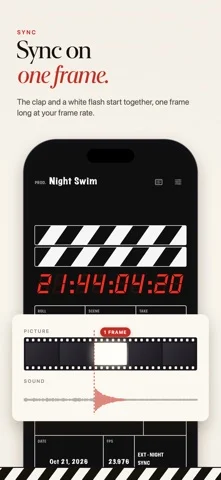
Clap turns your iPhone or iPad into a film slate. On iPhone Duo, the phone is the clapperboard. Open it to the slate, hold it up to the lens and shut it to clap. The halves meeting are the picture's sync mark, like a wooden clapper, and Clap plays a sharp clap for the sound at that instant, logs the take with its timecode and puts the next take on the cover. Shut it slowly for soft sticks, a quieter clap for close-ups. On any other iPhone, or on iPad, tap the sticks. On iPad the slate fills the screen, big enough for the whole crew to read. MADE FOR IPHONE DUO • Open upright, the sticks meet on the crease, like a real clapper • Lying open like a book, the slate is on one page and the shot log on the other • Shut, the cover shows the take you just clapped and the next one ready, with Circle, NG and Undo • Note the take or change the scene, roll or director without opening the phone SYNC THAT LANDS ON ONE FRAME • Tap to clap and the sound and a white flash start together; the flash lasts exactly one frame at your frame rate, with no fade • A sharp clap, or a 1 kHz beep one frame long that any mic picks up • The sticks snap shut on the sync frame, then the board and timecode hold for two seconds to read in the shot • A warning when the sound is going to Bluetooth, which plays it late A REAL SLATE • Production, roll, scene, take, director, camera, date, frame rate, INT/EXT, DAY/NIGHT and MOS • Time-of-day LED timecode from 23.976 to 60 fps that holds on the clap • New setup in one tap: 23, 23A, 23B, skipping I and O, back to take 1 • Back to take 1 in one tap • Keep every production: each has its own slate and shot log, ready to pick up where you left off • Tail slates, shown upside down the way crews do them • MOS takes clap silently THE SHOT LOG • Every clap logged with its timecode, grouped by scene • Circle the keepers, mark the NGs and note any take: lens, focus, boom in shot • Share a PDF camera report by email or Messages, or a CSV for your editor CLAP PRO Clap is free to download and starts with a 3-day free trial of Clap Pro, then $5.99 a month. Clap Pro unlocks the whole app. It renews automatically until you cancel at least 24 hours before the trial or the current period ends, and payment is charged to your Apple Account. Manage or cancel any time in Settings > Apple Account > Subscriptions. PRIVATE BY DESIGN No account, no ads, no tracking. Clap works offline and everything stays on your device. Terms of Use: https://www.apple.com/legal/internet-services/itunes/dev/stdeula/ Privacy Policy: https://clapfilm.app/privacy/
iPhone Duo에서의 Clap: Film Slate: 자주 묻는 질문
Clap: Film Slate은(는) iPhone Duo에 최적화되어 있나요?
네. Clap: Film Slate은(는) Duo 전용 설계 앱으로, 폴딩, Split View 또는 외부 디스플레이를 활용합니다. 2026년 10월 25일 확인(App Store 설명).
iPhone Duo에서 Clap: Film Slate은(는) 어떻게 보이나요?
On iPhone Duo, the phone is the clapperboard. Open it to the slate, hold it up to the lens and shut it
Clap: Film Slate의 가격은 얼마인가요?
Clap: Film Slate은(는) App Store에서 무료로 다운로드할 수 있습니다.
다른 크리에이티브 앱
모두 보기 ›
Duo 화면 절반에 그린 뒤 접었다 펴면 대칭 그림이 나타나는 드로잉 앱.

스포이트와 접기, 문지르기로 접힌 잉크 그림을 만들고 저장하거나 공유합니다.

iPhone을 즉석 카메라로 바꿔 흰 테두리 사진을 찍고 글귀를 붙여 보관한다.

사용자 지정 브러시와 무제한 레이어를 갖춘 드로잉·페인팅 앱

전면·후면 카메라로 동시에 녹화

크리에이터를 위한 카메라 앱, 텔레프롬프터, AI 영상 편집기를 하나로