
Snapshots: Instant Film Camera
iPhone을 즉석 카메라로 바꿔 흰 테두리 사진을 찍고 글귀를 붙여 보관한다.
Ryan Fredericks · 크리에이티브 · $1.99
iPhone 스크린샷
iPhone Duo 활용 방식
DESIGNED FOR IPHONE DUO
새로운 기능
버전 1.1.1 ·
Snapshots 1.1.1 • Fix for iPhone Duo's front display - the camera controls now stay in place after you open and close your print gallery. New in 1.1: • Fixes a crash on iPhone Duo when opening or closing it. • On iPhone Duo, the camera now opens straight into the right layout when the phone is already open. • Camera Control: press it to take a snapshot, and light press to change the film, zoom, timer or exposure. • Home Screen widgets: put your prints on your Home Screen, on their own or beside the time. • Swipe from the left edge to go back from your prints. • Small fixes and improvements.
개발자가 이 내용을 한국어로 제공하지 않았습니다.
App Store 설명개발자가 작성한 내용입니다.
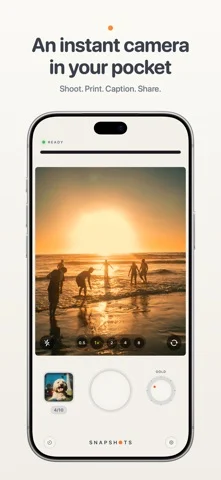
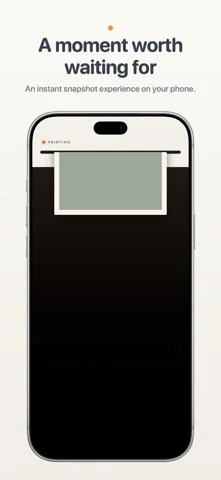
Snapshots turns your iPhone into an instant camera. Take a snapshot and watch a little printer feed your photo onto the screen. Watch it develop, or give your phone a shake to reveal it faster. Add a handwritten-style caption to remember the story behind it. Inspired by the instant cameras we grew up with, Snapshots captures one moment at a time. Keep your print or let it go, with a little room to enjoy the moment before taking another. SHOOT • Soft, tactile controls: a big shutter, a film-style dial and slide switches you can tap anywhere. • Rear and front cameras, with a zoom step for every lens on the back and a wide view for selfies. • Tap to focus. Press and hold to lock focus and exposure, then slide to brighten or darken. • Flash: off, auto or on. • Self-timer: 3 or 10 seconds. BOOTH MODE • Set the timer to Booth, press the shutter once, and strike three poses on a countdown. • All three print together as one tall snapshot. • Booth switches to the front camera for you. FIVE FILM STYLES • Classic – warm and gentle. • Gold – rich, late-afternoon color. • Coast – cool and crisp. • Sepia – the brown tones of an old photograph. • Mono – classic black and white. You see the style live in the viewfinder before you shoot. PRINT • Every shot prints as a framed instant photo with an even white border. • Shake your phone and it finishes developing at once. • Write a caption across the bottom in one of six fonts, from handwriting to typewriter. • Save the snapshot or discard it. YOUR PRINTS • A gallery of everything you've kept. Swipe through them, share them or save them to Photos. • Turn a print over to write a memory on the back, as long as you like. It stays private and never goes out with a shared picture. • Took it upside down? Turn the photo inside its frame. • Turn your phone on its side to see your prints laid out like photos on a table. CAMERA CONTROL • On iPhones with Camera Control, press it to take a snapshot. • Light press to choose a film style, zoom, set the self-timer or adjust exposure, without touching the screen. HOME SCREEN WIDGETS • Prints: your snapshots on your Home Screen, with a different one on top every hour. • Clock & Prints: the time beside your prints, like the nightstand clock. NIGHTSTAND CLOCK • Turn your iPhone on its side while it charges and Snapshots becomes a bedside clock, with your prints shuffling past beside the time. DESIGNED FOR IPHONE DUO • Landscape: the viewfinder on one screen and a full camera body on the other, with flash, zoom, self-timer and camera switches. • Seated: stand your iPhone Duo half open, take the shot, then unfold it flat and the print feeds out across the whole display. • Portrait: a large viewfinder above the controls, and a print that fills the screen. • Closed: a pocket camera on the front display. Turn it on its side to flip through your prints. • Standing: stand it up like a tent for a clock with your snapshots beside it. • Star White and Night Sky themes, named after the finishes iPhone Duo comes in. PRIVATE BY DESIGN Your photos stay on your phone. No account, no ads, and nothing is sent anywhere.
iPhone Duo에서의 Snapshots: Instant Film Camera: 자주 묻는 질문
Snapshots: Instant Film Camera은(는) iPhone Duo에 최적화되어 있나요?
네. Snapshots: Instant Film Camera은(는) Duo 전용 설계 앱으로, 폴딩, Split View 또는 외부 디스플레이를 활용합니다. 2026년 10월 25일 확인(App Store 설명).
iPhone Duo에서 Snapshots: Instant Film Camera은(는) 어떻게 보이나요?
DESIGNED FOR IPHONE DUO
Snapshots: Instant Film Camera의 가격은 얼마인가요?
Snapshots: Instant Film Camera은(는) App Store에서 $1.99입니다.
다른 크리에이티브 앱
모두 보기 ›
iPhone이나 iPad를 영화 슬레이트로 바꿔 클랩, 동기화, 테이크 기록을 합니다.

Duo 화면 절반에 그린 뒤 접었다 펴면 대칭 그림이 나타나는 드로잉 앱.

스포이트와 접기, 문지르기로 접힌 잉크 그림을 만들고 저장하거나 공유합니다.

사용자 지정 브러시와 무제한 레이어를 갖춘 드로잉·페인팅 앱

전면·후면 카메라로 동시에 녹화

크리에이터를 위한 카메라 앱, 텔레프롬프터, AI 영상 편집기를 하나로