
iPhone 스크린샷
iPhone Duo 활용 방식
• SCAN: tap the blue lens and point your iPhone at a toy, drawing or picture. DexFold recognizes it and opens its
새로운 기능
버전 1.1 ·
• SCAN: tap the blue lens and point your iPhone at a toy, drawing or picture. DexFold recognizes it and opens its entry, right on your iPhone. On iPhone Duo, the outer screen lights up while you scan. • Italian, including the voice. Thanks to Erego for the translation. • WHO IS IT? clues: each tap of the speaker gives a new hint (entry, height, weight, then type). • Each entry now shows which region and game it comes from. • Spanish and Italian entries for every creature from #899 to #1025. • Fixes: the menu sits higher, clear of the home bar, and the wallpaper lid is drawn correctly.
개발자가 이 내용을 한국어로 제공하지 않았습니다.
App Store 설명개발자가 작성한 내용입니다.
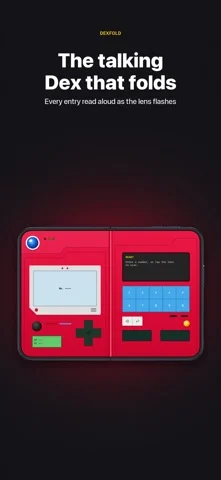
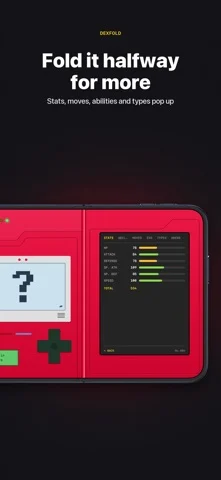
DexFold is a talking Dex designed for foldable iPhones, and it works on every iPhone. UNFOLD IT Closed, the outer screen becomes the red lid, with the big blue lens drawn right around your camera. Unfold your iPhone and the Dex powers on across both screens: the sprite screen on one half, the keypad and description on the other, split exactly at the fold. A robot voice reads every entry while the blue lens flashes with each word. FOLD IT HALFWAY Fold your iPhone partway and a data screen sweeps open: base stats, abilities, moves, evolutions and how each one happens, type matchups, and where to find it. Open it flat to go back to the keypad. SCAN IT Tap the blue lens and point your iPhone at a toy, a drawing or a picture. DexFold recognizes the creature and opens its entry, entirely on your iPhone: camera images are never saved or sent. PLAY ALONG • Track your catches in each game's regional Dex: 37 regional Dexes • Earn a trophy, with its own pixel-art region badge, for every Dex you complete • Build a team of six and see its shared weaknesses and resistances • Guess the silhouette in the quiz and keep your streak going BUILT IN • All 1,025 entries are in the app, so it works offline • English, Spanish and Italian, including the voice • Metric or imperial units • No ads, no accounts, no tracking ON ANY IPHONE Tap the lid to flip it open, and both halves fit on one screen. Turn your iPhone sideways to see them side by side, and tap the description for the data screen. DEXFOLD PLUS (OPTIONAL, ONE-TIME PURCHASE) Catch tracking and trophies, favorites and a team, where to find each one, seven case colors, the Clear and Robot voices, and iCloud sync, all for one payment with no subscription. Optional tips support the app and unlock nothing. DexFold is an unofficial, fan-made app. It is not affiliated with, endorsed or sponsored by Nintendo, The Pokémon Company or Game Freak. Pokémon and character names are trademarks of their respective owners. Entry data from PokéAPI. Terms of Use: https://intrapixel.com/dexfold/terms Privacy Policy: https://intrapixel.com/dexfold/privacy
iPhone Duo에서의 DexFold: 자주 묻는 질문
DexFold은(는) iPhone Duo에 최적화되어 있나요?
네. DexFold은(는) Duo 전용 설계 앱으로, 폴딩, Split View 또는 외부 디스플레이를 활용합니다. 2026년 10월 25일 확인(App Store 설명).
iPhone Duo에서 DexFold은(는) 어떻게 보이나요?
• SCAN: tap the blue lens and point your iPhone at a toy, drawing or picture. DexFold recognizes it and opens its
DexFold의 가격은 얼마인가요?
DexFold은(는) App Store에서 무료로 다운로드할 수 있습니다.
다른 독서 및 뉴스 앱
모두 보기 ›
실제 종이접기를 시뮬레이션해 접는 선을 자유롭게 끌거나 단계별 안내로 학, 비행기, 병아리를 접습니다.

답을 얼마나 드러냈는지로 카드 복습 시점을 정하고 난이도는 평가하지 않는다.

iPhone Duo를 접고 펼칠 때마다 화면이 바뀌는, 요약 기능을 갖춘 RSS 리더

접고 펼치는 데 맞춰 레이아웃이 바뀌는 RSS·뉴스 리더

26권의 고전을 읽고 낭독하며 각 페이지 옆에 이야기 세계를 보여줍니다.

양면 펼침으로 읽는 EPUB 리더, 접으면 표지와 진행률 표시.