
iPhone 스크린샷
새로운 기능
버전 4.4 ·
• Blister Guide now shows your blister progress, current position, and what to take next. • A new Blister Guide widget keeps your current blister visible at a glance. • Medicines scheduled together can now share one reminder or alarm and be recorded together. • Deep Scanning recognizes more package details while keeping requests private with Apple’s Private Cloud Compute. • Apple Watch can now record multiple medicines from the same reminder. • New Shortcuts help you check doses, manage supplies, set schedules, and view Blister Guide. • NFC medicine tags now support background reading. Rewrite a tag to open DoseKeeper and jump straight to logging that medicine. Existing tags still work. • Appearance adds more customization and the new Horizon theme. • DoseKeeper is now available in Vietnamese and Hebrew, with improved right-to-left support.
개발자가 이 내용을 한국어로 제공하지 않았습니다.
App Store 설명개발자가 작성한 내용입니다.
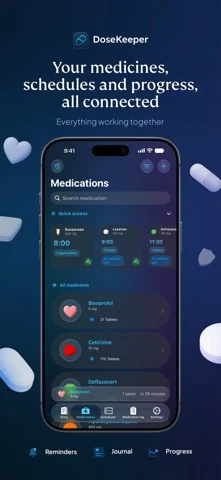
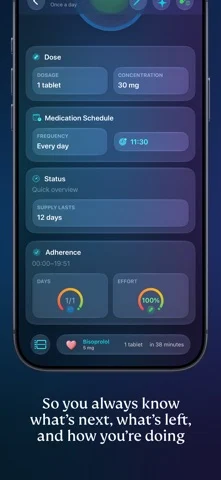
DoseKeeper: The Smarter Way to Manage Your Medications Take Control of Your Health Effortlessly Manage your medications with clarity. DoseKeeper helps you stay on schedule, keep everything organized, and review your progress in seconds, all in a private, thoughtfully designed app. Why DoseKeeper? Everything you need to manage your medications and well-being, thoughtfully designed in one calm, cohesive experience. From clear organization to intelligent insights, DoseKeeper brings comfort and control to your daily care. Smart Medication Tracking and Expiry Alerts Track doses with a clear schedule and history, manage batch-based inventory, see where you are in each blister pack, and receive early alerts before medicines expire. Adherence Insights You Can Tune See how consistent you are with your treatment. DoseKeeper shows full days with complete adherence and overall effort as a percentage, with options for timeframe, indicator style, and flexible or strict modes. Personalized Dose Reminders Create reminders that match your real schedule, including different times or days for each medicine. Use the Timing Assistant to plan doses that repeat every few hours from a chosen start time, and mark medicines that need food or specific times of day. Comprehensive Health Diary Write freely about your day and log symptoms, side effects, and moods in a dedicated diary. Link entries to medicines to spot patterns or export an entry as a PDF when you need to share it. When Apple Intelligence is available, DoseKeeper can generate a short summary and helpful tags on device so you can focus on your experience, not formatting. Quick Answers with App Shortcuts Use App Shortcuts to quickly add medicines, log a dose, check what is scheduled for a specific day, see remaining stock, review missed doses, or forecast refills without digging through the app. Several more shortcuts are available so you can ask DoseKeeper for what you need and get an immediate answer. PDF Reports You Control Export your medicine inventory, medication log, trends summary, and blood pressure reports as PDF files. Use filters for specific medicines, people, and date ranges so you can share or save only what you need. Blood pressure reports use selected data from Apple Health, including blood pressure, heart rate, resting heart rate, and workouts. DoseKeeper asks for Apple Health access only when you choose to build a blood pressure report, and Health data is used only to create that report context. Quick Access with NFC Assign NFC tags to medicines so you can open DoseKeeper, see details, or log a dose with a single tap. Critical Alerts Use critical alerts for scheduled medicines so time-sensitive reminders reach you even when Do Not Disturb or Focus is turned on. Post-Intake Alarms and Live Activity After you log a medicine, start a post-intake alarm for a chosen waiting time or let DoseKeeper decide based on your history. A Live Activity shows the time since your last dose on the Lock Screen and in the Dynamic Island. Secure and Private DoseKeeper is designed for complete privacy, with no ads and no tracking. Your information stays yours, and your schedule stays on time. Get Started for Free Use DoseKeeper at no cost with up to 3 medicines and 2 scheduled doses. When your routine grows, DoseKeeper Pass unlocks unlimited medicines and scheduling plus advanced features such as blister notes, diary highlights, TrueForm icons, powerful filters, daily progress indicators, and detailed reports. For more information, please review our Privacy Policy: https://www.dosekeeper.com/privacy and Terms of Use: https://www.apple.com/legal/internet-services/itunes/dev/stdeula/
iPhone Duo에서의 DoseKeeper: Medication Manager: 자주 묻는 질문
DoseKeeper: Medication Manager은(는) iPhone Duo에 최적화되어 있나요?
개발자 또는 스토어가 iPhone Duo 지원을 안내합니다.
DoseKeeper: Medication Manager의 가격은 얼마인가요?
DoseKeeper: Medication Manager은(는) App Store에서 무료로 다운로드할 수 있습니다.
다른 건강 및 피트니스 앱
모두 보기 ›
간격 종소리와 사운드스케이프, 연속 기록, Apple 건강 마인드풀 분을 지원하는 명상 타이머.

펼친 iPhone Duo에서 2단 레이아웃을 제공하는 물 마시기 트래커

Apple Watch 데이터로 회복, 운동 부하, 운동 인사이트를 보여 주는 앱

목표에 맞춘 적응형 운동 계획을 대화형 코치가 안내합니다.

수면 중 소리를 감지해 코골이와 수면 점수를 기록하고 기상 미션을 제공합니다.

운동을 기록하면 실시간 근육 맵에 훈련한 근육이 표시된다.