
SensAI: Fitness Sensei
목표에 맞춘 적응형 운동 계획을 대화형 코치가 안내합니다.
Origami, Incorporated · 건강 및 피트니스 · 무료
iPhone 스크린샷
iPhone Duo 활용 방식
MADE FOR IPHONE DUO
새로운 기능
버전 1.1.7 ·
READY FOR IPHONE DUO See more of your training at once: Coach beside your schedule, workout details beside your calendar, and activity history beside your results. Progress cards, Settings, and setup make better use of the wider display. Keep your place when folding or unfolding, so your training stays with you as you switch layouts. MORE CONTROL OVER EVERY SET Browse any exercise's sets without changing what comes next; use Start Now when you want to bring an exercise forward and end your current rest. Edit future sets or correct completed sets without interrupting rest. Apply your changes to just one set or matching remaining sets, then save when you're ready. KEEP YOUR COACH CLOSE The tab bar stays available while you track sets and rest, so you can open Coach or another tab whenever you need. Return with one tap on the active-workout button, with your current set, rest state, and unsaved edits intact. Also in this update: - Undo an accidentally completed set without losing its measurements, and add sets right from the set list - Keep workout controls and set details within reach when the keyboard is open or space is tight, with clearer rest-timer editing and room for longer exercise names - Improve Settings navigation, with Done available in every section and prompts to protect unsaved changes - Simplify setup on wider screens, with less scrolling for experience level, equipment, and goals - Fix a case where a deleted workout could return after restarting it and folding or unfolding iPhone Duo - Improve recovery when finishing a workout after an Apple Watch connection or Apple Health save problem, with progress preserved across retries and a way to finish in SensAI if the Health save cannot be confirmed - Minor polish and cleanup
개발자가 이 내용을 한국어로 제공하지 않았습니다.
App Store 설명개발자가 작성한 내용입니다.
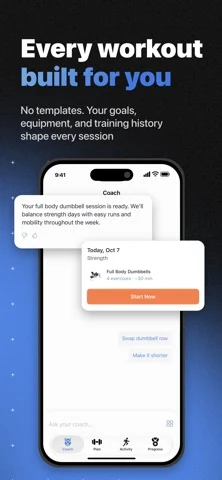
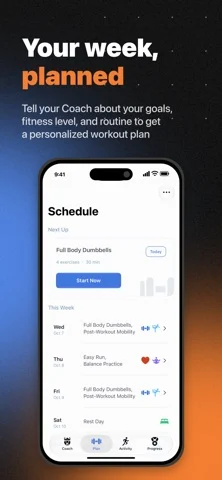
Meet SensAI - your training partner that adapts to you. Get a plan built around your goals, schedule, equipment, and fitness level. Train with set-by-set guidance and a Coach who adapts your plan through conversation and how you train. MADE FOR IPHONE DUO Open Duo to see Coach beside your schedule, workout details beside your calendar, and activity history beside your results. Fold or unfold during a workout without losing your current set, rest timer, or unsaved edits. A COACH THAT LISTENS Ask for a plan, get feedback on a meal photo, or adjust your week. Coach replies with interactive exercise cards, workout plans, progress charts, and proposed workout changes, right in the conversation. GUIDED WORKOUT TRACKING Follow each set with target weights, set history, and animated form guides. Rest starts automatically between sets. Track your session from the Lock Screen and Dynamic Island, or open Coach and return to your workout in one tap. MORE WORKOUT. LESS PHONE. Start today's workout from Apple Watch. Follow sets, edit weight, reps, time, or distance with the Digital Crown, and control exercise and rest timers. Get a tap when timers end; finish once all sets are complete. With Apple Health access, see live heart rate and active calories. On Apple Watch Ultra, use the Action button to complete sets or skip rest. Add a complication for quick access. Keep iPhone nearby and connected. PLANS CHANGE. SENSAI ADAPTS. Equipment busy? Use Smart Swap to replace an exercise. Need a different session? Smart Modify can shorten your workout, change its intensity, or shift its focus. Just type what you need. YOUR SETS, YOUR CALL Edit upcoming sets or correct completed ones. Apply changes to one set or matching remaining sets, then save. When you add an exercise mid-workout, SensAI automatically uses your previous measurements or estimates a starting point if it's new to you. EVERY WORKOUT, ONE HISTORY See completed SensAI workouts in Activity, with or without Apple Health. Connect Apple Health to include workouts from other apps and devices, and link them to planned sessions to mark them complete. 500+ EXERCISES WITH FORM GUIDES Explore strength, cardio, flexibility, and more, with animated technique guides, step-by-step cues, muscles worked, and equipment needed. WORKS OFFLINE Start and track workouts on iPhone without a signal. Log sets, reorder exercises, and use timers; your data syncs when you reconnect. AI features and fetching new plans need internet. BETTER TRAINING DECISIONS WITH APPLE HEALTH Coach uses HRV, sleep, resting heart rate, body composition, and cardio fitness from Apple Health to tailor training to your readiness. Completed workouts sync back. Works with Apple Watch, Garmin, Oura, WHOOP, and other devices that sync with Apple Health. TRY FREE Get full access free for 7 days. No subscription required to start. Requires iOS 26 or later; Apple Watch requires watchOS 26 or later. Privacy Policy: https://www.sensai.fit/legal/privacy-policy Terms of Service: https://www.sensai.fit/legal/terms-of-service
iPhone Duo에서의 SensAI: Fitness Sensei: 자주 묻는 질문
SensAI: Fitness Sensei은(는) iPhone Duo에 최적화되어 있나요?
네. SensAI: Fitness Sensei은(는) Duo 전용 설계 앱으로, 폴딩, Split View 또는 외부 디스플레이를 활용합니다. 2026년 10월 25일 확인(App Store 설명).
iPhone Duo에서 SensAI: Fitness Sensei은(는) 어떻게 보이나요?
MADE FOR IPHONE DUO
SensAI: Fitness Sensei의 가격은 얼마인가요?
SensAI: Fitness Sensei은(는) App Store에서 무료로 다운로드할 수 있습니다.
다른 건강 및 피트니스 앱
모두 보기 ›
간격 종소리와 사운드스케이프, 연속 기록, Apple 건강 마인드풀 분을 지원하는 명상 타이머.

펼친 iPhone Duo에서 2단 레이아웃을 제공하는 물 마시기 트래커

Apple Watch 데이터로 회복, 운동 부하, 운동 인사이트를 보여 주는 앱

수면 중 소리를 감지해 코골이와 수면 점수를 기록하고 기상 미션을 제공합니다.

운동을 기록하면 실시간 근육 맵에 훈련한 근육이 표시된다.

Apple Watch, iPhone, iPad용 수면 추적 및 스마트 알람