
SensAI: Fitness Sensei
Builds adaptive workout plans and guides each set with a conversational coach.
Origami, Incorporated · Health & Fitness · Free
iPhone screenshots
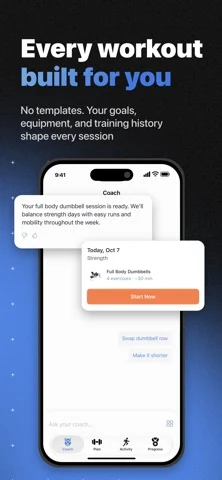
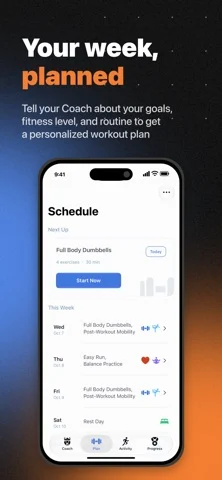
How it uses iPhone Duo
MADE FOR IPHONE DUO
What’s New
Version 1.1.7 ·
READY FOR IPHONE DUO See more of your training at once: Coach beside your schedule, workout details beside your calendar, and activity history beside your results. Progress cards, Settings, and setup make better use of the wider display. Keep your place when folding or unfolding, so your training stays with you as you switch layouts. MORE CONTROL OVER EVERY SET Browse any exercise's sets without changing what comes next; use Start Now when you want to bring an exercise forward and end your current rest. Edit future sets or correct completed sets without interrupting rest. Apply your changes to just one set or matching remaining sets, then save when you're ready. KEEP YOUR COACH CLOSE The tab bar stays available while you track sets and rest, so you can open Coach or another tab whenever you need. Return with one tap on the active-workout button, with your current set, rest state, and unsaved edits intact. Also in this update: - Undo an accidentally completed set without losing its measurements, and add sets right from the set list - Keep workout controls and set details within reach when the keyboard is open or space is tight, with clearer rest-timer editing and room for longer exercise names - Improve Settings navigation, with Done available in every section and prompts to protect unsaved changes - Simplify setup on wider screens, with less scrolling for experience level, equipment, and goals - Fix a case where a deleted workout could return after restarting it and folding or unfolding iPhone Duo - Improve recovery when finishing a workout after an Apple Watch connection or Apple Health save problem, with progress preserved across retries and a way to finish in SensAI if the Health save cannot be confirmed - Minor polish and cleanup
App Store descriptionWritten by the developer.
Meet SensAI - your training partner that adapts to you. Get a plan built around your goals, schedule, equipment, and fitness level. Train with set-by-set guidance and a Coach who adapts your plan through conversation and how you train. MADE FOR IPHONE DUO Open Duo to see Coach beside your schedule, workout details beside your calendar, and activity history beside your results. Fold or unfold during a workout without losing your current set, rest timer, or unsaved edits. A COACH THAT LISTENS Ask for a plan, get feedback on a meal photo, or adjust your week. Coach replies with interactive exercise cards, workout plans, progress charts, and proposed workout changes, right in the conversation. GUIDED WORKOUT TRACKING Follow each set with target weights, set history, and animated form guides. Rest starts automatically between sets. Track your session from the Lock Screen and Dynamic Island, or open Coach and return to your workout in one tap. MORE WORKOUT. LESS PHONE. Start today's workout from Apple Watch. Follow sets, edit weight, reps, time, or distance with the Digital Crown, and control exercise and rest timers. Get a tap when timers end; finish once all sets are complete. With Apple Health access, see live heart rate and active calories. On Apple Watch Ultra, use the Action button to complete sets or skip rest. Add a complication for quick access. Keep iPhone nearby and connected. PLANS CHANGE. SENSAI ADAPTS. Equipment busy? Use Smart Swap to replace an exercise. Need a different session? Smart Modify can shorten your workout, change its intensity, or shift its focus. Just type what you need. YOUR SETS, YOUR CALL Edit upcoming sets or correct completed ones. Apply changes to one set or matching remaining sets, then save. When you add an exercise mid-workout, SensAI automatically uses your previous measurements or estimates a starting point if it's new to you. EVERY WORKOUT, ONE HISTORY See completed SensAI workouts in Activity, with or without Apple Health. Connect Apple Health to include workouts from other apps and devices, and link them to planned sessions to mark them complete. 500+ EXERCISES WITH FORM GUIDES Explore strength, cardio, flexibility, and more, with animated technique guides, step-by-step cues, muscles worked, and equipment needed. WORKS OFFLINE Start and track workouts on iPhone without a signal. Log sets, reorder exercises, and use timers; your data syncs when you reconnect. AI features and fetching new plans need internet. BETTER TRAINING DECISIONS WITH APPLE HEALTH Coach uses HRV, sleep, resting heart rate, body composition, and cardio fitness from Apple Health to tailor training to your readiness. Completed workouts sync back. Works with Apple Watch, Garmin, Oura, WHOOP, and other devices that sync with Apple Health. TRY FREE Get full access free for 7 days. No subscription required to start. Requires iOS 26 or later; Apple Watch requires watchOS 26 or later. Privacy Policy: https://www.sensai.fit/legal/privacy-policy Terms of Service: https://www.sensai.fit/legal/terms-of-service
SensAI: Fitness Sensei on iPhone Duo: FAQ
Is SensAI: Fitness Sensei optimized for iPhone Duo?
Yes. SensAI: Fitness Sensei is Built for Duo: it uses the fold, Split View or the outer display. Verified on October 25, 2026 (App Store text).
What does SensAI: Fitness Sensei look like on iPhone Duo?
MADE FOR IPHONE DUO
How much does SensAI: Fitness Sensei cost?
SensAI: Fitness Sensei is free to download on the App Store.
More Health & Fitness apps
See all ›
Meditation timer with interval bells, soundscapes, streaks and Apple Health mindful minutes.

A water tracker with two-column layouts on the open iPhone Duo

Recovery, exertion and workout insights from your Apple Watch data

Listens while you sleep to detect snoring and score sleep quality, with wake missions.

Log workouts and see trained muscles light up on a live muscle map.

Sleep tracking and smart alarm for Apple Watch, iPhone and iPad