
iPhone 스크린샷
iPhone Duo 활용 방식
Duo support is reported in the linked sources. The specific fold interaction and real-device behavior have not been independently verified.
새로운 기능
버전 26.14 ·
KeepDates now comes with an Apple Watch app. On your wrist: See the dates coming up for the people you care about, with their photos, from your watch. It has its own settings for how far ahead to look and whether to include birthdays, so your watch can show a tighter list than your phone. Complications: Put your next date on your watch face, in any of the four styles watchOS offers. It rolls forward on its own as the day turns, and tapping it opens straight to that date. Tap for the whole story: A watch row only has room for so much. Tap one for the full name, the date written out, how many years it marks, and a bigger photo. Arrange it your way: Keep the watch list flat, break it into months, or gather it by person. A setting on the watch, affecting the watch only. Photos fill in over time: Contact photos are sent across a few syncs, soonest dates first, so the watch is useful right away. Until a photo arrives you will see that contact's initials. Free, like the rest of KeepDates.
개발자가 이 내용을 한국어로 제공하지 않았습니다.
앱 소개
Duo support is reported in the linked sources. The specific fold interaction and real-device behavior have not been independently verified.
영어 원문을 번역한 내용입니다.
App Store 설명개발자가 작성한 내용입니다.
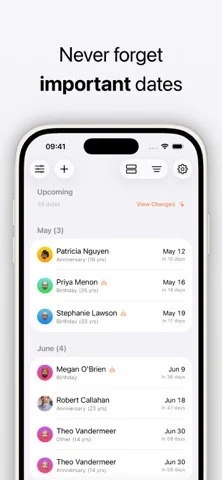
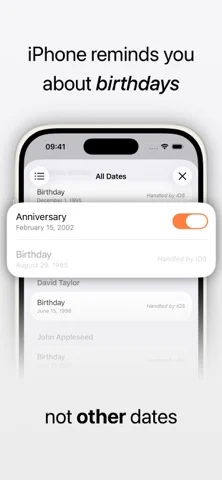
Your iPhone remembers birthdays. But important dates like anniversaries are easy to miss. KeepDates fixes that automatically. # What it does KeepDates finds the dates stored in your contacts: anniversaries, custom events, and more. It turns them into reminders you’ll actually see. It works quietly in the background and keeps everything up to date as your contacts change. # Why it’s useful * Never forget anniversaries, milestones, or important personal dates * See all upcoming dates in one simple list * Get reminders before they happen * Works automatically, with no manual setup # How it works * Scans your contacts for date fields * Lets you review and choose what to include * Syncs selected dates into a dedicated calendar * Keeps everything updated in the background # Key Features * Automatic contact date detection * Calendar sync with yearly recurring events * Optional reminders (day before by default) * Widgets for quick access to upcoming dates * Background sync, so it is always up to date * Works completely offline # Widgets * Small widget: next upcoming date * Medium widget: multiple upcoming dates * Lock screen widget: quick glance countdown # Privacy KeepDates is built to be simple and private: * No accounts * No cloud sync * No tracking * All data stays on your device # Premium (Optional) Unlock additional control and customization: * Smart reminders (multiple timings) * More events in widgets + large widget * Look-ahead window control * Pinned contacts * Advanced filtering and customization ### KeepDates is designed to feel like a missing system feature: simple, automatic, and out of the way.
iPhone Duo에서의 KeepDates: Contact Dates: 자주 묻는 질문
KeepDates: Contact Dates은(는) iPhone Duo에 최적화되어 있나요?
개발자 또는 스토어가 iPhone Duo 지원을 안내합니다.
iPhone Duo에서 KeepDates: Contact Dates은(는) 어떻게 보이나요?
Duo support is reported in the linked sources. The specific fold interaction and real-device behavior have not been independently verified.
KeepDates: Contact Dates의 가격은 얼마인가요?
KeepDates: Contact Dates은(는) App Store에서 무료로 다운로드할 수 있습니다.
다른 유틸리티 앱
모두 보기 ›
Duo 인터랙션에 관한 출처가 있습니다. 실제 기기 동작은 별도로 검증하지 않았습니다.

Duo 인터랙션에 관한 출처가 있습니다. 실제 기기 동작은 별도로 검증하지 않았습니다.

Duo 인터랙션에 관한 출처가 있습니다. 실제 기기 동작은 별도로 검증하지 않았습니다.

Duo 인터랙션에 관한 출처가 있습니다. 실제 기기 동작은 별도로 검증하지 않았습니다.

Duo 인터랙션에 관한 출처가 있습니다. 실제 기기 동작은 별도로 검증하지 않았습니다.

Duo 인터랙션에 관한 출처가 있습니다. 실제 기기 동작은 별도로 검증하지 않았습니다.