
iPhone 스크린샷
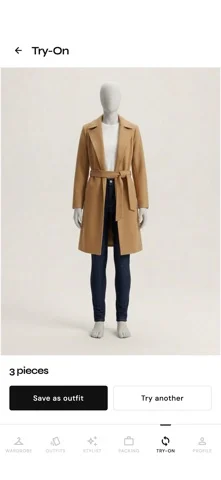
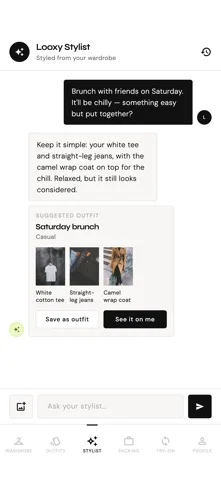
새로운 기능
버전 1.2.0 ·
• Five languages: English, Georgian, Russian, Arabic (right to left) and Turkish — in the app, the stylist chat and notifications. Choose yours on the welcome screen or in Profile → Language • The stylist now acts for you: log what you wore, add an item from a shop link, plan a trip with its packing list, or add photos of your clothes — right in the chat, and only after you confirm • Ask the stylist how to do something in LOOXY and it takes you there • New "How LOOXY works" guides in Profile, a short tour for new users and tips the first time you open a feature • Made for iPhone Duo: a layout for the large inner display • Forgot your password? Reset it from the sign-in screen • More of your photos now work for virtual try-on • Terms and Privacy Policy in your language • Fixes: "My shares" lists your shares again, editing an outfit no longer drops its try-on photo, sharper pieces when you split an outfit photo, and layouts that hold up at large text sizes
개발자가 이 내용을 한국어로 제공하지 않았습니다.
App Store 설명개발자가 작성한 내용입니다.
LOOXY turns the clothes you already own into outfits you'll actually wear. Photograph a garment and LOOXY tags it for you — category, colour, warmth, formality — and drops it into a wardrobe you can search. Wearing several things in one photo? LOOXY picks out each piece and lets you choose which to add. Paste a link from a shop and it pulls the item in automatically. From there, your closet does the work: outfit ideas built from real pieces you own, styling advice that knows the forecast, and a way to see a look on yourself before you commit to it. LOOXY speaks English, Georgian, Russian, Arabic and Turkish — the app, the stylist chat and your notifications. Key features Your wardrobe, digitized: Catalog clothes, shoes and accessories by photo or by pasting a product link. Add one item, a whole batch, or split an outfit photo into its pieces. Search by name, colour or tag. AI stylist chat: Ask for advice and get answers grounded in your own wardrobe and your style profile — never generic suggestions for clothes you don't have. Ask what to wear for an evening outdoors and it checks the forecast for that time and place first. A stylist that gets things done: Tell it what you wore and it logs the wear. Paste a shop link and it adds the item to your wishlist or your wardrobe. Say "I'm going to Barcelona Friday to Sunday" and it sets up the trip and its packing list. Attach photos to add clothes without leaving the chat. Nothing is saved until you confirm. Virtual try-on: See a combination on yourself before you get dressed — or tap "See it on me" on any outfit the stylist suggests. Wishlist and price alerts: Keep what you want apart from what you have. Add items by link with their price and store, then tell LOOXY when to alert you — "when it's 300 or lower", "when it's 50% off" — in your own words. It keeps checking and notifies you when your price arrives. Trips and packing: Add a destination and dates — or just tell the stylist — and LOOXY builds a packing list around the weather you're actually going to get. Wear tracking: Log what you wear, see which pieces earn their place, and get a weekly read on your habits. LOOXBOOK: Save looks that inspire you and rebuild them from what you own. Help built in: A short tour when you start, a tip the first time you open a feature, and step-by-step guides under "How LOOXY works" in your profile. Or ask the stylist how to do something — it explains and takes you there. Start without an account: Try everything first. Sign up later and your wardrobe stays exactly as you left it. Share from anywhere: Send a photo or product link to LOOXY from any app's share sheet. Made for iPhone Duo: On the large inner display, LOOXY uses the extra room — a side tab bar and a roomier wardrobe.
iPhone Duo에서의 LOOXY: AI Stylist & Wardrobe: 자주 묻는 질문
LOOXY: AI Stylist & Wardrobe은(는) iPhone Duo에 최적화되어 있나요?
개발자 또는 스토어가 iPhone Duo 지원을 안내합니다.
LOOXY: AI Stylist & Wardrobe의 가격은 얼마인가요?
LOOXY: AI Stylist & Wardrobe은(는) App Store에서 무료로 다운로드할 수 있습니다.
다른 유틸리티 앱
모두 보기 ›
iPhone Duo 힌지로 0.1°까지 각도를 측정하고 목표, 매칭, 수평계 도구를 제공합니다.

iPhone Duo를 경사 게이지로 바꿔 힌지 각도를 읽고, 다른 iPhone에서는 수평계로 쓴다.

iPhone Duo를 카드 슬롯과 현금, 펜, 영수증이 있는 실제 같은 반지갑으로 바꾼다.

iPhone Duo 힌지를 각도와 기준 도구 모음으로 바꾸며, 다른 iPhone에서는 무료 수평계를 쓴다.

iPhone을 자, 각도기, 수평계, 지름 게이지로, iPhone Duo를 실시간 접힘 각도 자로 만든다.

iPhone Duo 힌지 각도를 실시간 측정하고, 수평계와 각도기, 경사계, 카메라 각도기로도 쓴다.