
iPhone 截图
新功能
版本 1.15.0 ·
Thanks for using AirScrobble! This update includes some exciting new features: • Siri, meet Last.fm: Say “Add this song to AirScrobble” and Siri picks up the song from what you're looking at, like a music video or a track a friend sent you, and scrobbles it to Last.fm. Requires iOS 27 and a compatible device. • Made for iPhone Duo: AirScrobble adapts to your displays as you fold, unfold, and rotate your iPhone, giving your music and history more room. • Continuous Listening: You can once again recognize songs playing on your iPhone or iPad, even through headphones or AirPods! You can also start listening from Control Center or Shortcuts without opening the app. • Album Scrobbling: Listening to a full record? Match just one song, then scrobble the whole album at once! Choose which tracks to include, adjust their timestamps, and automatically skip songs you've already scrobbled. Available with AirScrobble+. • Visual Intelligence: Point your camera at a record, tap Search in Visual Intelligence, then choose AirScrobble to scrobble the album. Cover not recognized? Try the barcode on the back instead! Requires iOS 26, a compatible device, and AirScrobble+. This version also fixes the following issues: - Fixed issues with Live Activities showing the wrong sign-in status or staying active after listening stops. - Improved scrobble status in History when Last.fm corrects a song's metadata. - Fixed account information not refreshing when signing in from another screen. As always, if you need any help with the app or want to share what you'd like to see next, feel free to reach out at support@airscrobble.com!
开发者尚未提供此内容的中文版本。
App Store 简介由开发者撰写。
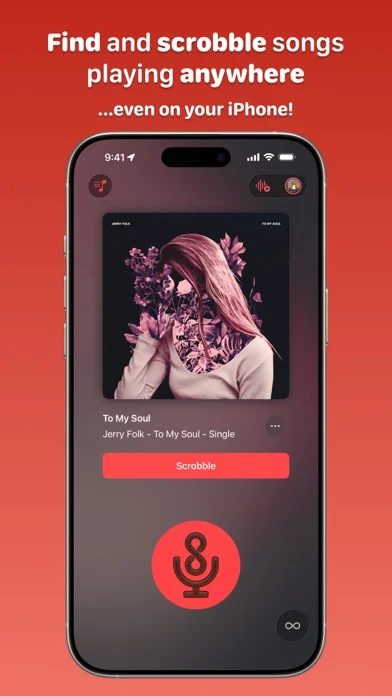
Welcome to AirScrobble, the ultimate way to scrobble everything from real life and your device directly to your Last.fm profile! Whether you’re grooving to vinyl, discovering tunes on the radio, or catching jams on social media, AirScrobble makes tracking and scrobbling a breeze. Just hit the record button to identify the song, then scrobble it to your Last.fm profile. Found a new favorite? Save it to your Music library or revisit it later in your History page. Want to keep track of a longer listening session? With AirScrobble+, Continuous Listening keeps identifying and scrobbling songs around you or playing on your iPhone or iPad, even through headphones and AirPods. Start a session from the app, Control Center, or Shortcuts, and follow along with Live Activities on your Lock Screen or Dynamic Island. You also get access to your full discovery history and Album Scrobbling: match one song, review the album’s tracks, and scrobble them together with adjustable timestamps. Here’s what you can look forward to: • Say “Add this song to AirScrobble” and Siri can scrobble a song from what you’re looking at, with a preview before you confirm. Requires iOS 27 and a compatible device. • Enjoy layouts adapted for iPhone Duo, with your current song and discovery history side by side when unfolded. • Find records with Visual Intelligence by scanning an album cover or barcode, then review and scrobble their tracks. Requires AirScrobble+, iOS 26, and a compatible device. • Start recognizing songs or control a Continuous Listening session from Control Center without opening the app, and follow the match status through Live Activities. • Quickly start a match via the Lock Screen Widget, Quick Action shortcut, or by asking Siri to “Start matching with AirScrobble.” • Scrobble and save songs from videos in your camera roll straight to your Music library! • Sync your scrobble history with iCloud, so you can seamlessly switch between your iPhone and iPad. • Block specific songs or artists from being recognized, and clean up your scrobbles with metadata filters for featured artists, release tags, and more. • Tailor your scrobbling experience with customizable settings, including metadata options and automatic scrobbling. • Use over 40 actions in the Shortcuts app to create automations and scrobble from even more sources! • iPad users, enjoy keyboard shortcuts and full support for Split View, Slide Over, and Stage Manager. Ready to elevate your scrobbling? Download AirScrobble now and start matching to your heart’s content! Privacy policy: https://airscrobble.com/privacypolicy/ Terms of use: https://www.apple.com/legal/internet-services/itunes/dev/stdeula/ Note: AirScrobble is not affiliated with Last.fm.
AirScrobble for Last.fm 在 iPhone Duo 上:常见问题
AirScrobble for Last.fm 针对 iPhone Duo 优化了吗?
开发者或商店资料已标明支持 iPhone Duo。
AirScrobble for Last.fm 多少钱?
AirScrobble for Last.fm 可在 App Store 免费下载。
更多音乐音频应用
查看全部 ›
复古音乐播放器,可播放自己的音乐和流媒体音乐库

把iPhone变成可挤压的手风琴,推拉风箱时奏出音符。

把iPhone变成卡带机,用卷轴和按键播放你的音乐。

把Apple Music和本地专辑当作复古磁带播放,配有机械音效。

把Duo变成手风琴,开合折叠处当风箱,右手弹琴键左手按和弦。

同步Discogs唱片收藏,扫描唱片条码,并以3D方式浏览你的黑胶藏品。