
iPhone 截图
在 iPhone Duo 上的表现
来源中有 Duo 支持声明,具体折叠交互和真机表现尚未独立核验。
新功能
版本 1.15.3 ·
This update makes it easier to bring images and recordings into Benkyo Box from other apps with the share sheet, or by dropping them on the app icon on iPad. We also fixed image annotations not zooming out enough in studies, blurry images added on the Mac, VoiceOver bugs, and several other issues. New Features: - Import images, audio files, CSVs, text files and folders in Benkyo Box from other apps using the share sheet, or by drag/dropping them to the Dock icon (on iPad). Improvements: - Better VoiceOver support: hear card rows, Library rows and annotation rows read as one item with clear labels. - Occlusions, arrows and pins are framed with more of the surrounding image while studying, and tapping can change the zoom level to full-image. Fixes: - Fixed VoiceOver collapsing and immediately re-expanding Today sections in the Library. - iPhone, iPad: Fixed the folder picker in the new card editor rarely showing. - iPhone, iPad: Home Screen quick actions now work when a study session was previously in progress. - Mac: Fixed images added on the Mac being saved at half their resolution, which made high-resolution images and screenshots look blurry. - Mac: RAW photos are now converted when added, like on iPhone and iPad.
开发者尚未提供此内容的中文版本。
App Store 简介由开发者撰写。
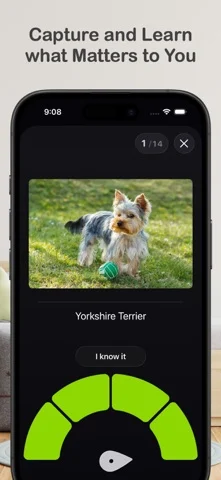
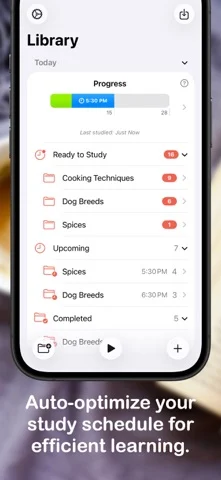
Benkyo Box is a flashcard app that is like your notes, but of the things that you want to commit to memory like names, fun facts, or exam material. These are the facts that you don't want to bury in a note taking app, and want to ensure you truly know them. Every flashcard you add to Benkyo Box is added to your daily studies, in which a beautiful study interface shows you the card’s question, you try to recall its answer, reveal it, then rate yourself after seeing the actual answer. Based on that rating, the card is re-surfaced in future with a notification so that you can practice again until you know it. Flexible flashcard content: Flashcards not only have the standard image/text front and back format, they also support in-app sketching and images for both the question and answer. Text supports multiple lines in both the question and answer so you can learn lists in a single flashcard. Powerful annotation cards: Looking to learn concept of an image? Like: - the components of a mechanical object - anatomical parts - different elements of a dish Benkyo Box makes this easy with Annotation Cards - simply annotate an image with arrows, rectangles and other tools, which automatically turn into flashcards. It preserves the original image as incredibly useful context. Easily create study material: - Natural Language: No need to enter questions and answers in flashcards! Enter a statement you'd like to learn, and with Apple Intelligence, we'll rewrite it as question and answer (Advanced Learner feature). - Quick Entry: Enter many cards at once by alternating questions and answers in plain text. This is specially helpful for pasting content from LLMs or adding multiple cards during a meeting. - CSV import: import a spreadsheet with flexible options on how to interpret the columns for the final flashcards - Folder import: select a folder with multiple images, creating a flashcard for each image in the question, filename on the answer. If the folder contains a CSV, the CSV can be used to customize how the images are imported (used as question, answer or both). Shortcuts for everything: Quickly do almost anything that you can do in the app within Shortcuts, like adding cards, checking your study status, importing content, and even updating app settings. Flexible organization: Organize your flashcards using folders and subfolders for all your topics, or keep them in the default unsorted folder if you prefer them that way. Your schedule and trends, at a glance: Open the app and you'll immediately see your study progress for the day and the time for your next study (also available as a widget). Navigate to the calendar to see what you have scheduled for today, the following days and how you scored the previous day. Flexible study sessions: Study a specific topic by navigating to it, or study all topics scheduled for today by studying from the Today view. Study times and flashcard frequencies can be configured in settings. Also if you are feeling like studying a topic but the cards are not available yet, you can always reset the folder and study right away. Privacy: Cards are private information and we have no access to them. If you use iCloud sync, Benkyo Box securely encrypts your content in iCloud with client-side encryption - nobody in the server can read your cards. Themes, each with a Dark Mode version: Choose a theme to match the mood of the study session. Advanced Learner Features: With Advanced Learner, a paid tier, you get features that help you streamline your studies: - Add cards using natural language - Extract cards from text and articles using on devices that support Apple Intelligence - Hidden folders that are ignored from studies until you are ready to unhide them - Deadlines that help prioritize studies before an important date Most importantly, the app is fully functional without Advanced Learner and we work hard to ensure that it’s easy to unsubscribe from it with the least disruption as possible.
Benkyo Box 在 iPhone Duo 上:常见问题
Benkyo Box 针对 iPhone Duo 优化了吗?
开发者或商店资料已标明支持 iPhone Duo。
Benkyo Box 在 iPhone Duo 上是什么样子?
来源中有 Duo 支持声明,具体折叠交互和真机表现尚未独立核验。
Benkyo Box 多少钱?
Benkyo Box 可在 App Store 免费下载。
更多阅读资讯应用
查看全部 ›
虚拟纸张的折叠跟随手机铰链,利用实际开合完成纸面折叠。

铰链展开逐步揭示答案,合盖切换卡片;揭示程度参与记忆难度记录。

内置摘要的 RSS 阅读器,随 iPhone Duo 折叠而重排布局

随折叠与展开切换布局的 RSS 与新闻阅读器

正文与故事中的人物、场景并排;半折切成床头朗读场景,合盖继续在外屏阅读。

模拟可折叠图鉴,半折呈现资料面板,扫描时利用外屏。