
iPhone 截图
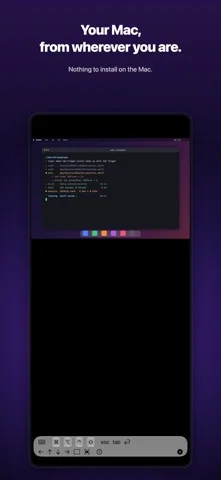
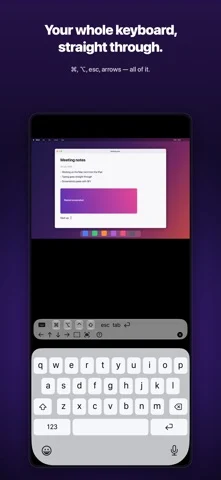
在 iPhone Duo 上的表现
来源中有 Duo 支持声明,具体折叠交互和真机表现尚未独立核验。
新功能
版本 1.4.0 ·
Headroom 1.4.0 • Open apps on your Mac in a tap. Use the new button on the control bar: type the first letters and pick a suggestion, or choose from your history. • When a connection fails, Headroom now tells you what to check for the actual cause — including Screen Sharing's "Allow access for" list, and networks that block the way to your Mac. • If your Mac stops responding during a session, Headroom now says so. • When adding a Mac, the host name field opens with the English keyboard. • A new tour of how Headroom works, with animated illustrations. • Settings is now on the home screen. Turn off "Show when the picture is behind" to hide the note that the picture is a few seconds old. • If you can't reach your home Mac while you're out, Headroom shows how to set it up for use from outside.
开发者尚未提供此内容的中文版本。
App Store 简介由开发者撰写。
Headroom is a remote desktop for controlling a Mac from your iPad, iPhone, or another Mac. The big idea: nothing to install on the Mac. Turn on macOS's built-in Screen Sharing — that's the whole setup. WHEN YOU WANT IT • Drive the Mac in the next room from the couch • Manage a headless Mac mini — no monitor, no keyboard • Peek at your dev machine or build server from wherever you are • Reach your home Mac from anywhere over a VPN such as Tailscale WHY HEADROOM • Zero install on the Mac Connects straight to macOS's built-in Screen Sharing (VNC). No server app, no agent, no menu-bar daemon. • Finds your Macs automatically Macs on the same Wi-Fi appear instantly via Bonjour. Manual IP connections work too. • Fast, smooth screen Metal rendering plus ZRLE compression — feels real-time on a LAN and stays usable on thin connections. • Touch that makes sense on iPad and iPhone Tap to click, one-finger scroll, long-press to drag and select text, two-finger wheel scrolling, pinch to zoom. • Real mouse behavior on the Mac On a Mac (same app), clicks, drags, and right-clicks pass through 1:1. Option-scroll pans; Command-scroll zooms. • Full keyboard, and your voice Software and hardware keyboards both work. Modifier keys (⌘⌥⌃⇧) tap once for the next keystroke or double-tap to lock — every shortcut is reachable. Tap the mic on the keyboard and what you say is typed straight into the Mac. • Private by design Credentials live only in your device's Keychain, and passwords are encrypted in transit using Apple's standard Screen Sharing authentication. • Made for iPhone Duo Half open like a laptop, your Mac sits on the upper screen and the keyboard on the lower one. Fully open or held like a book, the Mac spans the inner screen; closed, the outer screen works on its own. Nothing is drawn across the fold. CONNECTED IN THREE STEPS 1. On the Mac: System Settings > General > Sharing > turn on Screen Sharing 2. Open Headroom — your Macs appear automatically 3. Sign in with the Mac's username and password. Done. HEADROOM PRO • Unlimited connection time • Every future Pro feature included REQUIREMENTS • Client: iPad / iPhone (iOS 17+, verified on iOS 27 and iPadOS 27), Apple Silicon Mac • Host: any Mac with Screen Sharing enabled (no extra software) • Same network; for internet access we recommend a VPN such as Tailscale — Headroom is built by MusicFlow ("music × engineering") — the tool we made to run our own headless Mac minis, polished into something we use every day.
Headroom: Remote Desktop 在 iPhone Duo 上:常见问题
Headroom: Remote Desktop 针对 iPhone Duo 优化了吗?
开发者或商店资料已标明支持 iPhone Duo。
Headroom: Remote Desktop 在 iPhone Duo 上是什么样子?
来源中有 Duo 支持声明,具体折叠交互和真机表现尚未独立核验。
Headroom: Remote Desktop 多少钱?
Headroom: Remote Desktop 可在 App Store 免费下载。
更多工具应用
查看全部 ›
实时读取手机铰链角度,内屏或外屏显示,用于角度测量与目标对齐。

用铰链测角、用屏幕边缘当尺,物理开合直接产生读数。

把手机模拟成双折钱包,展开显示卡槽、纸币和收据,物理开合对应钱包开合。

以实际铰链角度提供量角与参考工具,移动手机时可锁定读数。

内外屏提供标尺,铰链开合直接显示角度。

把手机两半贴向不同表面,通过铰链与运动传感器读取夹角和各面的水平角。