
Headroom: Remote Desktop
macOS 내장 화면 공유로 iPad, iPhone에서 Mac을 원격 제어합니다.
Haruhiko Kishi · 유틸리티 · 무료
iPhone 스크린샷
새로운 기능
버전 1.4.0 ·
Headroom 1.4.0 • Open apps on your Mac in a tap. Use the new button on the control bar: type the first letters and pick a suggestion, or choose from your history. • When a connection fails, Headroom now tells you what to check for the actual cause — including Screen Sharing's "Allow access for" list, and networks that block the way to your Mac. • If your Mac stops responding during a session, Headroom now says so. • When adding a Mac, the host name field opens with the English keyboard. • A new tour of how Headroom works, with animated illustrations. • Settings is now on the home screen. Turn off "Show when the picture is behind" to hide the note that the picture is a few seconds old. • If you can't reach your home Mac while you're out, Headroom shows how to set it up for use from outside.
개발자가 이 내용을 한국어로 제공하지 않았습니다.
App Store 설명개발자가 작성한 내용입니다.
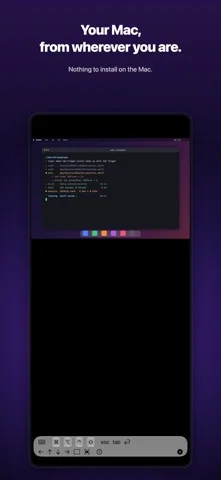
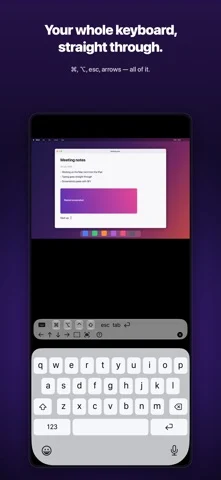
Headroom is a remote desktop for controlling a Mac from your iPad, iPhone, or another Mac. The big idea: nothing to install on the Mac. Turn on macOS's built-in Screen Sharing — that's the whole setup. WHEN YOU WANT IT • Drive the Mac in the next room from the couch • Manage a headless Mac mini — no monitor, no keyboard • Peek at your dev machine or build server from wherever you are • Reach your home Mac from anywhere over a VPN such as Tailscale WHY HEADROOM • Zero install on the Mac Connects straight to macOS's built-in Screen Sharing (VNC). No server app, no agent, no menu-bar daemon. • Finds your Macs automatically Macs on the same Wi-Fi appear instantly via Bonjour. Manual IP connections work too. • Fast, smooth screen Metal rendering plus ZRLE compression — feels real-time on a LAN and stays usable on thin connections. • Touch that makes sense on iPad and iPhone Tap to click, one-finger scroll, long-press to drag and select text, two-finger wheel scrolling, pinch to zoom. • Real mouse behavior on the Mac On a Mac (same app), clicks, drags, and right-clicks pass through 1:1. Option-scroll pans; Command-scroll zooms. • Full keyboard, and your voice Software and hardware keyboards both work. Modifier keys (⌘⌥⌃⇧) tap once for the next keystroke or double-tap to lock — every shortcut is reachable. Tap the mic on the keyboard and what you say is typed straight into the Mac. • Private by design Credentials live only in your device's Keychain, and passwords are encrypted in transit using Apple's standard Screen Sharing authentication. • Made for iPhone Duo Half open like a laptop, your Mac sits on the upper screen and the keyboard on the lower one. Fully open or held like a book, the Mac spans the inner screen; closed, the outer screen works on its own. Nothing is drawn across the fold. CONNECTED IN THREE STEPS 1. On the Mac: System Settings > General > Sharing > turn on Screen Sharing 2. Open Headroom — your Macs appear automatically 3. Sign in with the Mac's username and password. Done. HEADROOM PRO • Unlimited connection time • Every future Pro feature included REQUIREMENTS • Client: iPad / iPhone (iOS 17+, verified on iOS 27 and iPadOS 27), Apple Silicon Mac • Host: any Mac with Screen Sharing enabled (no extra software) • Same network; for internet access we recommend a VPN such as Tailscale — Headroom is built by MusicFlow ("music × engineering") — the tool we made to run our own headless Mac minis, polished into something we use every day.
iPhone Duo에서의 Headroom: Remote Desktop: 자주 묻는 질문
Headroom: Remote Desktop은(는) iPhone Duo에 최적화되어 있나요?
개발자 또는 스토어가 iPhone Duo 지원을 안내합니다.
Headroom: Remote Desktop의 가격은 얼마인가요?
Headroom: Remote Desktop은(는) App Store에서 무료로 다운로드할 수 있습니다.
다른 유틸리티 앱
모두 보기 ›
iPhone Duo 힌지로 0.1°까지 각도를 측정하고 목표, 매칭, 수평계 도구를 제공합니다.

iPhone Duo를 경사 게이지로 바꿔 힌지 각도를 읽고, 다른 iPhone에서는 수평계로 쓴다.

iPhone Duo를 카드 슬롯과 현금, 펜, 영수증이 있는 실제 같은 반지갑으로 바꾼다.

iPhone Duo 힌지를 각도와 기준 도구 모음으로 바꾸며, 다른 iPhone에서는 무료 수평계를 쓴다.

iPhone을 자, 각도기, 수평계, 지름 게이지로, iPhone Duo를 실시간 접힘 각도 자로 만든다.

iPhone Duo 힌지 각도를 실시간 측정하고, 수평계와 각도기, 경사계, 카메라 각도기로도 쓴다.