
iPhone 截图
新功能
版本 1.8.11 ·
Fixed an issue where the app could get stuck on a white screen and then close at launch on some 6.7-inch iPhones (iPhone 14 Pro Max, 15 Plus, 15 Pro Max, 16 Plus and others). Sorry for the trouble!
开发者尚未提供此内容的中文版本。
App Store 简介由开发者撰写。
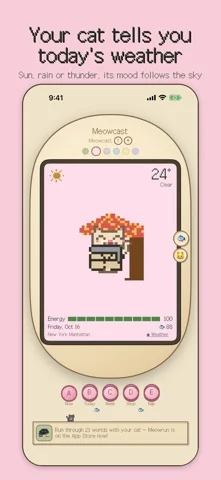
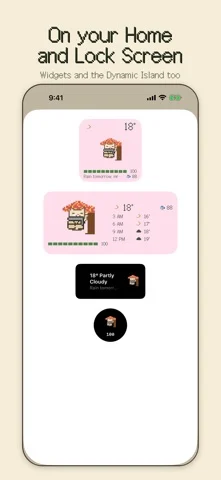
Meowcast is a weather app with a tiny pixel cat whose mood follows the weather where you are. One look at your cat tells you what the sky is doing today. It purrs when it's sunny, sulks in the rain and trembles when thunder rolls in. ■ Your forecast at a glance • Current weather and temperature • The next 8 three-hour slots, running into tomorrow • This week's forecast, with red flags on days your cat can't handle yet • Air quality: PM2.5 and PM10 • Your cat sends you a notification before it rains or when the air gets bad ■ A cat that feels the weather Happy purrs on clear days. A hiss if you touch it in the rain. It melts into a puddle in a heatwave and shivers with its fur on end when it's cold. On dusty days it covers its nose and sneezes, and at night it sleeps curled up like a loaf of bread. A quick pet and a long pet get you different reactions. ■ Dress up and decorate with fish Raincoats, scarves, trench coats, a straw hat, a face mask. Set up places too: a beach parasol, a cozy hotel blanket, a maple tree and more. The right item keeps your cat safe from the weather. If bad weather keeps getting through, its energy drains, and at zero it turns into a ghost and loses everything it owns, so plan ahead. ■ Choose your cat Start with Cheese, Shadow or Patches. Save up fish to adopt White, Cream and Bluebell. Or pick the colors, pattern, name and background yourself to make a one-of-a-kind cat of your own (in-app purchase). ■ Nap time: put your phone down, earn fish Choose 10, 25, 45 or 60 minutes and tuck your cat in. Stay out of the app until the time is up, and your cat wakes up with fish for you. Your screen can be off. Use it as a focus timer for study or work, or as a little digital detox. ■ Home Screen, Lock Screen and Dynamic Island Home Screen and Lock Screen widgets keep your cat and the weather in view. With Live Activities, your cat shows up in the Dynamic Island too. ■ Apple Watch, Mac and iPhone Duo • Apple Watch: see the same cat you raise on your iPhone, plus the weather • Mac: drag your cat out of the window onto your desktop and keep it company while you work • iPhone Duo: unfold it to see your cat on the left and the forecast or shop on the right ■ Made for you if you • want a cute way to check the weather • love cats, pixel art and retro games • like decorating your Home Screen and Lock Screen • pick up your phone more than you'd like ■ How it works 1. Allow location to get the weather where you are 2. Check your cat and the Week forecast, then get an umbrella or a scarf ready 3. Nap to earn fish, then spend it on outfits, places and new cats ■ FAQ Q. Is it free? A. The forecast, widgets, raising your cat and naps are free. Fish packs and making your own cat are in-app purchases. Q. My cat doesn't show up on my Apple Watch. A. Open Meowcast on your iPhone once and it will reach your watch. No account needed. Your location is only used to get the weather where you are.
Meowcast: Weather Cat Widget 在 iPhone Duo 上:常见问题
Meowcast: Weather Cat Widget 针对 iPhone Duo 优化了吗?
开发者或商店资料已标明支持 iPhone Duo。
Meowcast: Weather Cat Widget 多少钱?
Meowcast: Weather Cat Widget 可在 App Store 免费下载。
更多天气应用
查看全部 ›
追踪某个重要日子的天气预报,为 Duo 的每种姿态提供专属布局

以图表为核心的天气应用,Duo 展开后左右并排显示

采用游戏风格 3D 界面、预报详尽的天气应用

自带毒舌机器人主持的天气应用,现已支持 iPhone Duo

提供澳大利亚天气预警、降雨雷达、河流水位和农牧业专项预报。

提供气象专家风暴报道、交互雷达与逐小时天气预报。