
iPhone 스크린샷
새로운 기능
버전 1.8.11 ·
Fixed an issue where the app could get stuck on a white screen and then close at launch on some 6.7-inch iPhones (iPhone 14 Pro Max, 15 Plus, 15 Pro Max, 16 Plus and others). Sorry for the trouble!
개발자가 이 내용을 한국어로 제공하지 않았습니다.
App Store 설명개발자가 작성한 내용입니다.
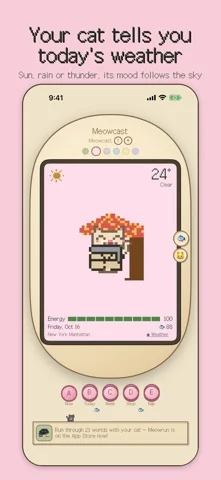
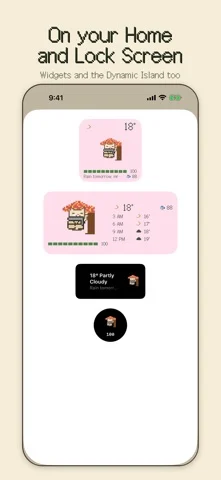
Meowcast is a weather app with a tiny pixel cat whose mood follows the weather where you are. One look at your cat tells you what the sky is doing today. It purrs when it's sunny, sulks in the rain and trembles when thunder rolls in. ■ Your forecast at a glance • Current weather and temperature • The next 8 three-hour slots, running into tomorrow • This week's forecast, with red flags on days your cat can't handle yet • Air quality: PM2.5 and PM10 • Your cat sends you a notification before it rains or when the air gets bad ■ A cat that feels the weather Happy purrs on clear days. A hiss if you touch it in the rain. It melts into a puddle in a heatwave and shivers with its fur on end when it's cold. On dusty days it covers its nose and sneezes, and at night it sleeps curled up like a loaf of bread. A quick pet and a long pet get you different reactions. ■ Dress up and decorate with fish Raincoats, scarves, trench coats, a straw hat, a face mask. Set up places too: a beach parasol, a cozy hotel blanket, a maple tree and more. The right item keeps your cat safe from the weather. If bad weather keeps getting through, its energy drains, and at zero it turns into a ghost and loses everything it owns, so plan ahead. ■ Choose your cat Start with Cheese, Shadow or Patches. Save up fish to adopt White, Cream and Bluebell. Or pick the colors, pattern, name and background yourself to make a one-of-a-kind cat of your own (in-app purchase). ■ Nap time: put your phone down, earn fish Choose 10, 25, 45 or 60 minutes and tuck your cat in. Stay out of the app until the time is up, and your cat wakes up with fish for you. Your screen can be off. Use it as a focus timer for study or work, or as a little digital detox. ■ Home Screen, Lock Screen and Dynamic Island Home Screen and Lock Screen widgets keep your cat and the weather in view. With Live Activities, your cat shows up in the Dynamic Island too. ■ Apple Watch, Mac and iPhone Duo • Apple Watch: see the same cat you raise on your iPhone, plus the weather • Mac: drag your cat out of the window onto your desktop and keep it company while you work • iPhone Duo: unfold it to see your cat on the left and the forecast or shop on the right ■ Made for you if you • want a cute way to check the weather • love cats, pixel art and retro games • like decorating your Home Screen and Lock Screen • pick up your phone more than you'd like ■ How it works 1. Allow location to get the weather where you are 2. Check your cat and the Week forecast, then get an umbrella or a scarf ready 3. Nap to earn fish, then spend it on outfits, places and new cats ■ FAQ Q. Is it free? A. The forecast, widgets, raising your cat and naps are free. Fish packs and making your own cat are in-app purchases. Q. My cat doesn't show up on my Apple Watch. A. Open Meowcast on your iPhone once and it will reach your watch. No account needed. Your location is only used to get the weather where you are.
iPhone Duo에서의 Meowcast: Weather Cat Widget: 자주 묻는 질문
Meowcast: Weather Cat Widget은(는) iPhone Duo에 최적화되어 있나요?
개발자 또는 스토어가 iPhone Duo 지원을 안내합니다.
Meowcast: Weather Cat Widget의 가격은 얼마인가요?
Meowcast: Weather Cat Widget은(는) App Store에서 무료로 다운로드할 수 있습니다.
다른 날씨 앱
모두 보기 ›
중요한 하루의 예보를 따라가는 앱, 모든 Duo 자세에 맞춘 레이아웃

펼친 Duo에서 좌우 분할 레이아웃을 제공하는 차트 중심 날씨 앱

게임에서 영감을 받은 3D 인터페이스와 상세한 예보를 갖춘 날씨 앱

빈정대는 로봇 진행자가 안내하는 날씨 앱, iPhone Duo 지원 추가

호주 기상 경보, 강우 레이더, 하천 수위, 농업인 예보를 보여줍니다.

전문가 폭풍 보도와 인터랙티브 레이더, 시간별 예보를 제공합니다.