
App Portfolio
Duo support is reported in the linked sources. The specific fold interaction and real-device behavior have not been independently verified.
Michael Fischer · Utilities · Free
iPhone screenshots
How it uses iPhone Duo
Duo support is reported in the linked sources. The specific fold interaction and real-device behavior have not been independently verified.
What’s New
Version 1.0.3 ·
• Your latest transactions now appear right on each app's page, one tap shows them all. • Fewer error messages: brief hiccups at Apple or on the network are retried quietly. A message only appears when you need to act or the numbers are really out of date. • Feedback or ideas? Write to us at hallo@appportfolio.app.
About this app
"So, what does your app actually do?" With App Portfolio the answer is one glance away.
App Store descriptionWritten by the developer.
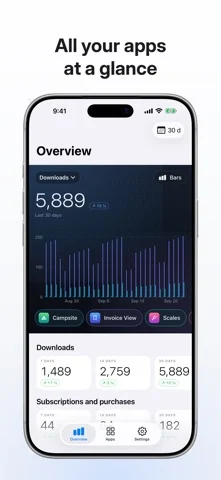
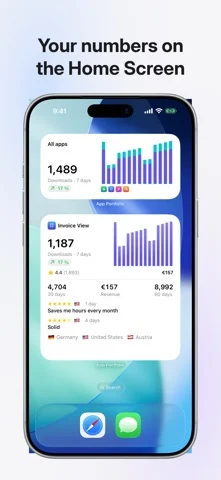
"So, what does your app actually do?" With App Portfolio the answer is one glance away. App Portfolio is the companion to App Store Connect. It shows what Apple's website hides behind many clicks: downloads, revenue, subscriptions and reviews of all your apps, clearly laid out, on iPhone, iPad and Mac. ALL APPS AT A GLANCE The overview stacks all your apps in one chart, each in its own color. Switch between downloads, revenue and subscriptions, compare 7, 14 and 30 days and see the trend right away. EVERY APP IN DETAIL First downloads, redownloads and updates, split by device and country. Revenue in your currency. Sessions, crashes, installations and deletions, and how people find your app in the store. SUBSCRIPTIONS AND PURCHASES New subscribers, free trials, offer codes and paying subscribers. Every single transaction with day, country and duration. REVIEWS FROM EVERY COUNTRY All reviews in one list, filtered by stars and country, with a daily notification. NOTIFICATIONS AND WIDGETS A daily, weekly or monthly summary, a note for new revenue, new subscriptions or new reviews. Widgets bring your numbers to the Home Screen, the Lock Screen and the Mac desktop. PERSONAL AND COMPANY SIDE BY SIDE Add several App Store Connect accounts and see all their apps together. PRIVATE BY DESIGN There is no server in between. The app talks directly to Apple with your App Store Connect key, and the key stays in your device's keychain. Numbers can travel to your other devices through your own iCloud, the key never does. No account, no tracking. TRY IT WITHOUT A KEY Demo data shows every screen before you add your own key. FREE AND PRO Free: one app from one account, with every view. App Portfolio Pro, a one-time purchase: all apps, several accounts, iCloud sync and all widgets. No subscription. You need an App Store Connect API key with the “Sales and Reports” role. Usage reports need an “Admin” key once to request them. The app explains every step. App Portfolio is not affiliated with Apple Inc.
App Portfolio on iPhone Duo: FAQ
Is App Portfolio optimized for iPhone Duo?
The developer or App Store listing mentions iPhone Duo support.
What does App Portfolio look like on iPhone Duo?
Duo support is reported in the linked sources. The specific fold interaction and real-device behavior have not been independently verified.
How much does App Portfolio cost?
App Portfolio is free to download on the App Store.
More Utilities apps
See all ›
Angle Gauge turns the hinge of iPhone Duo into a precision protractor. Set the phone into a corner, against two surfaces or

Fold Protractor turns iPhone Duo into a bevel gauge. Open the phone, set it into a corner or against two edges, and

Foldhide turns iPhone Duo into the thing you used to carry in your pocket.

Put useful angles within reach. FoldLab turns the physical hinge in iPhone Duo into an angle and reference toolkit. Other iPhones can

Foldmeter turns your iPhone into a measuring tool – and your iPhone Duo into a folding rule: unfold it and the app

Open iPhone Duo and Foldometer turns its hinge into a precision instrument. Watch the two halves move on screen as you open