
Coax - Surf your Plex Server
Duo support is reported in the linked sources. The specific fold interaction and real-device behavior have not been independently verified.
Out to Lunch Productions, LLC · Entertainment · Free
iPhone screenshots

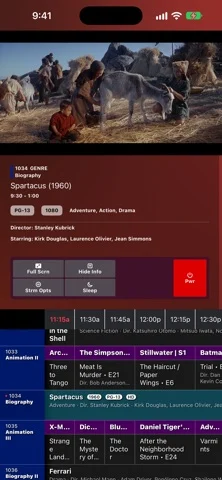
How it uses iPhone Duo
Duo support is reported in the linked sources. The specific fold interaction and real-device behavior have not been independently verified.
What’s New
Version 1.5.1 ·
WHAT'S NEW • You can finally share schedules with other people ◦ They have to have access to the server for the schedule you're sharing ◦ They can't make any changes to the lineup, except to toggle the "send playback data to server" option ◦ You, the sharer, will need to keep the schedule topped up. That means either keeping the app running on a Mac or opening the app once a day or two ◦ If I can figure out how to move schedule top-ups to the background without causing problems, then I can drop this requirement • AirPlay support ◦ OK I think folks were asking for this one, too ◦ I think it works pretty well, but please let me know if specific devices have trouble • Sleep Timer tweak - now you can just select "when whatever I'm watching ends" and it will honor channel changes (if you're watching something that ends at 10:30, then switch to something that ends at 10:45, the Sleep will activate at 10:45 if you have this switched on) • macOS fixes ◦ Restored smooth scrolling - why do they even have an "off" setting for that in the code? ◦ Added back the Control Cluster (changeable in the View menu) • CarPlay ◦ Added video playback in CarPlay for the Apple Homeview - not clear to me if this works as my car doesn't support video but hey I have a few weeks left to figure this out • iCloud sync failure logs have been enhanced ◦ Chasing a few sync issues, hopefully this helps • Scrolling in tvOS and macOS, the channel guide goes "around the horn" - scroll past the bottom, and it goes to the top, and vice-a-versa • A scheduling tweak for collections and playlists ◦ When you use A Lot or Whoa for the channel amount, you can now decide how your Collections and Playlists behave ◦ If you want the number of channels each Collection/Playlists produces to be based on the number of items in them, then leave this off ◦ Turn it on and you'll get a lot more channels, regardless of the number of items in your Collections/Playlists • A tvOS fix that would trigger transcoding on 4K HDR titles when image-based subtitles were turned on
About this app
Demolish the tyranny of too much choice, say "NO" to BigAlgo, and just Relax with Coax.
App Store descriptionWritten by the developer.
Demolish the tyranny of too much choice, say "NO" to BigAlgo, and just Relax with Coax. Within seconds, you'll be flipping through a schedule made entirely of your own home media server content. Jump right in with the on-screen cable guide and watch whatever's on, just like the old days. You can't pause, you can't skip forward, you can't rewind - all you can do is change the channel. Experience the joy of randomly happening upon a great scene in a movie you forgot you had, or a TV show marathon for an old favorite. Coax requires no setup at all - it uses the metadata your media library already has. If you want, you can create your own custom Lineups, with all sorts of simple yet powerful scheduling rules - create a Saturday Morning Cartoons Lineup for your inner (or actual) child, or a Late Night Thrillers Lineup for date night. Important: This app requires a Plex account and access to a Plex Media Server (or Jellyfin, or Emby). Coax does not provide or distribute any media; it only connects to content you already own. How to configure your Lineups: • Coax scans your home media libraries and generates a channel guide based on your content’s metadata. • Select which channel categories you want: Genre, Decade, Recent Additions, Actor, Studio, Director, and Collections. • Create 100% custom channels using Collections. • Unify your libraries to mix TV and movie channels. • Adjust the number of channels you want to generate. • Customize the time between your programs with Gap Content - play Trailers, or content from another Library if you want! Coax is your personal “cable box” for your own content — no extra accounts, no third-party streaming, just your Plex library organized in a fun, nostalgic way. https://www.apple.com/legal/internet-services/itunes/dev/stdeula/
Coax - Surf your Plex Server on iPhone Duo: FAQ
Is Coax - Surf your Plex Server optimized for iPhone Duo?
The developer or App Store listing mentions iPhone Duo support.
What does Coax - Surf your Plex Server look like on iPhone Duo?
Duo support is reported in the linked sources. The specific fold interaction and real-device behavior have not been independently verified.
How much does Coax - Surf your Plex Server cost?
Coax - Surf your Plex Server is free to download on the App Store.
More Entertainment apps
See all ›
AskZine is a quiet ritual for curiosity and reflection, designed around the unfolding experience of iPhone Duo.

ON iPHONE DUO, YOUR PHONE IS THE PAPER

Inkblotter turns iPhone Duo into the paper. Ink one page, shut the phone, and the print spreads from the spine as the

A described Duo layout or interaction is linked in the sources; no independent device test was performed.

MADE FOR IPHONE DUO

Watch IPTV channels from your own M3U playlists