
ComicFlow - CBR & CBZ to PDF
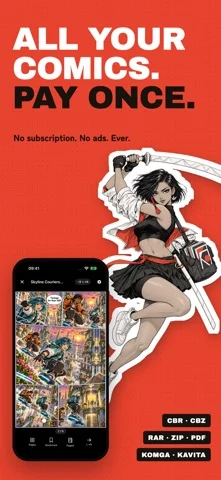
Reads CBR, CBZ and PDF comics, converts archives to PDF, and streams from Komga or OPDS servers.
Navid Gooranourimi · Utilities · $2.99
iPhone screenshots
What’s New
Version 3.7 ·
ComicFlow 3.7 READ FROM YOUR COMIC SERVER Connect ComicFlow to Komga, Kavita or any OPDS server, such as Calibre, Codex or Stump, at home, over Tailscale or over the internet. Browse your whole collection, stream any book without downloading it, or download it to read offline. Your place syncs both ways with the server, and with KOReader, so you pick up where you left off on any device. MADE FOR SERIES Manga opens right to left when your server marks it, wide spreads stay whole, and the next book in the series is one tap away. Keep Downloaded keeps the next unread books ready offline and can clear them once you've read them. ALSO NEW Lock a server behind Face ID, send a server book to your e-reader, and pick up your current comic from Siri or Shortcuts. New to servers? Tap the question mark on the Servers tab for a short guide. Comic servers are part of ComicFlow Pro, a one-time unlock. You can test the connection to your server without it. Still a one-time purchase. No subscription, no ads, ever.
App Store descriptionWritten by the developer.
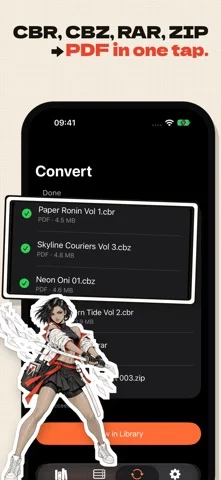
ComicFlow reads CBR, CBZ and PDF comics directly, converts archives to PDF, organizes your collection and now reads straight from your comic server. Private and offline-first. No ads, no account, no subscription. READ FROM YOUR COMIC SERVER (PRO) Connect ComicFlow to Komga, Kavita or any OPDS server, such as Calibre, calibre-web, Codex or Stump, at home, over Tailscale or over the internet. - Browse your whole collection, stream a book without downloading it, or download it to read offline - Your reading position syncs both ways with the server, and with KOReader - Manga opens right to left when the server marks it, and wide spreads show as one page - Up Next opens the next book in the series, and Keep Downloaded keeps the next unread books ready offline - Lock a server behind Face ID, or send a server book to your e-reader Testing the connection to your server doesn't need Pro. Reading from it is part of ComicFlow Pro. YOUR COMPUTER, YOUR LIBRARY Two ways to get comics onto your device without a cable, both included in the app. - WATCH FOLDERS: Point ComicFlow at a folder in Files, including iCloud Drive or a network share you have mounted there. - WI-FI UPLOAD: Open one address in a browser on your computer and drag comics onto the page. CONVERT CBR/CBZ TO PDF Convert comic book archives to PDF with one tap. ComicFlow extracts every page from your CBR, CBZ, RAR, and ZIP files and builds a clean, correctly ordered PDF in seconds. - Three quality settings: Low for sharing, Medium for everyday reading, High for collectors - Batch conversion: queue multiple files and watch per-file progress CBZ EXPORT — INCLUDED Turn any comic into a standard CBZ that opens on Kobo, Boox, PocketBook, KOReader and nearly every comic reader. No re-encoding, no quality loss. READ COMICS DIRECTLY — NO CONVERSION NEEDED Open CBR, CBZ and PDF files instantly in the built-in reader. - Double-tap or pinch to zoom into artwork - Tap zones for one-handed page turns - Reading position saved automatically for every file - Bookmark pages and jump back anytime ORGANIZE YOUR COLLECTION - Custom collections for series or genres - 5-star ratings, personal notes, and tags - Reading status: unread, reading, completed - Instant search; filter by publisher, year, genre, rating, or status - ComicInfo.xml metadata read automatically FLEXIBLE READING MODES - Single page, double-page spread, or vertical scroll for webtoons - Right-to-left page order for manga iCLOUD SYNC Reading progress, bookmarks, ratings, and notes sync across your Apple devices. Optional, no account needed — and it never uploads your comic files. COMICFLOW PRO — OPTIONAL, ONE-TIME UPGRADE The base app is complete and stays that way. Pro is a single in-app purchase — pay once, keep it forever, no subscription — that adds: - Face ID-locked collections: keep private comics behind Face ID, Touch ID, or your passcode - Reader presets: save your manga, western, and webtoon setups and switch in one tap - EPUB export for e-readers: fixed-layout EPUB3 tuned for Kobo, Boox, reMarkable, and PocketBook, with a .kepub option for Kobo - E-ink image optimization: auto-crop, contrast and sharpening tuned per device, grayscale palettes, double-page splitting for manga, webtoon strip splitting An honest note on Kindle: Kindle devices don't open sideloaded EPUB files. ComicFlow's EPUB export works together with the free Calibre desktop app to get comics onto a Kindle — the app explains the exact steps instead of pretending it's one tap. OFFLINE AND PRIVATE Your own files need no internet. No account, no ads. Your comics stay on your device or your own server, and your reading habits are nobody's business but yours. FAIR PRICING Pay once for the app. Pro is optional and also one-time. Nothing renews, expires or nags you. SUPPORTED FORMATS CBR, CBZ, RAR, ZIP, and PDF — opened from the Files app, email, cloud storage, or any sharing app.
ComicFlow - CBR & CBZ to PDF on iPhone Duo: FAQ
Is ComicFlow - CBR & CBZ to PDF optimized for iPhone Duo?
The developer or App Store listing mentions iPhone Duo support.
How much does ComicFlow - CBR & CBZ to PDF cost?
ComicFlow - CBR & CBZ to PDF costs $2.99 on the App Store.
More Utilities apps
See all ›
Measures angles to 0.1° using the iPhone Duo hinge, with target, match, and level tools.

Turns iPhone Duo into a bevel gauge that reads hinge angles, and works as a level on any iPhone.

Turns iPhone Duo into a realistic bi-fold wallet with card slots, cash, pen and receipt.

Turns the iPhone Duo hinge into an angle and reference toolkit, with a free bubble level on other iPhones.

Turns iPhone into a ruler, protractor, level and diameter gauge, and iPhone Duo into a live folding rule.

Measures the iPhone Duo hinge angle live, and serves as a level, protractor, slope meter and camera angle finder.