
Cookback: Cooking Journal
A cooking journal for logging what actually happened at the stove, then cooking it back next time.
Sousy LLC · Food & Drink · Free
iPhone screenshots
What’s New
Version 1.0.2 ·
Made for iPhone Duo: open it like a book and your cook sits on one page with last time, its summary, or Ask facing it. Plus bug fixes and improvements.
App Store descriptionWritten by the developer.
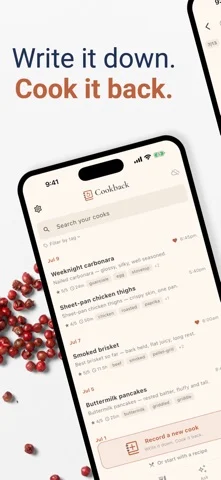
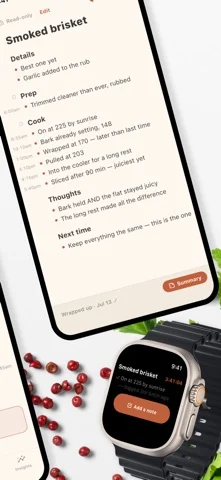
Write it down. Cook it back. Cookback is a cooking journal — not another recipe app. It's for what actually happened at the stove: the temp you ran, the rest you cut short, the tweak you swore you'd remember. Write it in your own words while you cook. Next time you make the dish, everything you learned is right there waiting. THE JOURNAL — FREE TO KEEP • Freeform notes with a light structure: Details, Prep, Cook, Thoughts, Next time. Write two lines or two pages. • A timeline in the margin stamps your notes as you cook, so "how long did it actually rest?" answers itself. • Photos, tags, and ratings for difficulty and enjoyment. • Dishes: every brisket you've ever logged, gathered in one place, so you can watch it get better cook after cook. • Cook it back: start tonight's cook with last time's notes at your side. • Insights: your year at the stove at a glance. • Search and filters: favorites, quick weeknight wins, needs-work, any tag. MESSY HANDS? COOK ANYWAY • Live Activity and Dynamic Island keep your active cook on the Lock Screen — glance at your last note, log a new one in a tap. • Apple Watch: your cook on your wrist, with dictation to add a note without touching your phone. • Siri: add a note or ask for your next step, by voice. MADE FOR iPHONE DUO • Closed, it's the phone app, with the mic and your tools in the column beside the screen. • Open it like a book and the journal becomes a spread: tonight's cook on one page, last time's attempt, its summary, or Ask about this cook facing it. • Half open, the note sits up top with a capture deck below: speak a note, mark a moment, add a photo. COOKBACK PRO The journal is free to keep. Pro is for reflecting: • Summaries: wrap up a cook and get a tidy recap in your own words — what you did, what mattered, what to try next time — with tags added automatically. • Ask: questions answered from YOUR journal, not the internet. Ask "what made this brisket better than my last two?" and get an answer that cites your actual cooks. • Recipe import: paste a link and get a clean, cook-along note — ingredients and steps, with room for your own notes on top. You get starter credits to try every Pro feature before paying a cent. Pro is an auto-renewing subscription (monthly or yearly); cancel anytime in your App Store settings. YOURS, PRIVATELY Your journal lives on your device and syncs privately through iCloud. AI is off until you turn it on, and nothing leaves your device before that. No account to create, no ads, and you can delete everything at any time. Terms of Use (EULA): https://www.apple.com/legal/internet-services/itunes/dev/stdeula/
Cookback: Cooking Journal on iPhone Duo: FAQ
Is Cookback: Cooking Journal optimized for iPhone Duo?
The developer or App Store listing mentions iPhone Duo support.
How much does Cookback: Cooking Journal cost?
Cookback: Cooking Journal is free to download on the App Store.
More Food & Drink apps
See all ›
Catalogs wine bottles, tracks drinking windows, and gives AI sommelier recommendations.

Saves recipes and builds one cooking timeline working back from serve time.

Tracks your home bar and shows cocktails you can make, with AI ideas from your bottles.

Recipe manager with meal planning, grocery lists and a step-by-step Cook Mode

Suggests family meals scored to your tastes and builds weekly meal plans.

Crowdsourced map showing real pint prices at over 1,000 UK pubs.