
HanziAgain
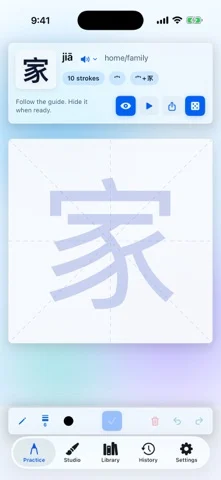
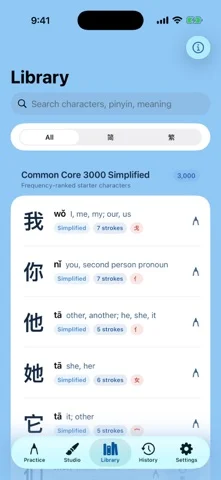
Handwriting practice for 3,000 simplified and traditional Chinese characters.
Sipeng Gao · Entertainment · Free
iPhone screenshots
What’s New
Version 2.0 ·
• Refined portrait layouts and writing controls for iPhone and iPad. • New Studio compositions start at 2 × 2 cells, with your selected size remembered for the next work. Existing compositions keep their saved size. • Enter rows and columns directly when creating or resizing a composition. • Improved drawing and toolbar behavior when the workspace changes size. • Fixed a startup crash affecting some iPhones. Requires iOS or iPadOS 27 or later.
App Store descriptionWritten by the developer.
HanziAgain helps people who can recognize Chinese characters but want to remember how to write them by hand. Practice at your own pace: • Trace a reference or recall a character from memory. • Search 3,000 simplified and 3,000 traditional characters in the bundled offline library. • See stroke order, hear Mandarin pronunciation, and write with Apple Pencil or your finger. • Check a completed character with on-device recognition and deterministic stroke-alignment guidance. • Review local history, score trends, saved drawings, and strokes that need more practice. Create in Studio: • Build local, autosaved compositions with writing guides and adjustable ink. • Start a new composition at 2 × 2 cells, or enter your preferred rows and columns. • Zoom, pan, rename, duplicate, undo, redo, and export your work. • Share PNG or SVG exports to destinations you choose, or add PNG exports to Photos. Practice, Library, and History are free. Free Studio includes one work up to 10 × 10 cells, all writing guides and ink controls, and plain PNG export without a watermark. Studio Lifetime is an optional one-time in-app purchase. It unlocks unlimited works, layouts up to 30 × 30, paper materials, a reusable name seal, mounting styles, complete presentation PNG exports, and SVG export. There is no subscription. Purchases are processed by Apple and can be restored from Settings. Private by design: • No account. • No advertising, analytics, or tracking. • No handwriting uploads. • Drawings, practice history, recognition, and the character catalog stay on device. HanziAgain provides handwriting-practice guidance, not calligraphy assessment. Version 2.0 requires iOS or iPadOS 27 or later.
HanziAgain on iPhone Duo: FAQ
Is HanziAgain optimized for iPhone Duo?
The developer or App Store listing mentions iPhone Duo support.
How much does HanziAgain cost?
HanziAgain is free to download on the App Store.
More Entertainment apps
See all ›
Reveals a stored answer as you unfold your phone, for questions you keep to yourself.

Paint on half the page, fold it shut, rub, then peel open to reveal a mirrored paint print.

Drop ink, fold the phone to press a blot, then get a written reading of what you see.

Makes paint-blot prints by folding the phone to press and peel colors apart.

A phone fridge to pin notes, photos and magnets, and stock groceries.

Watch IPTV channels from your own M3U playlists