
KeyboardKit
Duo support is reported in the linked sources. The specific fold interaction and real-device behavior have not been independently verified.
Kankoda Sweden AB · Utilities · Free
iPhone screenshots
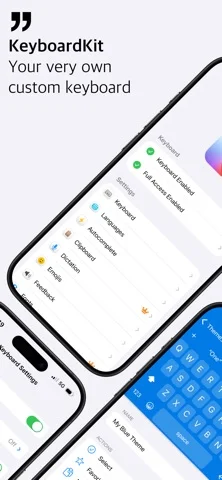
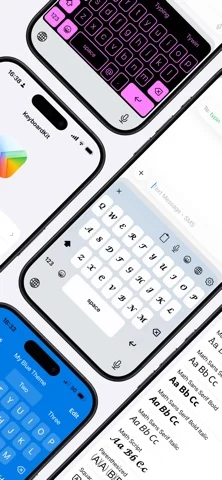
How it uses iPhone Duo
Duo support is reported in the linked sources. The specific fold interaction and real-device behavior have not been independently verified.
What’s New
Version 4.8.0 ·
This version adds a new split-screen design for the iPhone Duo and the iPad.
About this app
KeyboardKit lets you replace the system keyboard with a custom keyboard that is truly yours.
App Store descriptionWritten by the developer.
KeyboardKit lets you replace the system keyboard with a custom keyboard that is truly yours. KeyboardKit: - Works with all apps - Supports 75 languages - Has many settings and themes KeyboardKit supports: - 75 languages - QWERTY, QWERTZ, AZERTY - Colemak, Dvorak - Vietnamese TELEX, VIQR, VNI KeyboardKit lets you: - Apply more settings - Type with custom fonts - Add an extra row of buttons - Add buttons to the main toolbar - Add buttons next to the spacebar - Paste into any app from a list of clips - Style your keyboard with beautiful themes - Make your keyboard keys bigger and bolder KeyboardKit settings: - Keyboard: One-Handed Keyboard, Character Preview, Haptic Feedback, Sound, Auto-Capitalization, Auto-Collapse, Enable Caps Lock, Predictive Text, "." Shortcut, Spacebar Long Press, Spacebar Menus, Toolbar Menu, Input Toolbar, Spacebar Actions, Toolbar Actions - Accessibility: Bold Text, Custom Button Height - Languages: English, Albanian, Arabic, Arabic (PC), Armenian, Azerbaijani, Belarusian, Bengali, Bulgarian, Catalan, Cherokee, Croatian, Czech, Danish, Dutch, Dutch (Belgium), English (Australia), English (Canada), English (United Kingdom), English (United States), Estonian, Faroese, Filipino, Finnish, French, French (Canada), French (Belgium), French (Switzerland), Georgian, German, German (Austria), German (Switzerland), Greek, Hawaiian, Hebrew (Israel), Hungarian, Icelandic, Inari Sami, Indonesian, Irish (Ireland), Italian, Kazakh, Kurdish, Sorani, Kurdish, Sorani (Iraq), کوردیی ناوەندی (PC), Latvian, Lithuanian, Macedonian, Malay, Maltese, Mongolian, Northern Sami, Norwegian Bokmål, Norwegian Nynorsk, Pamiri Shughni (Shughni Tajik), Persian, Polish, Portuguese (Portugal), Portuguese (Brazil), Romanian, Russian, Serbian, Serbian (Latin), Slovak, Slovenian, Spanish, Spanish (Latin America), Spanish (Mexico), Swedish, Swahili, Turkish, Ukrainian, Uzbek, Welsh, Vietnamese - Autocomplete: Auto-Complete, Auto-Correction, Auto-Ignore Words, Auto-Learn Words, Emoji Suggestions, Next Character Prediction, Text Replacements, Ignored Words, Number of Suggestions, Next Word Prediction, Hide toolbar - Clipboard: Add Clipboard Content, Create Custom Clips - Dictation: Silence Limit (before dictation ends) - Emoji: Default Emoji Skin Tone - Feedback: Audio & Haptic Feedback - Fonts: Select Custom Font - Theme: Pick Theme, Create Custom Themes (Premium) We hope that you will love using KeyboardKit! Terms & Conditions: https://apple.com/legal/internet-services/itunes/dev/stdeula/
KeyboardKit on iPhone Duo: FAQ
Is KeyboardKit optimized for iPhone Duo?
The developer or App Store listing mentions iPhone Duo support.
What does KeyboardKit look like on iPhone Duo?
Duo support is reported in the linked sources. The specific fold interaction and real-device behavior have not been independently verified.
How much does KeyboardKit cost?
KeyboardKit is free to download on the App Store.
More Utilities apps
See all ›
Angle Gauge turns the hinge of iPhone Duo into a precision protractor. Set the phone into a corner, against two surfaces or

Fold Protractor turns iPhone Duo into a bevel gauge. Open the phone, set it into a corner or against two edges, and

Foldhide turns iPhone Duo into the thing you used to carry in your pocket.

Put useful angles within reach. FoldLab turns the physical hinge in iPhone Duo into an angle and reference toolkit. Other iPhones can

Foldmeter turns your iPhone into a measuring tool – and your iPhone Duo into a folding rule: unfold it and the app

Open iPhone Duo and Foldometer turns its hinge into a precision instrument. Watch the two halves move on screen as you open