
Morpho Convert Currency & Unit
Duo support is reported in the linked sources. The specific fold interaction and real-device behavior have not been independently verified.
Think Tap Work · Utilities · Free
iPhone screenshots
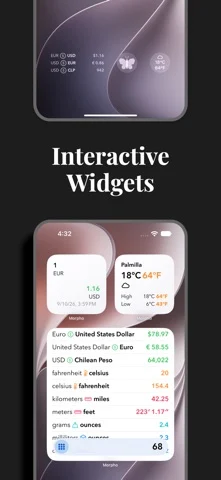
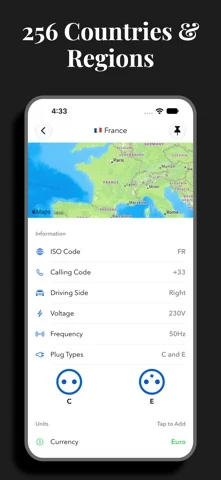
How it uses iPhone Duo
Duo support is reported in the linked sources. The specific fold interaction and real-device behavior have not been independently verified.
What’s New
Version 3.4 ·
iPhone Duo Support • Flexible layouts to adjust for different Duo poses. • Use a large keypad while in Laptop pose. • Take advantage of the expansive inner screen on the Duo with multiple column support. • Improved columns for iPhone Duo and iPad. • Made improvements to cell layout, especially with large numbers.
About this app
Morpho is a new take on conversions, focused on speed. Open, type a number, and instantly see all your favorite conversions. No fiddling.
App Store descriptionWritten by the developer.
Morpho is a new take on conversions, focused on speed. Open, type a number, and instantly see all your favorite conversions. No fiddling. Add all of your most-used conversions to the home screen so that you see what you want–and only what you want. • Choose from 311 units and 174 currencies in 24 categories. • Countries: view and add common units of measure from 256 countries and regions. Quickly view electrical information, calling codes, driving side, languages, and time zones to help plan your trip. • Custom Units: Define specialized units for your profession or hobby, or add an uncommon unit that is not yet officially supported. • Speak results: Select from 38 languages in Settings. Long-press a conversion and choose a language to have the result spoken to you. • It's universal: iPhone, iPad, Mac, and Apple Watch. We have you covered no matter where you need a conversion. • Long press for more: copy result, copy the full text of the conversion, or quickly add a reverse conversion. • Conversions widget: new, interactive widget lets you convert your favorites instantly. • Currency widget: use the currency widget to stay on top of changes throughout the day from your Home Screen or Lock Screen. • Complications: launch Morpho from a complication, or use a currency complication to always have the latest exchange rate. • Weather: instant temperature, wind speed, and precipitation amount conversions with Weather integration. • Siri: get the full list of conversions using your voice. • Shortcuts: work currency conversions into your custom shortcuts. • Quick Notes: add values or countries to your Quick Notes. • Keyboard support: make full use of your hardware keyboard. • Hand Off, URL schemes, and multiple windows: enjoy. • Support for dynamic type sizes and VoiceOver. If you choose to purchase a Morpho Pro subscription, payment will be charged to your iTunes account, and your account will be charged for renewal 24 hours prior to the end of the current period. Auto-renewal may be turned off at any time by going to your settings in the iTunes Store after purchase. Terms of use: https://thinktapwork.com/tos.html
Morpho Convert Currency & Unit on iPhone Duo: FAQ
Is Morpho Convert Currency & Unit optimized for iPhone Duo?
The developer or App Store listing mentions iPhone Duo support.
What does Morpho Convert Currency & Unit look like on iPhone Duo?
Duo support is reported in the linked sources. The specific fold interaction and real-device behavior have not been independently verified.
How much does Morpho Convert Currency & Unit cost?
Morpho Convert Currency & Unit is free to download on the App Store.
More Utilities apps
See all ›
Angle Gauge turns the hinge of iPhone Duo into a precision protractor. Set the phone into a corner, against two surfaces or

Fold Protractor turns iPhone Duo into a bevel gauge. Open the phone, set it into a corner or against two edges, and

Foldhide turns iPhone Duo into the thing you used to carry in your pocket.

Put useful angles within reach. FoldLab turns the physical hinge in iPhone Duo into an angle and reference toolkit. Other iPhones can

Foldmeter turns your iPhone into a measuring tool – and your iPhone Duo into a folding rule: unfold it and the app

Open iPhone Duo and Foldometer turns its hinge into a precision instrument. Watch the two halves move on screen as you open