
PixoMap: Trip Maps from Photos
Reads place and time in your photos to draw an ordered trip route you can share by QR code.
Amit Kumar Srivastava · Travel · Free
iPhone screenshots
How it uses iPhone Duo
ON IPHONE DUO
What’s New
Version 1.4.1 ·
Ready for iPhone Duo. Turned upright, the open screen now uses its whole width on every page, either way up.
App Store descriptionWritten by the developer.
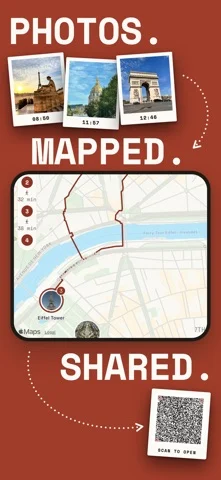
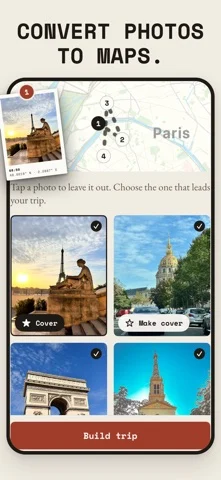
Your photos already know where you went. PixoMap reads the place and time inside each photo, right on your iPhone, and draws the trip for you. Every stop named. Every stop in order. One route you can follow, keep and share. Then it folds the whole trip into a single QR code. A friend scans it and your map opens on their phone. No account. No login. Nothing to set up. PHOTOS • PixoMap finds the trips already in your library and names each one. • Or choose up to six photos yourself and watch the map build. • Each photo takes the name of its place: Louvre Museum, not a street address. MAPPED • Every stop in order, on a route that follows the streets. • Each leg shows the walk and the ride by public transport. Tap either to open it in Apple Maps. • Everywhere you have been on one map, with a timeline of when you went. ON IPHONE DUO • Open it and the trip spreads out: the map on one side, every stop on the other. • Every page fits the screen, closed or open, either way up. SHARED • One QR code carries the whole trip. A friend scans it and the map opens. • Scan a friend's PixoMap code with Scan QR and see the trip before you save it. • Turn a trip into story pages in three styles: Editorial, Atlas and Polaroid. • Place each photo by hand and change the words on the page. PLAN THE NEXT ONE • Search any city, tap the places you want, and the route builds itself. • More than 1,000 ready guides across nearly 300 cities in 72 countries. • Spin the globe, save a guide in one tap and follow it stop by stop. PRIVATE BY DESIGN No account. No login. No tracking. Your photos and maps stay on your iPhone unless you choose to share them. PLANS PixoMap is free with room for 10 maps. Optional subscriptions give you more room. • Basic: 25 maps. $1.99 a month or $17.99 a year. • Pro: 50 maps. $4.99 a month or $44.99 a year. Subscriptions renew automatically unless cancelled at least 24 hours before the end of the current period. Payment is charged to your Apple ID account. Manage or cancel anytime in Settings then Apple ID then Subscriptions. Terms of Use (EULA): https://www.apple.com/legal/internet-services/itunes/dev/stdeula/ Privacy Policy: https://pixomap.app/privacy Your photos already know the way.
PixoMap: Trip Maps from Photos on iPhone Duo: FAQ
Is PixoMap: Trip Maps from Photos optimized for iPhone Duo?
Yes. PixoMap: Trip Maps from Photos is Built for Duo: it uses the fold, Split View or the outer display. Verified on October 25, 2026 (App Store text).
What does PixoMap: Trip Maps from Photos look like on iPhone Duo?
ON IPHONE DUO
How much does PixoMap: Trip Maps from Photos cost?
PixoMap: Trip Maps from Photos is free to download on the App Store.
More Travel apps
See all ›
Turns your photo library into a private travel passport with a world map, stamps and stats.

Live flight tracking with delay alerts and pilot-grade data

Discovers nearby places and plays audio guides telling their history and secrets.

Counts days spent in each country against Schengen, visa and residence rules.

Plan driving trips, track fuel and play car games along the way

An automatic timeline of everywhere you go and how you got there