
Planetary Hours by Planetaro
Duo support is reported in the linked sources. The specific fold interaction and real-device behavior have not been independently verified.
Muhammed Tanriverdi · Utilities · Free
iPhone screenshots
How it uses iPhone Duo
Duo support is reported in the linked sources. The specific fold interaction and real-device behavior have not been independently verified.
What’s New
Version 2026.6.1 ·
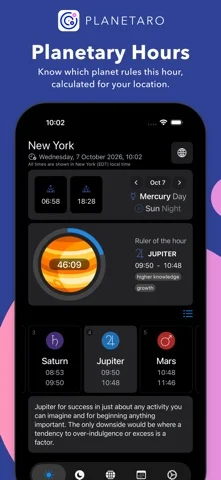
• Ready for iPhone Duo: unfold it and Planetaro spreads out — the current hour and the full list of planetary hours side by side, and the Moon screen split into phases and Void of Course. • Smoother translations in every language, including clearer Void of Course wording. • Small fixes: weekday initials in notification settings, tidier settings layout.
About this app
Planetaro is a powerful planetary hours calculator and moon‑phase calendar that syncs with your location to divide each day into unequal hours from sunrise to sunset. Track which of the seven classical planets—Saturn, Jupiter, Mars, Sun, Venus, Mercury and Moon—rules each hour, and align your activities with their energies. Now featuring Moon Sign
App Store descriptionWritten by the developer.
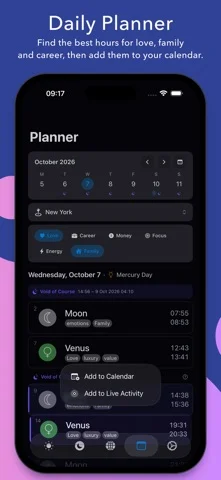
Planetaro is a powerful planetary hours calculator and moon‑phase calendar that syncs with your location to divide each day into unequal hours from sunrise to sunset. Track which of the seven classical planets—Saturn, Jupiter, Mars, Sun, Venus, Mercury and Moon—rules each hour, and align your activities with their energies. Now featuring Moon Sign tracking and Void of Course (VOC) alerts to help you time your life with even greater precision. Stay in tune with the sky: • Planetary hours & moon calendar — view rulership and lunar phases at a glance • Moon Sign & VOC tracking – Identify the current lunar zodiac sign and avoid the "Void of Course" periods when planning new projects. • Lock & home screen widgets for iPhone and iPad, plus Apple Watch complications • Siri and Shortcuts – ask for the current planetary hour, Moon phase, void of course or your best hours, hands-free • Notifications for selected planetary hours so you never miss a moment • Multiple themes and automatic or manual location selection • Universal app: works seamlessly on iPhone, iPad and Apple Watch Based on the ancient Star of the Magi principle, Planetaro helps you make the most of your time by showing favorable and unfavorable moments for different activities. Explore the planetary clock that gave rise to the names of the days of the week and discover a timeless tool for self‑awareness, scheduling and astrology. Learn more at www.planetaro.com. — Terms & Conditions https://planetaro.com/terms-and-conditions/ Privacy Policy https://planetaro.com/planetaro-planetary-hours-widget-privacy-policy/
Planetary Hours by Planetaro on iPhone Duo: FAQ
Is Planetary Hours by Planetaro optimized for iPhone Duo?
The developer or App Store listing mentions iPhone Duo support.
What does Planetary Hours by Planetaro look like on iPhone Duo?
Duo support is reported in the linked sources. The specific fold interaction and real-device behavior have not been independently verified.
How much does Planetary Hours by Planetaro cost?
Planetary Hours by Planetaro is free to download on the App Store.
More Utilities apps
See all ›
Angle Gauge turns the hinge of iPhone Duo into a precision protractor. Set the phone into a corner, against two surfaces or

Fold Protractor turns iPhone Duo into a bevel gauge. Open the phone, set it into a corner or against two edges, and

Foldhide turns iPhone Duo into the thing you used to carry in your pocket.

Put useful angles within reach. FoldLab turns the physical hinge in iPhone Duo into an angle and reference toolkit. Other iPhones can

Foldmeter turns your iPhone into a measuring tool – and your iPhone Duo into a folding rule: unfold it and the app

Open iPhone Duo and Foldometer turns its hinge into a precision instrument. Watch the two halves move on screen as you open