
ShamsiCal
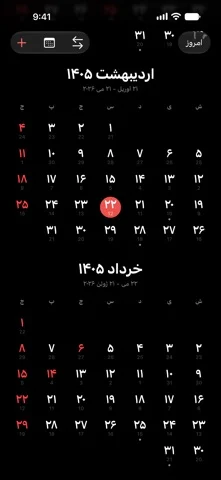
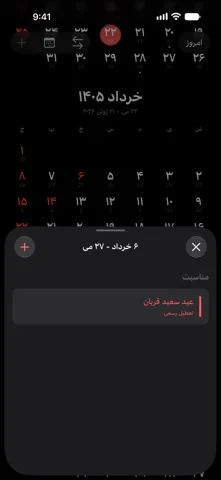
Displays the Persian calendar with holidays, date conversion, and widgets.
Alireza Khoddam · Utilities · Free
iPhone screenshots
What’s New
Version 4.6 ·
Adds support for iPhone Duo - Layout: Unfold your phone and turn it sideways to see the calendar and the day's holidays and events side by side. On the outer screen, or unfolded and held upright, the calendar fills the screen and a day's details open when you tap it. - Continuity: Fold, unfold, or turn your phone and the calendar stays right where you left it, along with the day you picked. - Controls: Today, the date converter, events, and new event sit in the toolbar along the edge of the screen, always within reach. - Portrait and landscape: Use ShamsiCal either way on iPhone Duo.
App Store descriptionWritten by the developer.
ShamsiCal keeps the Persian calendar within reach, from your Home Screen to your wrist. See today’s Persian date at a glance, browse the full month, and convert between Persian and Gregorian dates. Keep track of occasions and calendar events with widgets that fit naturally into your day. Key Features: - Persian calendar with official holidays and easy month navigation - Calendar events alongside Persian occasions - Built-in Persian and Gregorian date converter - Home Screen and Lock Screen widgets, including larger month and agenda layouts - Siri and Shortcuts actions for quick access to calendar features - Keyboard shortcuts on iPad for common actions - Native design with Liquid Glass on supported versions - Dark Mode support On Apple Watch: - Today’s date with a background inspired by the current season - Digital Crown scrolling from today’s details to the full month - Easy navigation between months - Widgets with seasonal backgrounds and complications for quick date checks Your Persian calendar, always within reach.
ShamsiCal on iPhone Duo: FAQ
Is ShamsiCal optimized for iPhone Duo?
The developer or App Store listing mentions iPhone Duo support.
How much does ShamsiCal cost?
ShamsiCal is free to download on the App Store.
More Utilities apps
See all ›
Measures angles to 0.1° using the iPhone Duo hinge, with target, match, and level tools.

Turns iPhone Duo into a bevel gauge that reads hinge angles, and works as a level on any iPhone.

Turns iPhone Duo into a realistic bi-fold wallet with card slots, cash, pen and receipt.

Turns the iPhone Duo hinge into an angle and reference toolkit, with a free bubble level on other iPhones.

Turns iPhone into a ruler, protractor, level and diameter gauge, and iPhone Duo into a live folding rule.

Measures the iPhone Duo hinge angle live, and serves as a level, protractor, slope meter and camera angle finder.