
TimeWave: Timer Chains
Duo support is reported in the linked sources. The specific fold interaction and real-device behavior have not been independently verified.
Muhammed Sahil Arayakandy · Utilities · Free
A source explicitly mentions Duo support; the specific layout and real-device behavior have not been independently verified.
Not yet tested on a device — based on the source above. · US · 2026-10-25
TimeWave comes to the iPhone Duo.
Store text only: we haven't seen the app running, and the store page doesn't show how each pose is used.
iPhone screenshots
How it uses iPhone Duo
Duo support is reported in the linked sources. The specific fold interaction and real-device behavior have not been independently verified.
What’s New
Version 4.50 ·
TimeWave comes to the iPhone Duo. Open it wide, fold it halfway, or turn it sideways. Your timer and controls move with you, making the most of the larger display. You can also set it up in the tabletop pose for a clear view of your timer while you work, cook, or unwind.
About this app
"Liquid Glass really comes to life on its widgets"
App Store descriptionWritten by the developer.
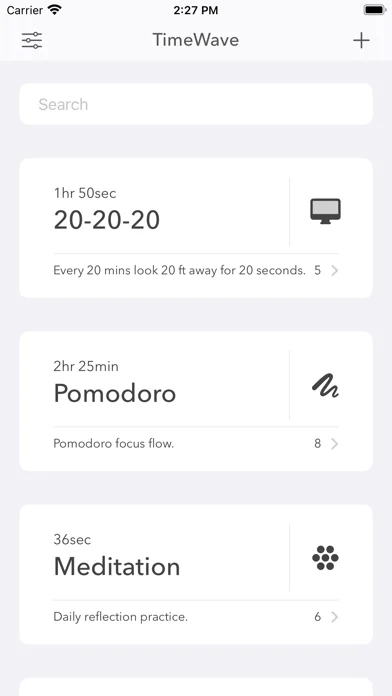
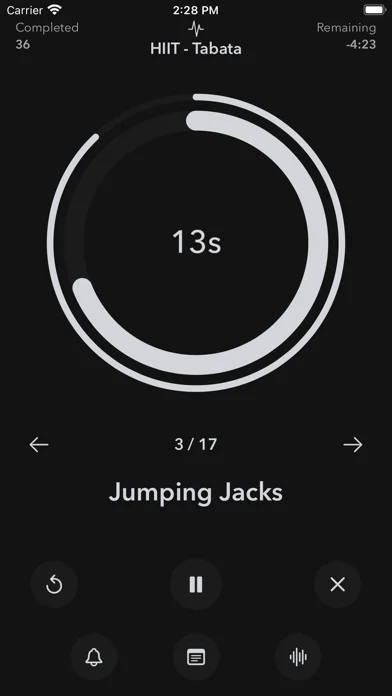
"Liquid Glass really comes to life on its widgets" - Michael Burkhardt, 9to5Mac. "What I like most about TimeWave, though, is its clean, black-and-white design" - John Voorhees, MacStories. "Best iPhone Apps of July, 2021" - Beau Hamilton, Slashdot. WHAT CAN YOU DO WITH TIMEWAVE? TimeWave allows you to combine your breathwork app, your workout app, your focus timer, cooking timer and much more into one single app. You can use TimeWave for: • Breathwork — build custom breathing flows like 4-7-8 Breathing to lower blood pressure, Physiological Sigh to reduce stress and anxiety, Wim Hof Breathing to increase alertness, Box Breathing to relax and much more. • Intermittent Fasting — Create your own intermittent fasting using various splits like 16:8, 12:12, 5:2, etc. You can create timer-splits for each day or for the entire week. • Workout Routines — create your own workouts by chaining excercise and break durations. You can make Tabata/HIIT workouts or even yoga routines. • 20-20-20 Rule — create a timewave to follow the 20-20-20 rule (Every 20 minutes look at something 20 ft away for 20 seconds) while working with screens to prevent eye-strain. • Focus Timers — create pomodoro timers or any kind of work-break timewaves. You are not restricted to 25 minute session, you can create any sequence that suits your preferences. • Cooking — ever had to keep resetting your timers after each whistle? well, now you wont have to. Just create a timewave for each recipe. • Everything — anything else that involves timed sequential tasks. SPECIAL FEATURES: • TimeWave A.I — TimeWave will tell you what has to be done for how long while the Calibre is running. For eg: "Breathe In For 4 Seconds" so you don't have to look at the screen. • iCloud Sync — Available on Mac, iPad, iPhone and Apple Watch and keeps everything up-to to date on all your devices with iCloud Sync. • Black & White UI — B&W is a lot of colours. If you are anything like us, you'll love our ironically modern black and white UI. MORE: • Personal touch — a hand-crafted Indie app. If you have any questions or feedback, you can reach out to us at timewave.team@gmail.com Privacy Policy: https://timewaveapp.com/privacy Terms of Use: https://timewaveapp.com/terms
TimeWave: Timer Chains on iPhone Duo: FAQ
Is TimeWave: Timer Chains optimized for iPhone Duo?
A source explicitly mentions Duo support; the specific layout and real-device behavior have not been independently verified.
What does TimeWave: Timer Chains look like on iPhone Duo?
Duo support is reported in the linked sources. The specific fold interaction and real-device behavior have not been independently verified.
How much does TimeWave: Timer Chains cost?
TimeWave: Timer Chains is free to download on the App Store.
More Utilities apps
See all ›
Angle Gauge turns the hinge of iPhone Duo into a precision protractor. Set the phone into a corner, against two surfaces or

Fold Protractor turns iPhone Duo into a bevel gauge. Open the phone, set it into a corner or against two edges, and

Foldhide turns iPhone Duo into the thing you used to carry in your pocket.

Put useful angles within reach. FoldLab turns the physical hinge in iPhone Duo into an angle and reference toolkit. Other iPhones can

Foldmeter turns your iPhone into a measuring tool – and your iPhone Duo into a folding rule: unfold it and the app

Open iPhone Duo and Foldometer turns its hinge into a precision instrument. Watch the two halves move on screen as you open