
Zen Flip Clock - Minimal Timer
Duo support is reported in the linked sources. The specific fold interaction and real-device behavior have not been independently verified.
Chaoyang Minimal Software Studio · Utilities · Free
iPhone screenshots
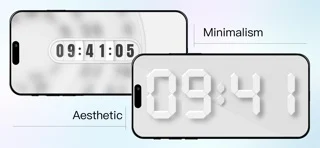
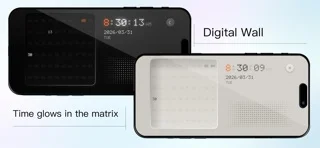
How it uses iPhone Duo
Duo support is reported in the linked sources. The specific fold interaction and real-device behavior have not been independently verified.
What’s New
Version 4.15.1 ·
Fixed widgets
About this app
Zen Flip Clock
App Store descriptionWritten by the developer.
Zen Flip Clock A minimalist flip clock, desk clock, and focus timer designed to make time clear, simple, and easy to follow. Choose from multiple clock themes, including flip clock, digital clock, and minimalist styles. Use it as a fullscreen clock for studying, working, focusing, or as a clean nightstand clock. Open the app and start right away. Why Zen Flip Clock More than just a clock, Zen Flip Clock is a simple tool for focus and time management. From study sessions and focused work to everyday timing, it helps you stay aware of your time and make every minute count. Key Features Multiple Clock Themes Choose from flip clock, digital clock, and minimalist clock designs. Use your favorite theme as a desk clock, fullscreen clock, or nightstand clock for work, study, and everyday use. Pomodoro Timer Stay focused with the built-in Pomodoro timer. Perfect for studying, reading, working, and other tasks that require concentration. Count Up Timer Track elapsed time for studying, workouts, meditation, reading, and everyday activities. Hourly Chime Stay aware of time with hourly chimes and customizable reminders. Build better routines for work, study, and daily life. Focus Statistics Track your focus time and usage to better understand how you spend your time. Personalization Multiple Themes Switch between a variety of minimalist clock themes, from classic flip clock designs to clean digital styles. Smooth Animations Enjoy clean, natural, and fluid clock animations designed for a calm visual experience. Home & Lock Screen Widgets View the time at a glance with Home Screen and Lock Screen widgets without opening the app. Easy Controls Swipe left for Pomodoro Swipe right for Count Up Timer Tap to open Settings Whether you need a flip clock for your desk, a fullscreen digital clock for studying, a Pomodoro timer for focused work, or a simple nightstand clock, Zen Flip Clock keeps time clear and focus simple. Make time visible. Stay focused. Contact & Legal ▸ Bug Reports & Feedback: minimalsoftwarestudio@gmail.com ▸ Terms of Use: https://minimalsoftwarestudio.feishu.cn/docs/doccnK7LrYMwBFdr7SRl4qQv2lb
Zen Flip Clock - Minimal Timer on iPhone Duo: FAQ
Is Zen Flip Clock - Minimal Timer optimized for iPhone Duo?
The developer or App Store listing mentions iPhone Duo support.
What does Zen Flip Clock - Minimal Timer look like on iPhone Duo?
Duo support is reported in the linked sources. The specific fold interaction and real-device behavior have not been independently verified.
How much does Zen Flip Clock - Minimal Timer cost?
Zen Flip Clock - Minimal Timer is free to download on the App Store.
More Utilities apps
See all ›
Angle Gauge turns the hinge of iPhone Duo into a precision protractor. Set the phone into a corner, against two surfaces or

Fold Protractor turns iPhone Duo into a bevel gauge. Open the phone, set it into a corner or against two edges, and

Foldhide turns iPhone Duo into the thing you used to carry in your pocket.

Put useful angles within reach. FoldLab turns the physical hinge in iPhone Duo into an angle and reference toolkit. Other iPhones can

Foldmeter turns your iPhone into a measuring tool – and your iPhone Duo into a folding rule: unfold it and the app

Open iPhone Duo and Foldometer turns its hinge into a precision instrument. Watch the two halves move on screen as you open