
iPhone スクリーンショット
新機能
バージョン 3.0 ·
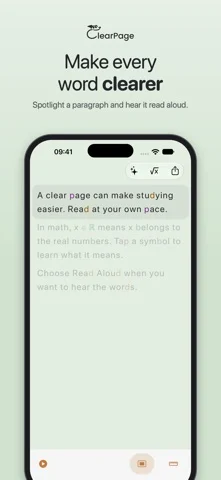
Two new ways into a hard page. • Summarize: the main points of a page in a few short sentences, about one for each paragraph. Tap the sparkles in the reader, or shake your device. • Simplify: the whole page again in shorter sentences and everyday words. Math, headings and short lines stay exactly as they were. Both appear in your own typeface, spacing and colors, and can be shared or saved. Both are written on your device by Apple Intelligence. Your page never leaves your phone, and it works offline. They need an iPhone or iPad with Apple Intelligence. On other devices ClearPage works exactly as before. A summary or a rewrite can miss or change a detail, so the original page is always one tap away.
開発者はこの内容を日本語化していません。
App Store の説明開発者による説明です。
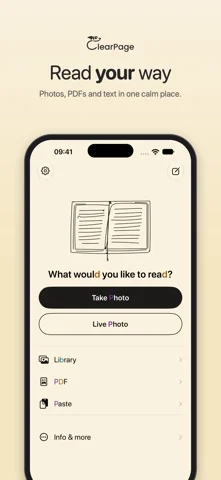
ClearPage re-renders any text — a photo, a screenshot, pasted text, or the live camera — in a layout designed for dyslexic readers. Everything runs on your device: no account, no network, no analytics. YOUR READING PROFILE A 30-second calibration asks one question: which feels easiest to read? From your answers, ClearPage derives your profile — letter spacing, line height, text size, a dyslexia-friendly typeface (OpenDyslexic included), and a low-stimulus background tint. The profile styles the whole app, even the Home Screen icon and widget. LETTERS THAT STAY PUT Confusable letters (b, d, p, q) are anchored in consistent colors, so they stop flipping. Contrast is checked on every surface. MATH WITHOUT THE GUESSWORK Built for dyscalculia too: 35 confusable math symbols are color-anchored. Tap any symbol for a plain-language meaning card with lookalike disambiguation. Read Aloud speaks them in words. A Math Power toggle tunes the scanner for formulas. READ ANYTHING, FROM ANYWHERE Photo, screenshot, camera, pasted image or text — crop to just the passage you want Live mode: point the camera and read continuously in your layout, with an optional focus band Share & Action Extensions: send images or text from any app Siri, Shortcuts, and Action Button support Home Screen widget: one-tap scan, camera, live, or paste from the clipboard READ ALOUD On-device speech with word-by-word highlighting and automatic language detection, plus a Live Activity so you can follow along from the Lock Screen. STAY FOCUSED A draggable reading ruler dims surrounding lines so your eyes keep their place. PRIVATE BY DESIGN Text recognition uses Apple's on-device engine in English, Spanish, and German. Nothing you scan ever leaves your iPhone or iPad. ACCESSIBLE TO EVERYONE Reading sizes up to 80 pt (multiplied further by Dynamic Type), full VoiceOver labelling, Reduce Motion respected. ClearPage was built on the curb-cut principle: features designed for dyslexia make reading easier for everyone — tired eyes, second-language readers, anyone studying dense material.
iPhone Duo での ClearPage: Dyslexia Reader:よくある質問
ClearPage: Dyslexia Reader は iPhone Duo に最適化されていますか?
開発者またはストアに iPhone Duo 対応の記載があります。
ClearPage: Dyslexia Reader の価格は?
ClearPage: Dyslexia Reader は App Store で無料でダウンロードできます。
その他の読書/ニュースアプリ
すべて見る ›
本物の折り紙を再現し、折り線を自由に動かしたり手順に沿って鶴や飛行機、ひよこを折れる。

答えをどこまで見たかでカードの復習時期を決め、難易度は評価しない。

折りたたみに合わせてレイアウトが変わる、要約機能内蔵の RSS リーダー

折りたたみ・展開に合わせてレイアウトが切り替わるRSS/ニュースリーダー

26冊の古典を朗読付きで読め、各ページの横に物語の世界を表示。

図鑑の項目を音声で読み上げ、カメラでおもちゃや絵をスキャンして識別する。